4-2
4.1 Simple Upgrade
NOTE: When upgrading from Ver.1.7 or before, the device
driver installation is necessary before installing the
system software (see Subsection 3.5.2).
In the “Simple Upgrade”, you can upgrade the
FRONTIER 570 System Software (A1) and Variety
Print Software (B1) by following the simple guidance
messages on the screen.
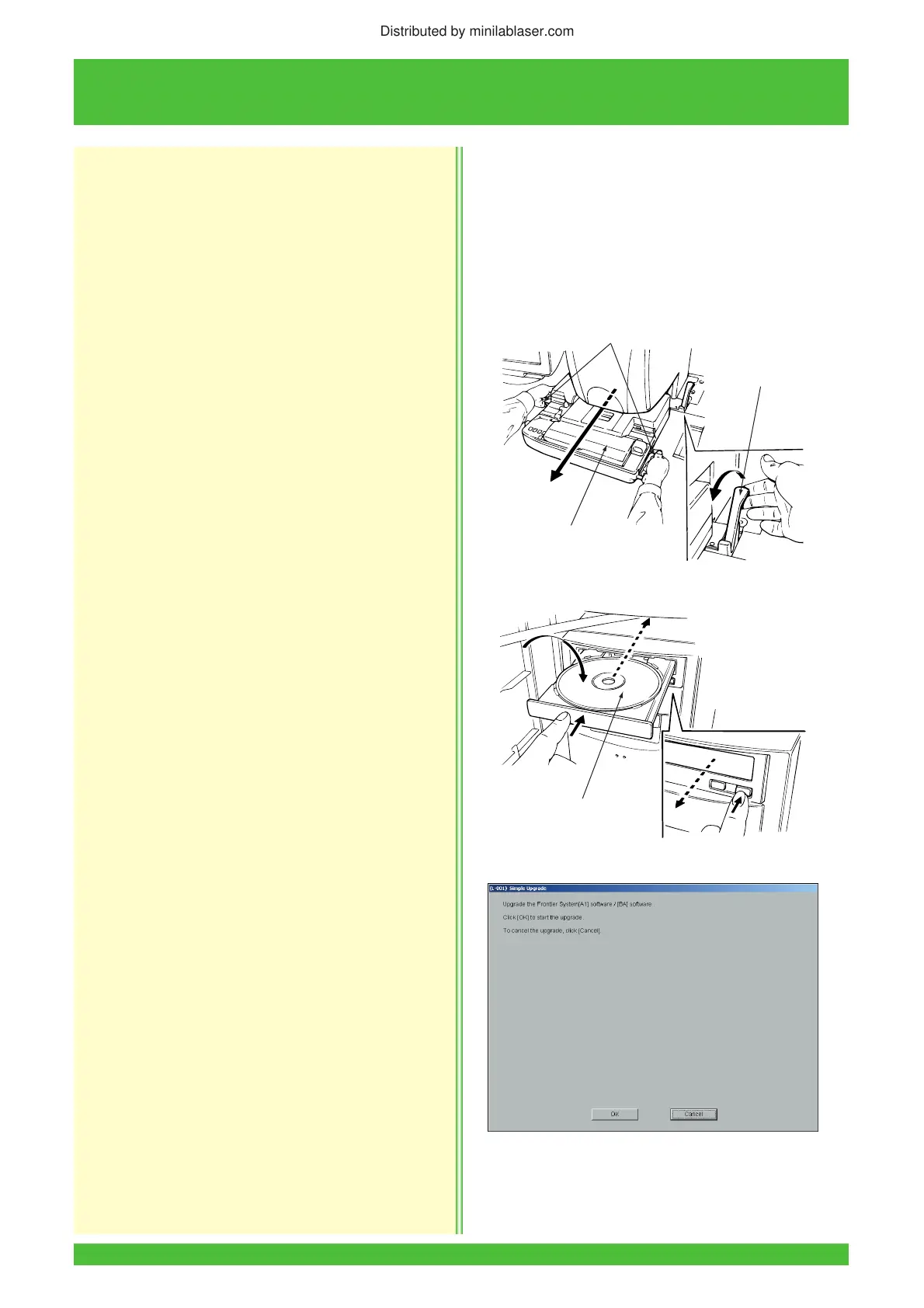
1. Turn the power switch ON to start up the Printer/
Processor and then to STANDBY.
2. Remove the film carrier.
3. Insert the FRONTIER 570 System (A1) Disk into
the CD-ROM drive.
4. Perform the post-operational checks to shut down
the system.
5. Press the START switch.
• The installer is started up and the “(L-001)
Simple Upgrade” screen appears.
6. Click the [OK] button.
Z2051
Handles
Auto Film Carrier
NC100AY
Film Carrier
Lock Release
Lever
Z2043
FRONTIER 570
System (A1) Disk
Distributed by minilablaser.com



 To Next Page