18-51
18.6 SU2400AY Sorter
18
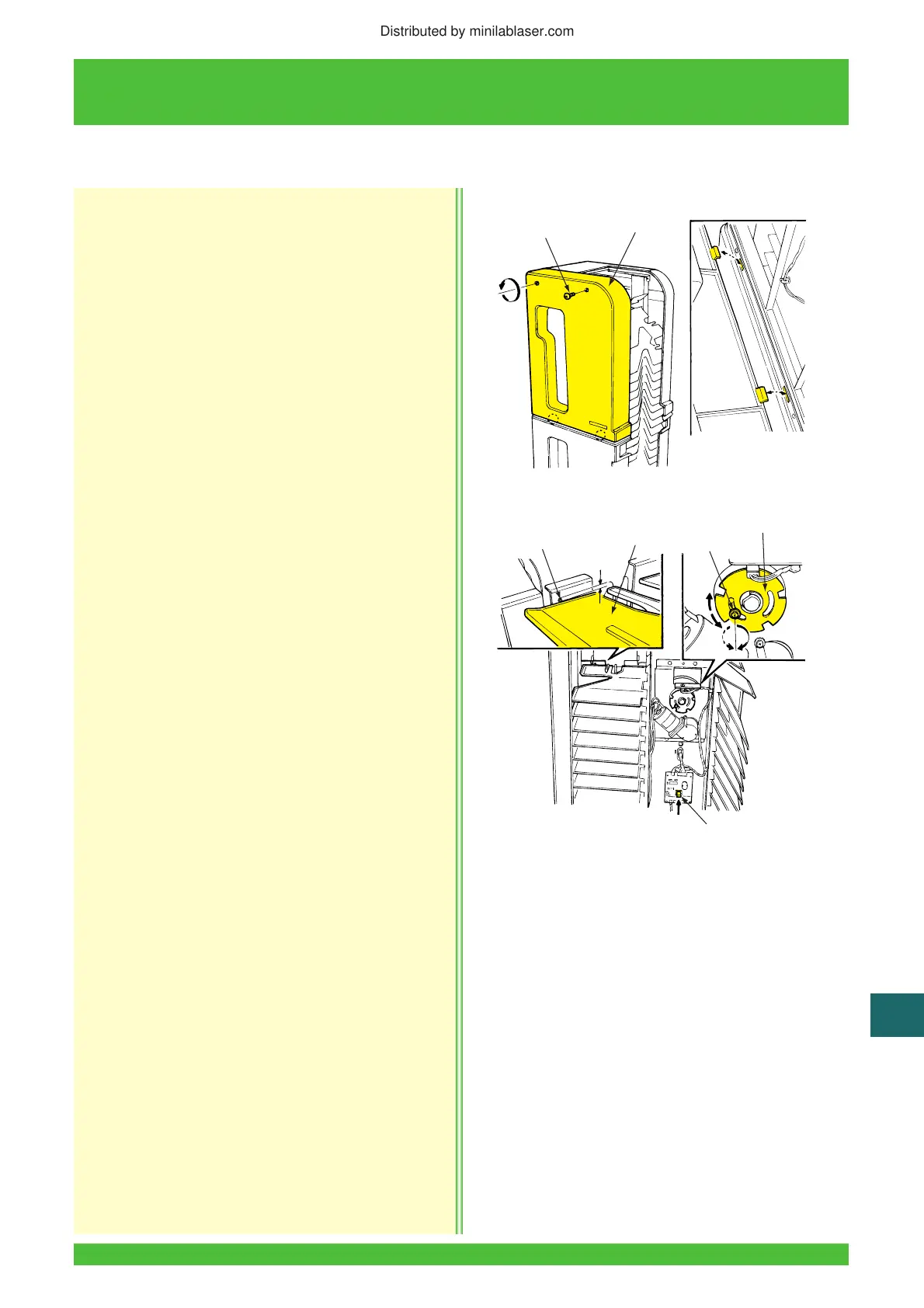
1. Remove the two screws and then the sorter right
upper cover.
2. Press the sorter drive switch to feed the sorter
tray one pitch.
3. Check that the upper surface of the tray aligns
with the hole in the transversal sorter as shown.
If it does not align, loosen the screw and adjust by
turning the detecting plate of the sorter tray stop
position sensor.
If the upper surface is above the hole, turn the
detecting plate clockwise.
If the upper surface is below the hole, turn the
detecting plate counterclockwise.
Tighten the detecting plate screw securely.
4. Reinstall the sorter right-upper cover.
18.6.9 Sorter Tray Step Position Adjustment
LII834
Screws (2)
Cover
LII908
Hole
Upper Surface
Detection Plate
Screw
Sorter Drive Switch
Distributed by minilablaser.com






 To Next Page