8-9
8
8.2 Scanner Section
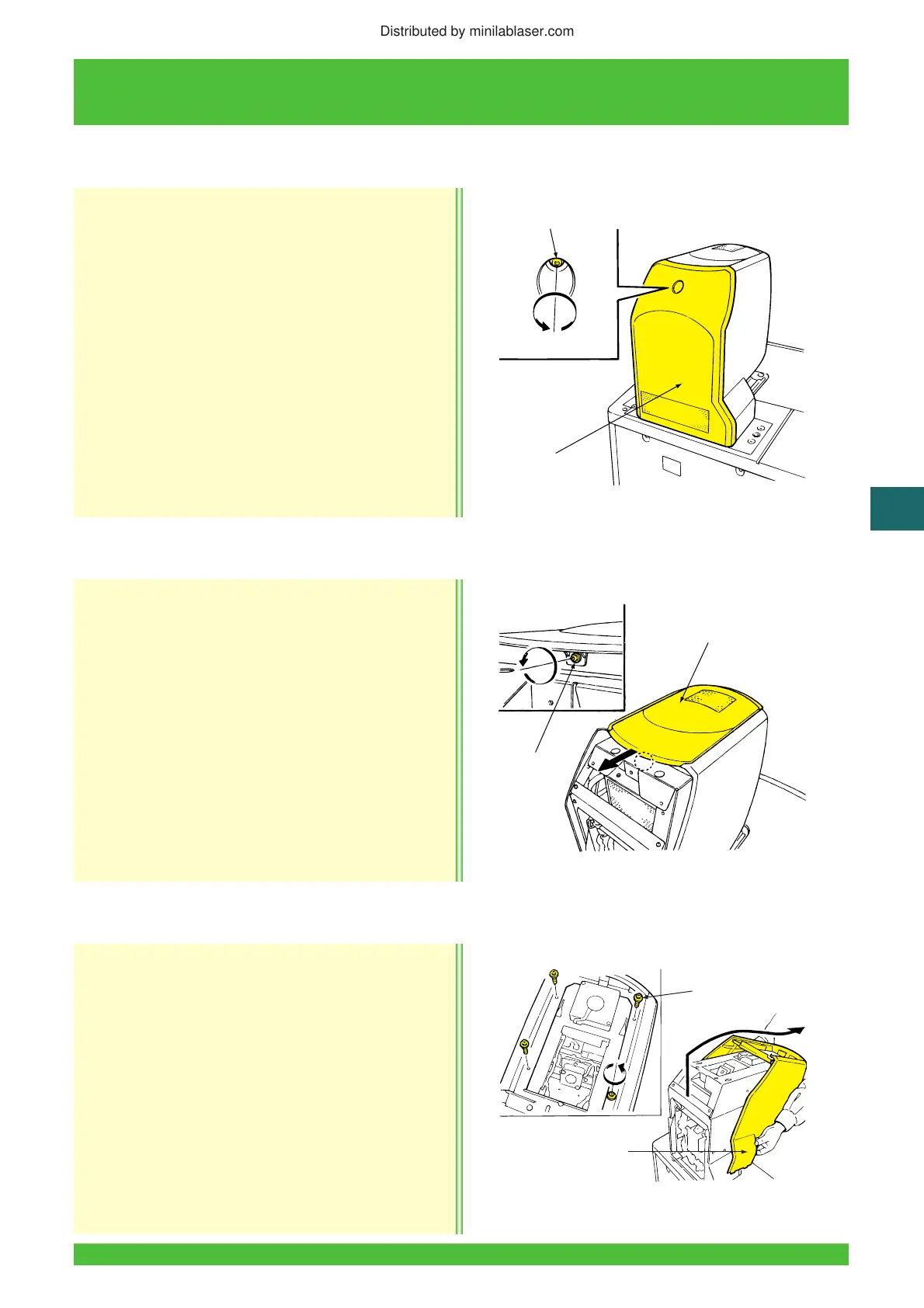
Removal
1. Perform the post-operational check to shut down
the system.
2. Turn OFF the built in circuit breaker and
disconnect the power supply cord from the wall
outlet.
3. Loosen the screw and remove the scanner rear cover.
Reinstallation
Reinstallation is essentially in the reverse order of
removal.
Removal
1. Remove the scanner Section rear cover
(See Subsection 8.2.1).
2. Loosen the screw and remove the scanner
section upper cover.
Reinstallation
Reinstallation is essentially in the reverse order of
removal.
Removal
1. Remove the scanner section upper cover
(See Subsection 8.2.2).
2. Remove the four screws and then the scanner
section front cover.
Reinstallation
Reinstallation is essentially in the reverse order of
removal.
8.2.1 Scanner Section Rear Cover Removal/Reinstallation
Z2016
Scanner Section
Rear Cover
Screw
8.2.2 Scanner Section Upper Cover Removal/Reinstallation
Z2017
Scanner Section
Upper Cover
Screw
8.2.3 Scanner Section Front Cover Removal/Reinstallation
Z2103
Scanner Section
Front Cover
Screws (4)
Distributed by minilablaser.com




 To Next Page