System expansions
A26361-K675-Z120-1-7619, edition 3 59
Extensions to the mainboard
The description of how to upgrade the main memory and/or processor is contained in the technical
manual for the mainboard.
► Open the casing (see "Opening the casing" chapter).
► Fold up the drive cage (see "Folding up and down the drive cage" chapter).
Upgrading main memory
► Upgrade the memory according to the description in the technical manual for the mainboard.
► Fold down the drive cage (see chapter "Folding up and down the drive cage").
► Close the casing (see "Closing the casing" chapter).
Replacing the processor
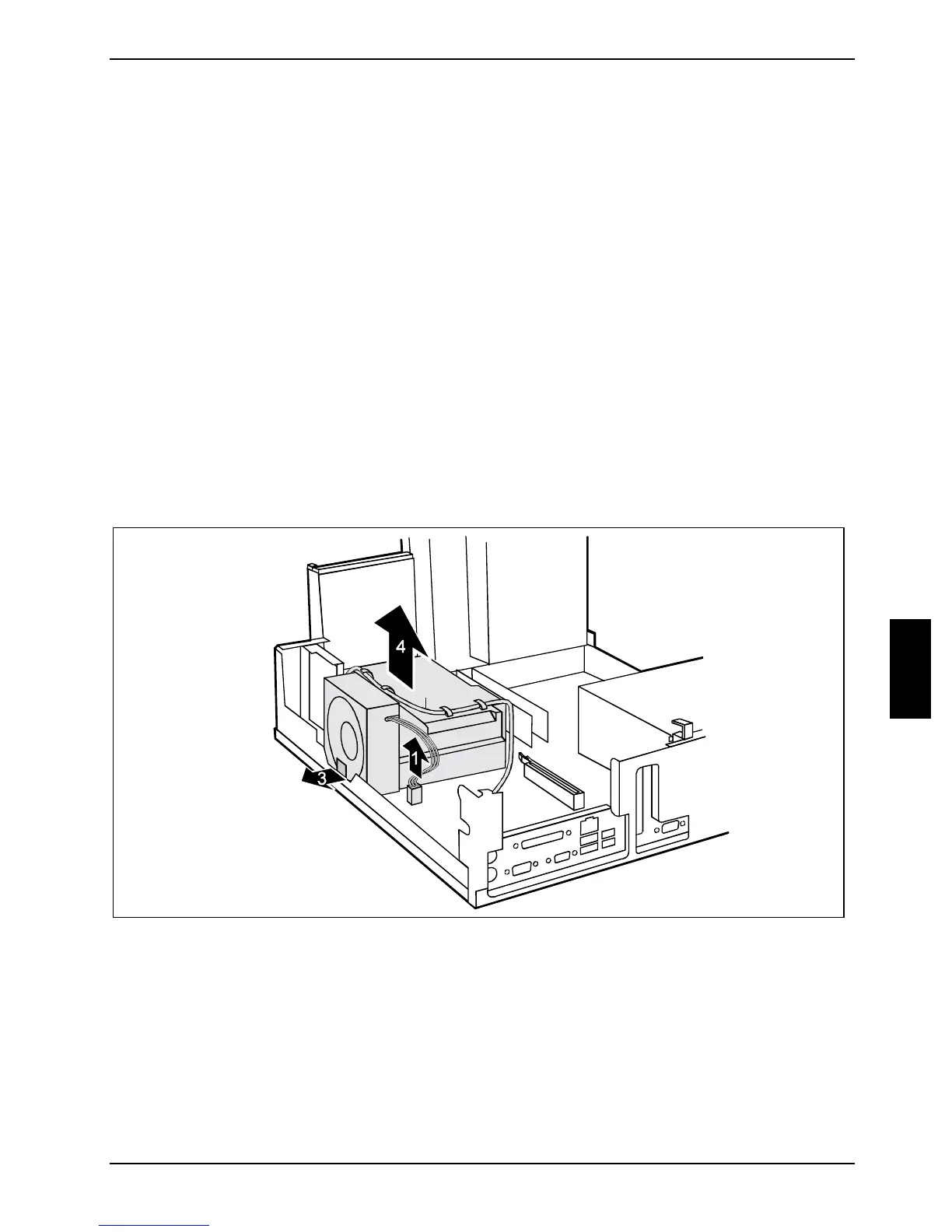
To replace the processor you must first remove the ventilation cover.
Removing ventilation duct
2
► Pull off the fan plug (1).
► If any cables (2) have been attached to the ventilation duct, remove them from the hooks.
► Pull the locking lug on the fan in the direction of the arrow (3).
► Grasp the ventilation duct from above and lift it out of the casing in the direction of the
arrow (4).



 To Next Page