201
How to operate the tuner with an optional HD Radio tuner connected (U.S.A. only)
XIII
Switching between displays when receiving HD Radio
During digital reception, the name of the station being received and other
information can be displayed.
Press the [DISP] button for more than one second.
Each time the button is pressed the display item changes in the
following order:
station name ➔ title* ➔ artist* ➔ album* ➔ genre.
*: Depending on the nature of the broadcast, no information may be shown.
HD Radio reception settings
The HD Radio reception method can be selected. When the HD Radio
tuner is connected to this deck for the first time, it will be set at [AUTO]
(automatic digital/analog selection).
Press the [FUNC] button for less than one second.
The function mode is activated.
Turn the [SEL] button to select HD Radio.
The selected item will be high lighted.
Press the [SEL] button.
The mode will change to reception setting mode.
The maximum number of characters that can be displayed for each
item is as follows:
Long name: 48 characters
Short name: 7 characters
Song title: 32 characters
Album: 32 characters
Genre: 32 characters
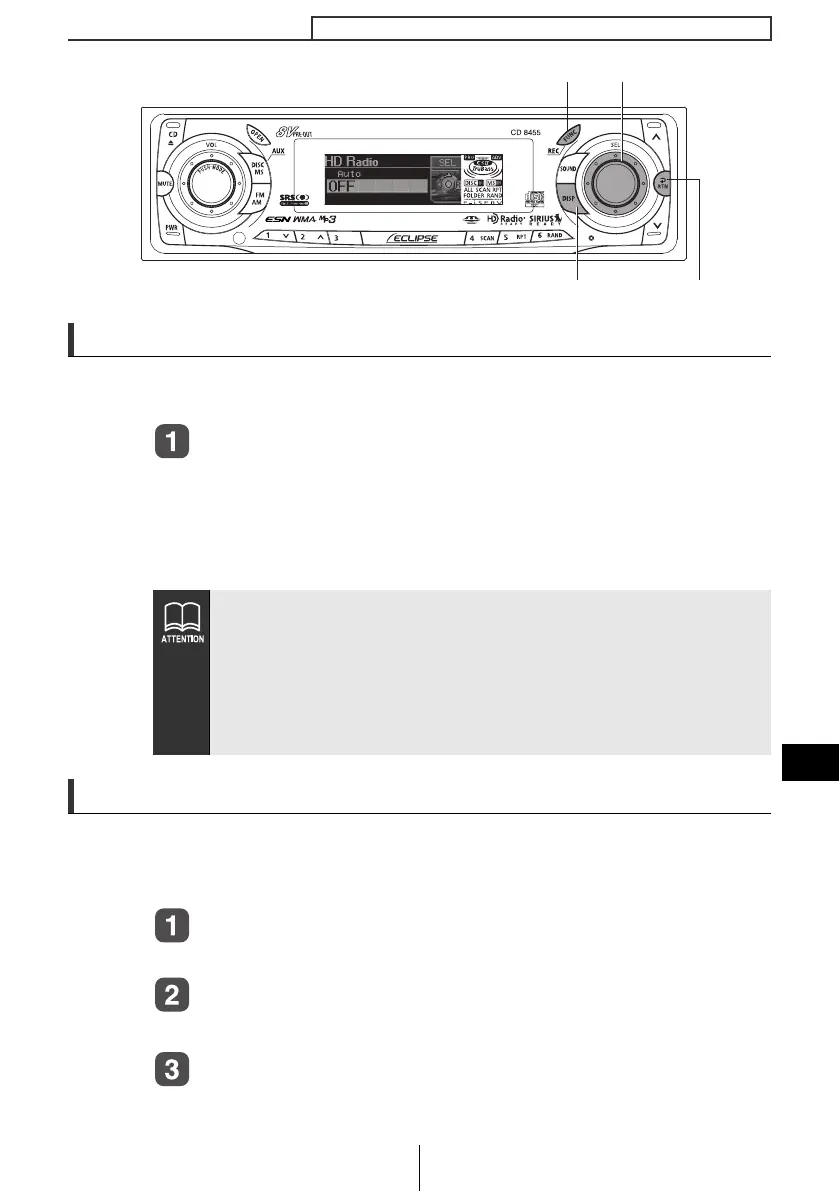
[DISP] button [RTN] button
[FUNC] button [SEL] button
CD8455_13_E.fm 201 ページ 2004年12月13日 月曜日 午後8時37分



 To Next Page