Chapter 2 Installation and Connection
IP-9500e
23
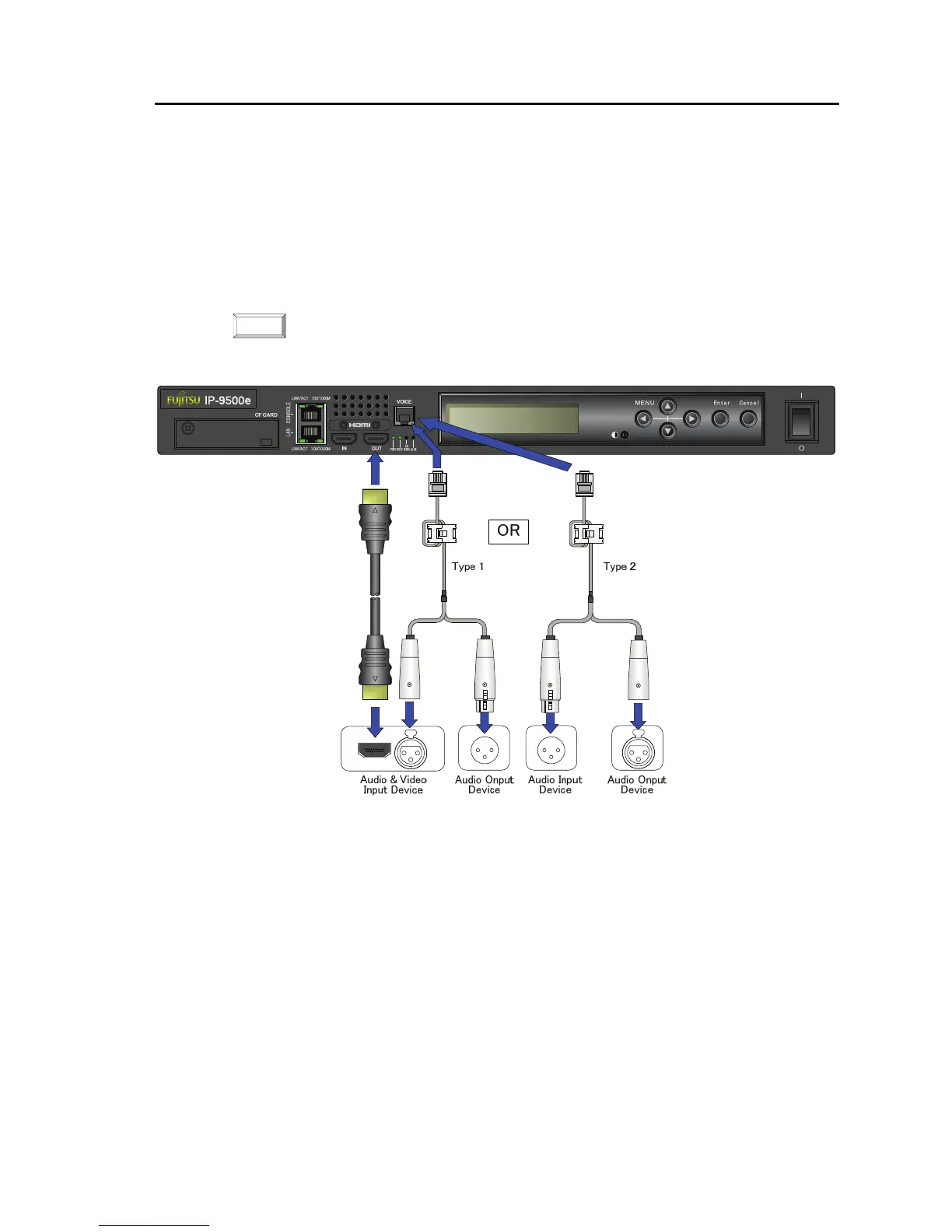
For HDMI output, there is one HDMI terminal to connect the video and audio input device.
Connect to HDMI OUT on the front panel of IP-9500e using the HDMI cable.
For voice communication between IP-9500e, there is one voice terminal to connect the voice
communication device (e.g., intercom).
Connect to VOICE terminal on the front panel of IP-9500e using the dedicated adaptor cable with the
bidirectional voice communication terminal (RJ25 – XLR). The impedance is terminated in 600Ω.
There are two types of the cables. Procure the appropriate type separately because this cable is not
attached to IP-9500e. For more information, see Section 4.2, "Cable and Connector Details."
For details of the connector and cable, see Section 4.2, "Cable and Connector
Details." For the electric specifications, see Appendix 2.3, Function Specifications."
NOTE:



 To Next Page