Chapter 3 Operation instructions
IP-9500e
40
3.4 Device Setting and Operation
(Front Panel)
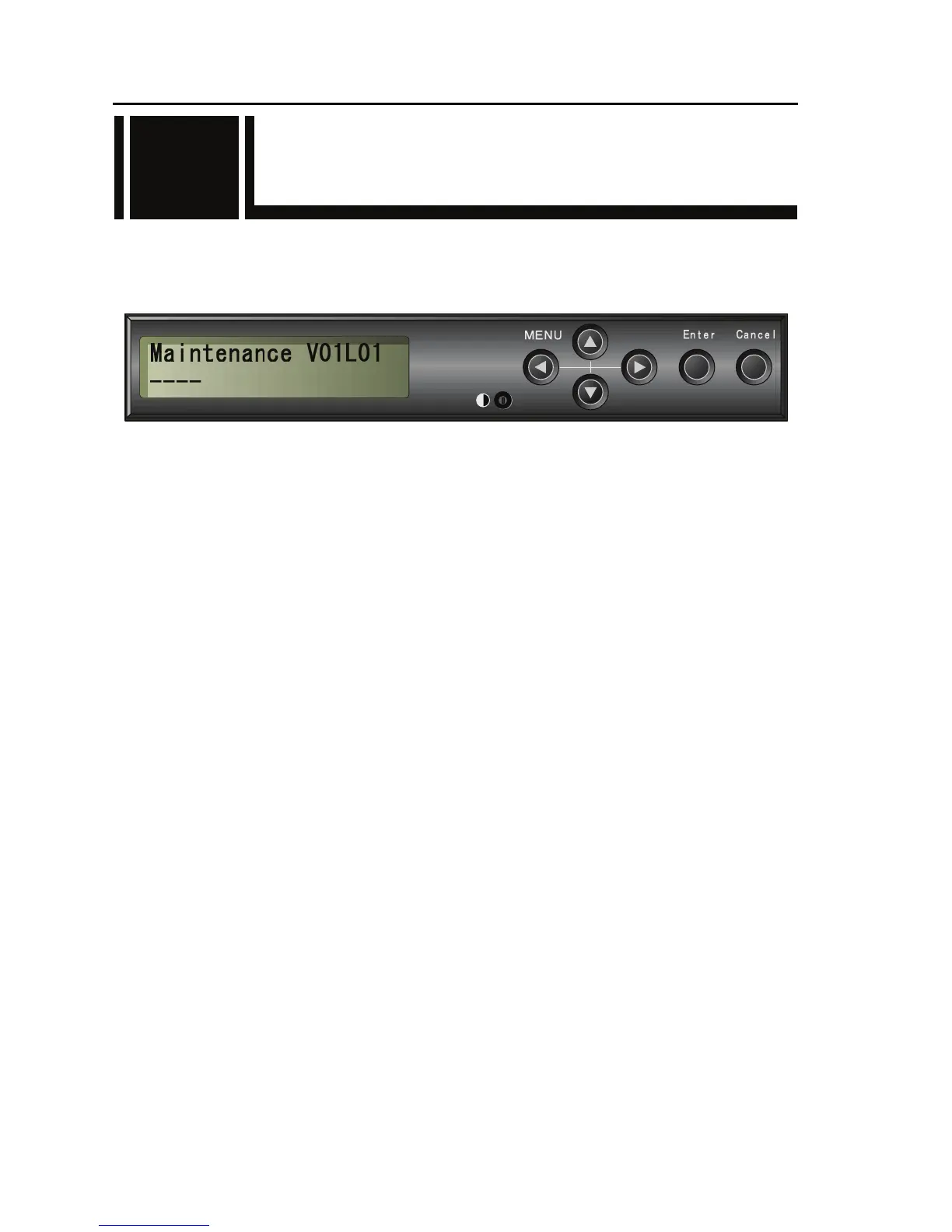
The IP-9500e has six control keys: [U], [V], [Y], [Z], [Enter] and [Cancel]. Use these keys for
making settings.
The LCD panel displays of two lines, 20 characters per line.
Front Control Pane;
■Function description of each key
Functions of [U] and [V] keys
- Each key changes the menu items or setting items displayed on the LCD panel.
- The displayed item changes each time either key is pressed. [U] and [V] change items in
the opposite direction.
Functions of [Y] and [Z] keys
- Each key moves the cursor displayed on the LCD panel to the left or right.
- The cursor moves one column each time either key is pressed.
[Enter] key
- Pressing the [Enter] key while the maintenance initial page is displayed proceeds to the
maintenance menu page.
- Pressing the [Enter] key on the maintenance menu page allows you to make settings for status
display and shutdown.
[Cancel] key
- Pressing the [Cancel] key while the maintenance menu page is displayed proceeds to the
maintenance initial page. Pressing the [Cancel] key on the setting item selection page returns to
the page displayed immediately before you pressed the [Enter] key.
Other
- If you do not make any key input for 30 seconds on any page, the LCD panel backlight goes
off.
- If you do not make any key input for 60 seconds on any page, the current page proceeds to the
maintenance initial page.
3.4



 To Next Page