Troubleshooting and tips
The external monitor remains bl
ank
Monitor
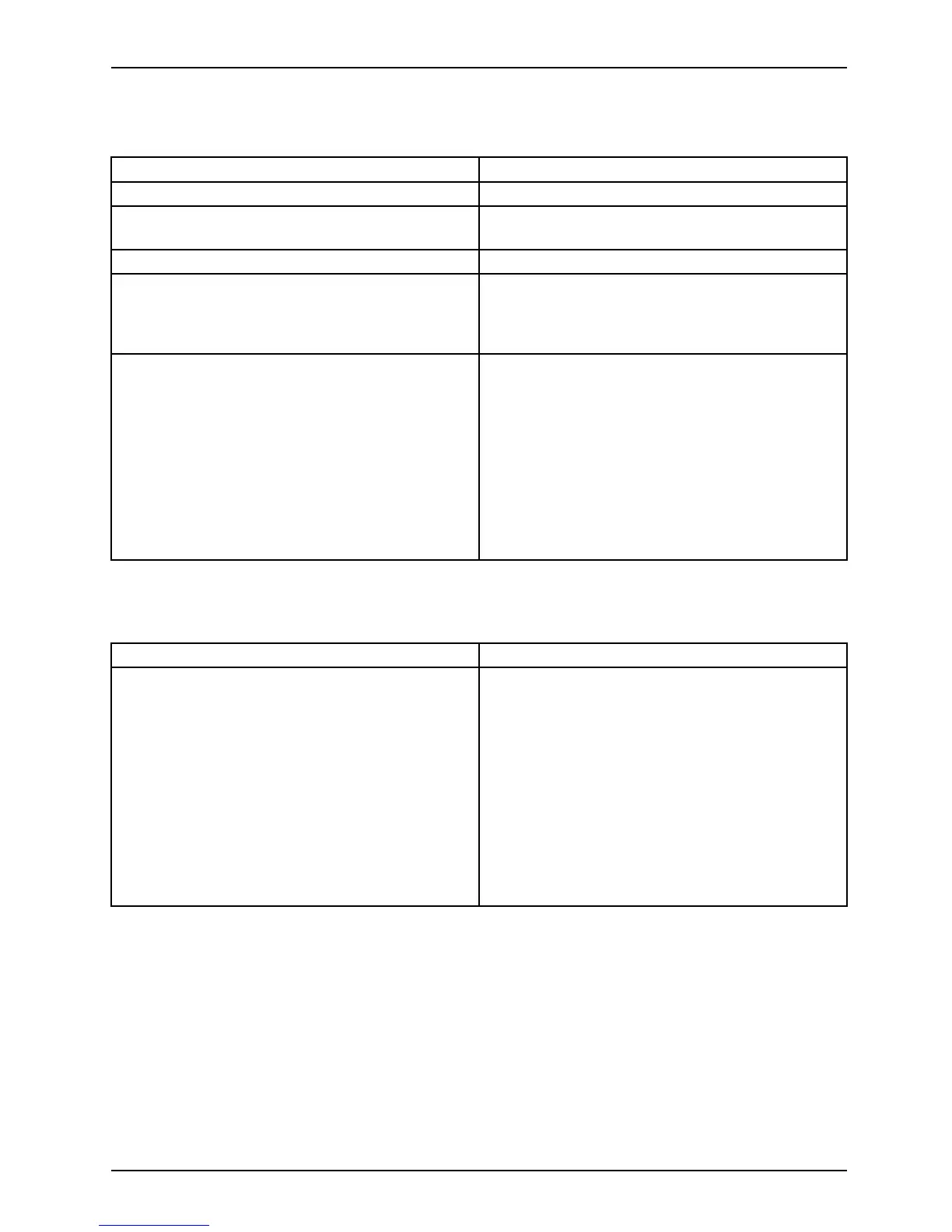
Cause Troubleshoo ting
Monitor is switched off. ► Switch the external monitor on.
Power s aving has been activated (monitor is
blank).
► Press a key (external keyboard) or tap on
the touchscreen.
Brightness is set to d ark.
► Adjust the brightness of the
monitor.
Screen output is set to the Tablet PC
touchscreen.
► Check whether the graphics driver settings
are correct or whether an e xternal monitor
has been detected in "Intel G raphics Media
Accele rator Driver for mobile".
The external monitor’s AC cable or data cable is
not connected properly.
► Switch o ff the Tablet PC and the external
monitor.
► Check w hether the A C cable is plugged
properly into the external monitor a nd into
the power outle t.
► Check that the data cable is properly
connected to the Tablet PC and the external
monitor (if it is plugged in with a connecto r).
► Switch on the external monitor and the
Tablet PC.
The external mo
nitor is b lank or the image is unstable
MonitorMonitor
Cause Troubleshoo ti
ng
The wrong exte
rnal monitor has been selected
or the wrong sc
reen resolution ha s been set for
the applicat
ion program.
► Shut down the application program in
Windows. If the error persists a fter shutting
down the pro gram, use the key combination
for switching the screen output in order to
switch to the touchscreen of the Tablet PC.
Change the following setting:
► Set the screen resolution: Set the screen
resolution as described in the documentation
for your operating system.
► Select monitor: Select monitor 1 or 2 as
described in the documentation for your
operating system.
Fujitsu 71



 To Next Page
 Loading...











