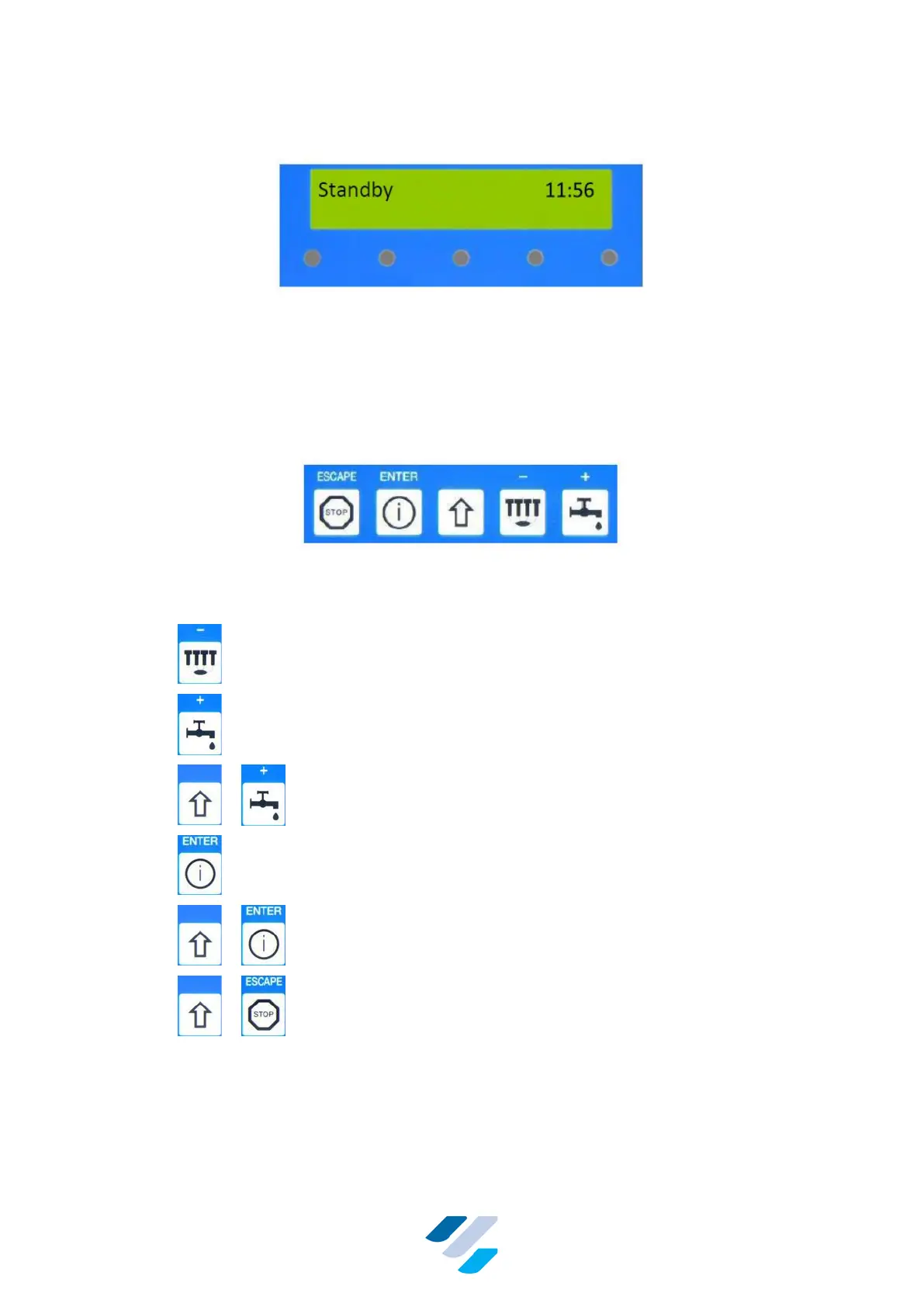
10.1.1. Standby Mode
Figure 12 Display & LEDs in Standby Mode
When a FullClean Plus controller is powered up, the alarm output is active for two seconds
before entering the Standby Mode. In Standby Mode the controller by default does not read
any input or activates any device. It is waiting for a key to be pressed by the operator.
In this Standby Mode a disinfection cleaning can be started automatically if enabled. Time
settings for such cleanings are explained in Section 10.1.6.
Figure 13 Arrangement of the Keys on the Front
From the Standby Mode, all user-modes can be accessed by pressing following keys:
• – Enter “Milking Mode”
• – Enter “Cleaning Mode”
• + – Enter “Manual cleaning Mode”
• – Enter “Info Mode”
• + – Enter “User setting Mode”
• + – Show total running-hours vacuum pump since last
service


 To Next Page