12.1.1. How to Enter Adjust Mode
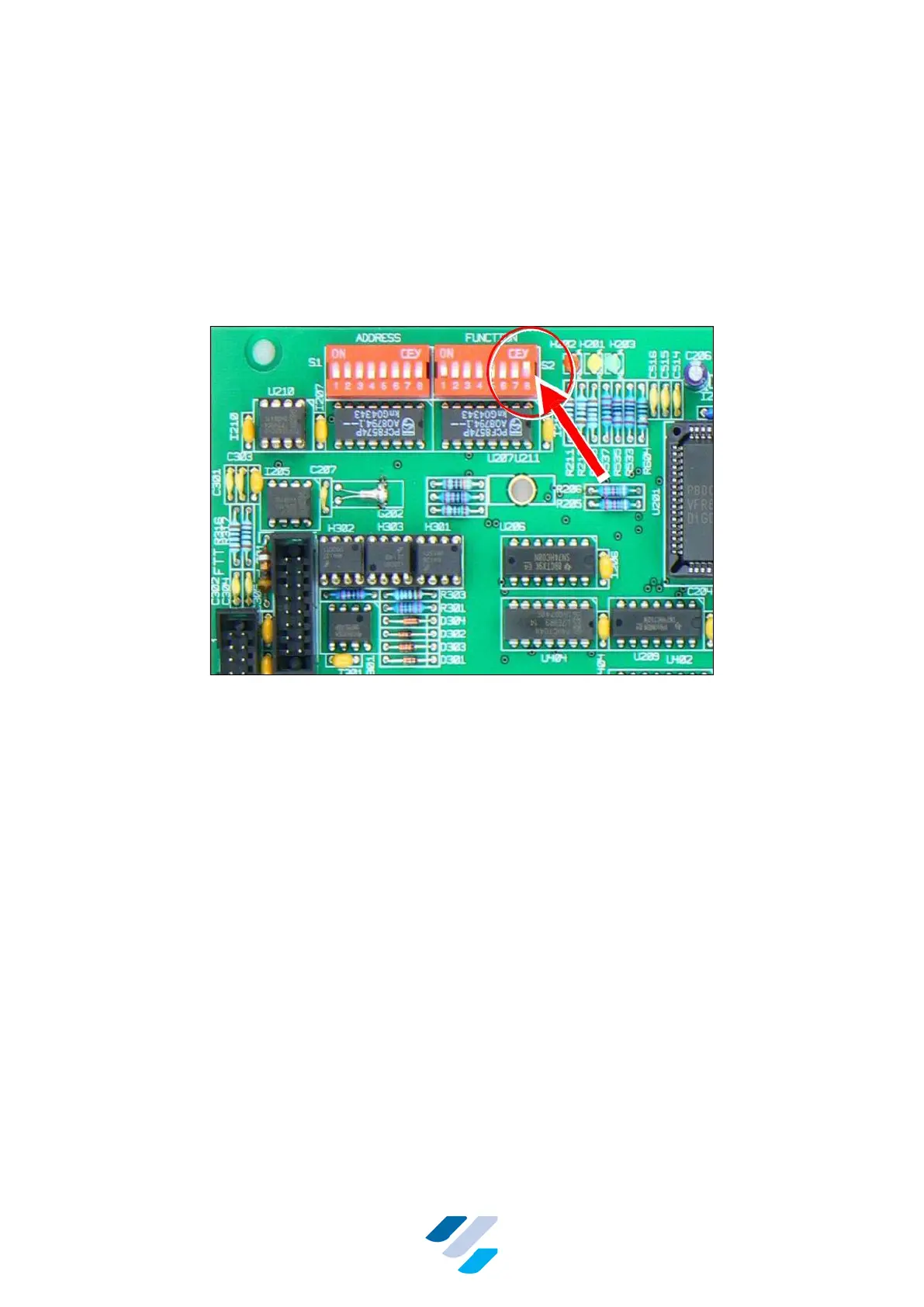
To let the FullClean Plus controller enter the Adjust Mode, the controller must be powered up
with only Function-switch 8 set to “on”, see Figure 21. The address switch can be left
unchanged at address 1.
After powering up, the terminal shows the FTT version number for one second (“FTT 1.05”),
then for 2 s “FullClean Adjust Mode FCC”, the current language and firmware revision number.
Thereafter “General” is shown; this is the first menu item in the main menu of the FullClean
Adjust Mode.
Figure 21 Position of Function Switch 8
12.1.2. First Time Settings - Full Reset
If this is the first time use of the FullClean Plus, the desired language and cleaning system
needs to be set first. The available cleaning systems are: None (=Default); Heat based and
Circulation. These settings can be made in the menu item “General” (Figure 22).
A Full system reset can also be performed here. All settings will return to their defaults and all
user settings erased! Figure 22 shows a simplified structure of the menus; the menu “General”
with basic settings showed in detail.
See the Sections 12.1.5 and 12.1.6 for full information on how to navigate through the menus,
how to modify and save the settings by using the buttons.


 To Next Page