EasyManua.ls Logo

FUTABA FX40 - Page 124

FUTABA FX40
129 pages
Print Icon
To Next Page IconTo Next Page
To Previous Page IconTo Previous Page
Loading...
124
<Data>
C
urve sett
i
ng operat
i
on
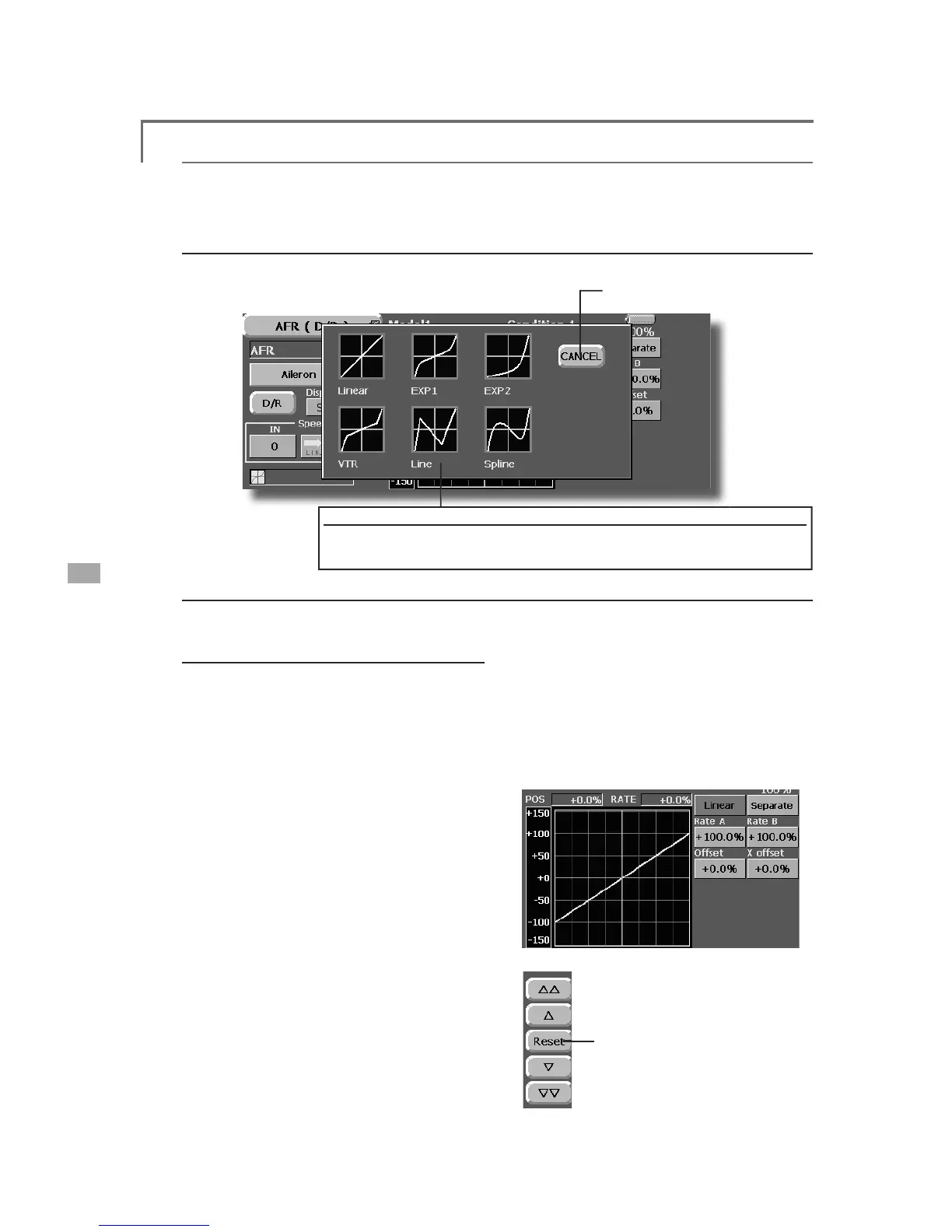
This section describes the settin
g
procedure of curves which are used with the AFR function and each
mi
x
i
ng funct
i
on
.
C
urve t
y
pe select
i
o
n
When the curve t
y
pe select button on the mixin
g
function screen or other screen is touched, the setup
sc
r
ee
n
show
n
below
is
c
a
lled.
ŏ
5HWXUQWRRUL
J
LQDOVHWXSVFUHHQ
of
or
igi
nal
f
unct
i
on
C
urve t
y
pe select
i
on
1
. Touch the button o
f
the curve type you want to use.
*The curve type changes and the d
i
splay returns to the or
i
g
i
nal screen.
L
inear curve ad
j
ustmen
t
R
ate A an
d
Rate B can
b
e a
dj
uste
d
separate
l
y o
r
si
mu
l
taneous
ly.
>
6HWW
L
Q
J
PRGHV@
*
[S
eparate
]
mo
d
e: 5DWHVDUHDG
M
XVWHG
s
eparate
l
y.
*
[Comb
i
ned] mode
:
5DWHVDUHDG
M
XVWHG
si
multaneously.
>
6HWW
L
QJPHWKRG@
1
. Select the sett
i
ng mode
.

7
RXF
KWK
H
5
D
W
H
$
R
U5
D
W
H
%
EX
WW
R
Q
8VHWKHDG
M
XVWPHQWEXWWRQVWRVHWWKHUDWH
*Initial value: +100.0
%
$GMXVWPHQWUDQJHa
The curve can also be offset horizontall
y
in the
vert
i
ca
l
di
rect
i
on an
d
t
h
e rate reference po
i
nt can
b
e offset to t
h
e
l
eft or r
igh
t.
>
2
II
VHWW
L
QJWKHFXUYHKRU
L
]RQWDOO\
L
QWKHYHUW
L
FDO
GL
UHFW
L
RQ@
7RXFKWKH2
II
VHWEXWWRQ
8VHWKHDG
M
XVWPHQWEXWWRQVWRPRYHWKH
F
XUYHKRU
L
]RQWDOO\XSDQGGRZQ
*Initial value: +0.0
%
S
ett
i
ng by curve type
When the curve t
y
pe is selected as described above, ad
j
ustment buttons correspondin
g
to the curve t
y
pe
appear on the original screen. Adjust each curve as described below
.
>2IIVHWWLQ
J
WKHUDWHUHIHUHQFH
S
R
L
QWWRWKHOH
I
WRUU
L
JKW@
7RXFKWKH;2
II
VHWEXWWRQ
8VHWKHDG
M
XVWPHQWEXWWRQVWR
m
ove the re
f
erence po
i
nt to the
l
e
f
t or r
i
ght.
*Initial value: +0.0
%
(
L
i
near curve
)
5DWHDG
M
XVWPHQWEXWWRQV
ŏ
5
H
W
X
UQW
R
LQLWL
D
OY
D
O
XH

Table of Contents

Related product manuals