GPSMAP 76CSx Owner’s Manual 3
GETTING STARTED > USING THE GPSMAP 76CSX KEYPAD
Using the GPSMAP 76CSx Keypad
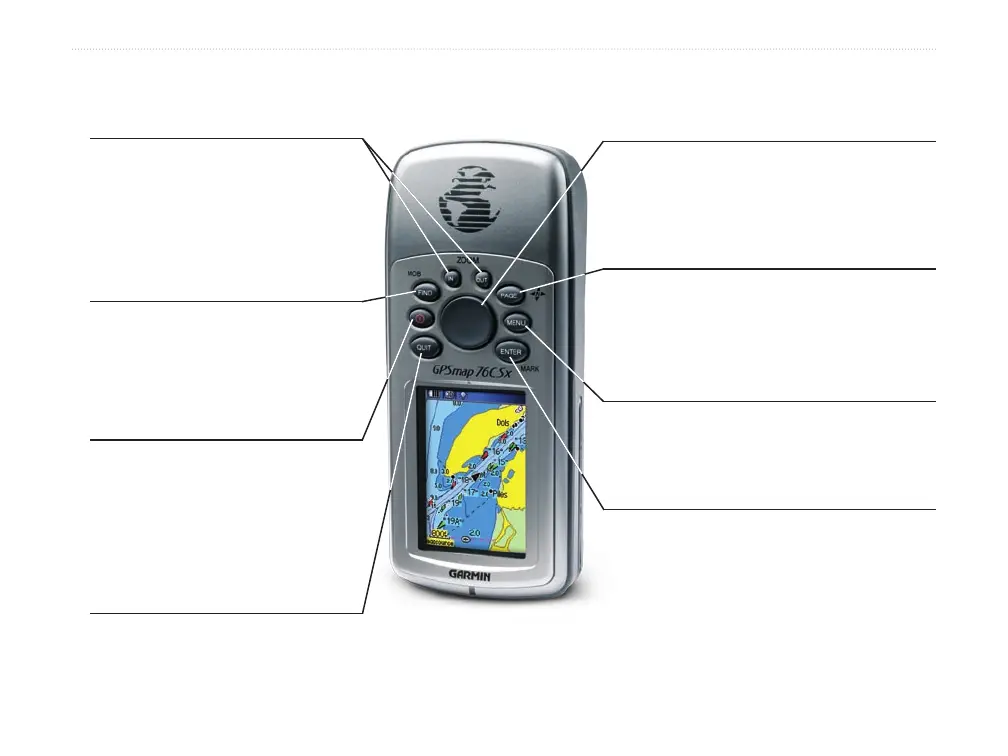
QUIT Key
• Press to cancel data entry or
exit a page.
ENTER/MARK Key
• Press and release to enter highlighted
options, data or confirm on-screen
messages.
• Press and hold at any time to mark
your current location as a waypoint.
IN/OUT Zoom Keys
• Press to zoom in or out on the
Map Page.
• Press to scroll up or down a
list on any other page.
FIND/MOB Key
• Press at any time to view the
Find Menu.
• Press and hold for MOB.
POWER Key
• Press and hold to turn the unit
on or off.
• Press and Release to adjust
the backlighting.
ROCKER Key
• Press up, down, left, or right to
highlight options and to enter data, or
move the map panning arrow.
PAGE Key
• Press to cycle through the main pages.
• Press and hold to turn the compass
on or off
MENU Key
• Press to view page options.
• Press twice to view the Main Menu.












 To Next Page