GPSMAP 76CSx Owner’s Manual 63
MAIN MENU > TRACKS
MAIN MENU
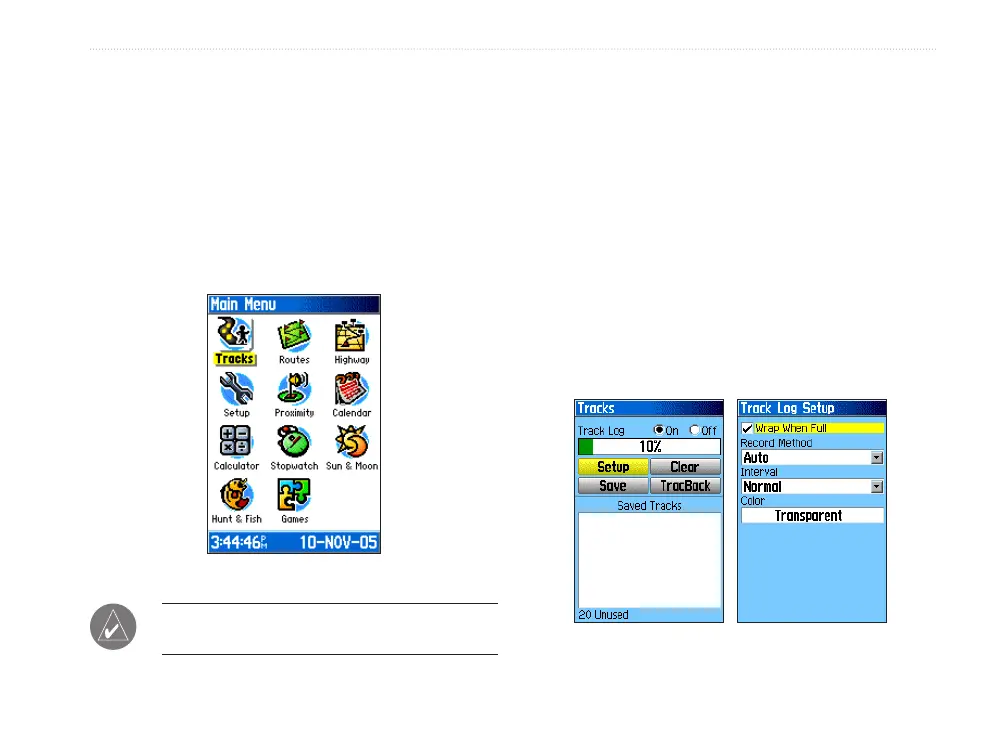
The Main Menu contains settings and features not
found on the main pages and submenus. The time and
date are shown at the bottom of this page. The Main
Menu is accessible from any page by pressing MENU
twice. To select an item on the Main Menu, highlight
the menu item, and press ENTER.
Main Menu
NOTE: If a page is added to the page sequence,
the icon does not appear on the Main Menu.
Tracks
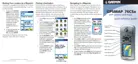
The Tracks Page shows the percentage of track
memory used and a list of saved tracks. Use the
Tracks Page to set up, clear, or save a track log, or
activate the TracBack feature for the current track log.
For more information, see page 30.
To access the Tracks Page:
1. Press MENU twice to open the Main Menu.
2. Select the Tracks icon, and press ENTER.
3. Highlight the Setup button, and press ENTER
to open the Track Log Setup Page.
Tracks Page Track Log Setup












 To Next Page