GPSMAP 76CSx Owner’s Manual 85
MAIN MENU > SUN AND MOON
Sun and Moon
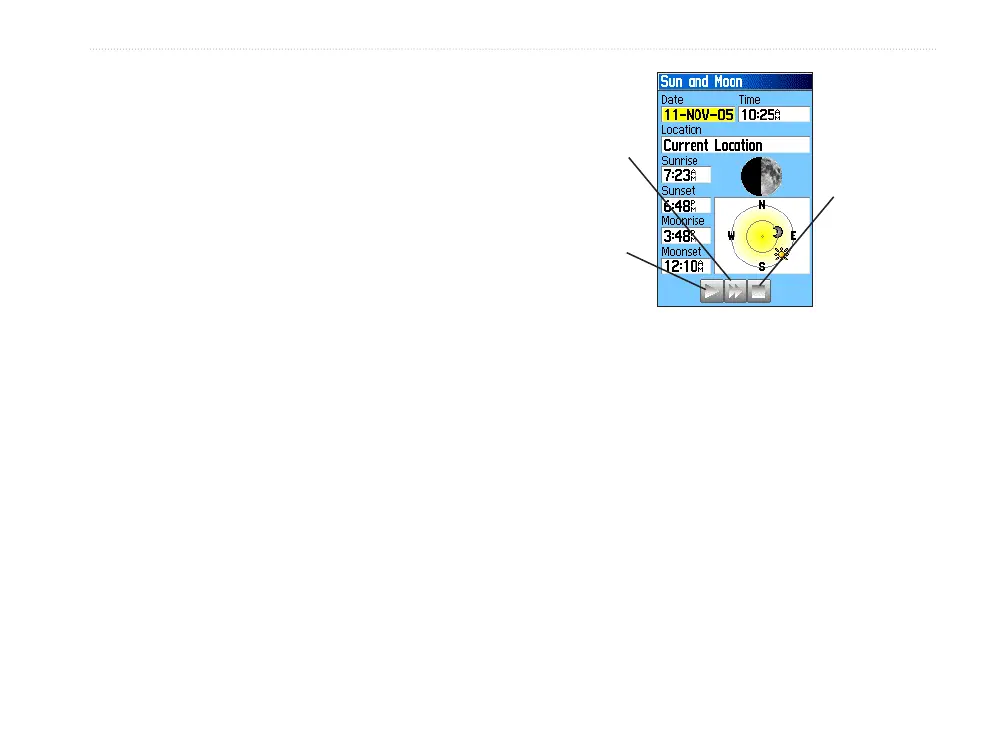
The Sun and Moon Page provides you with a graphic
depiction of the sun and moon relative to the Earth.
Sun and moon positions can be shown for any time,
date, and location on Earth.
The Sun and Moon Page also shows sunrise, sunset,
moonrise, and moonset times for a selected time, date,
and location. Use the on-screen buttons to animate the
movement of the sun and moon and stop at a given
time or date.
To view sun and moon locations for a
specified time, date, and location:
1. Press MENU twice to open the Main Menu.
2. Select the Sun & Moon icon, and press
ENTER.
Sun and Moon Page
Press to
animate the
display of the
sun and moon
Press to
animate
moon phases
Press
to stop
animation
3. To view the predictions for a different date
and time, highlight either the Date or Time
field, and press ENTER to open the on-screen
keypad.
4. To view the predictions for a different location,
highlight the Location field, and press ENTER
to open the New Location Options Menu and
choose from the options shown.












 To Next Page