GPSMAP 76CSx Owner’s Manual 55
MAIN PAGES > ALTIMETER PAGE
You can configure the Profile field in the center of
the page to show either elevation or ambient pressure
plots as selected from the Altimeter Page Options
menu.
Data fields at the top of the page are user selectable
and show a variety of recorded or current data.
Altimeter Page Options
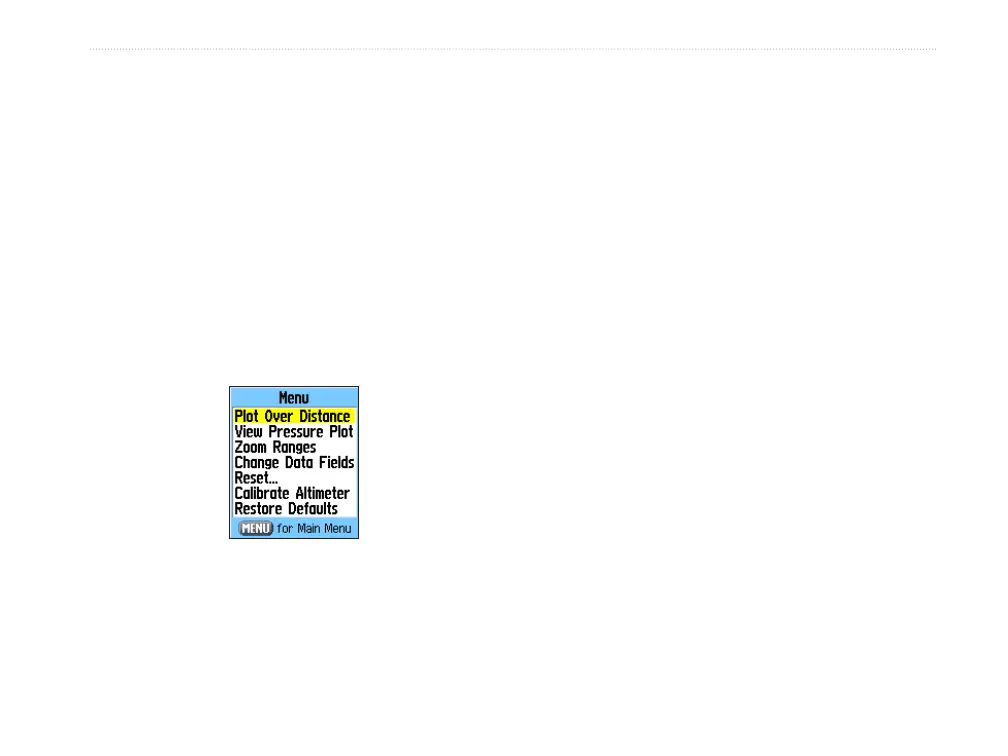
Use the Altimeter Page Options Menu to customize
the Altimeter Page. With the Altimeter Page open,
press MENU to open the Options Menu.
Altimeter Page
Options Menu
The following options are available:
Plot Over Time (Plot Over Distance)
—plots the
elevation over time or distance.
View Elevation Plot (View Pressure Plot)
—shows
elevation or pressure plot.
Zoom Ranges—allows you to set the Zoom Ranges
for elevation, distance, or time when you show the
View Elevation Plot.
Reset—allows you to reset the elevation data and the
maximum elevation data.
Calibrate Altimeter
—if you know the correct
elevation for your location, you can increase the
accuracy of the altimeter using the Calibrate Altimeter
option.
Restore Defaults
—use to clear recorded data from
the page and begin recording new data.
You can customize the View option by using the
Zoom Ranges option to determine time, distance,
pressure, and elevation parameters.












 To Next Page