14 GPSMAP 76CSx Owner’s Manual
BASIC OPERATION > CREATING AND USING WAYPOINTS
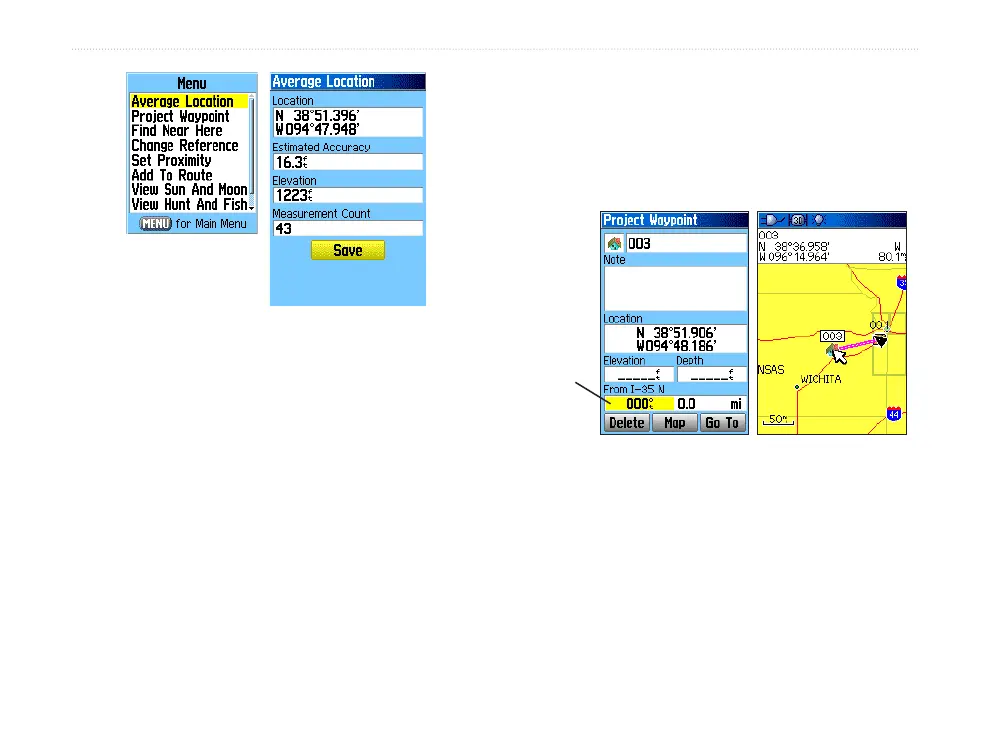
Waypoint
Options menu
6. Press ENTER to save the location.
Projecting a Waypoint
You can create a new waypoint by projecting the
distance and bearing from a specific location to a new
location.
To project a waypoint:
1. Press FIND to open the Find Menu.
2. Highlight the Waypoints icon, and press
ENTER to open the Waypoints Page.
3. Select the waypoint you want to project, and
press ENTER. The Waypoint Page opens.
4. Press MENU to open the Options menu.
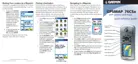
5. Select Project Waypoint
, and press ENTER
to open the Project Waypoint Page.
6. Enter the distance and bearing to the projected
waypoint in the appropriate fields at the bottom
of the page, and press QUIT when finished.
Project Waypoint
Page
Projected
waypoint on the
map
Enter
bearing
and
distance












 To Next Page