34 GPSMAP 76CSx Owner’s Manual
BASIC OPERATION > CREATING AND USING ROUTES
To review individual route points:
1. Press MENU twice to open the Main Menu.
2. Highlight the Routes icon, and press ENTER
to open the Routes Page.
3. Select a saved route, and press ENTER.
4. Highlight a point on the Route Page, and press
ENTER to open an options menu.
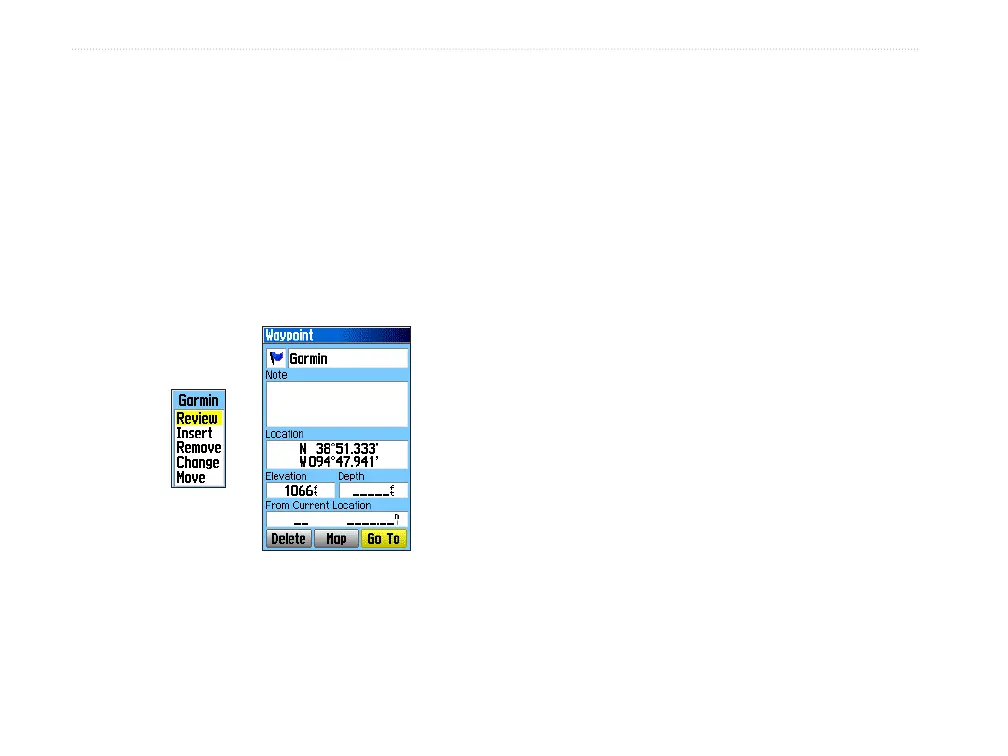
5. Highlight Review and press ENTER to open
the information page for the route point.
Route point
review
options
Information page
6. Select Save (save the point as a waypoint),
Map (show the point on the Map Page), or Go
To (navigate to the point), and press ENTER.
To delete a route:
1. Press MENU twice to open the Main Menu.
2. Highlight the Routes icon, and press ENTER
to open the Routes Page.
3. Press MENU to open the Options Menu.
4. Highlight Delete All Routes, and press
ENTER to clear the list of saved routes. A
confirmation message appears, asking “Do
you really want to delete all routes?” Select
Yes, and press ENTER.
To select the off-road transition for a route:
1. Press MENU twice to open the Main Menu.
2. Highlight the Routes icon, and press ENTER
to open the Routes Page.
3. Press MENU to open the Options Menu.
4. Select Off Road Transition, and press
ENTER to open the Off Route Transition Page.
5. Highlight the Route Leg Transition field, and
press ENTER to view the list of options.
6. Select the method to use (Manual or
Distance) when advancing the route to the
next point.












 To Next Page