Checkbox – if selected, the audio stream will be played while during
the live video view. Else, the audio will be muted by default.
Nevertheless, the audio can still be toggled on and off from the video
viewing screen itself.
DEFAULT SETTINGS:
Checkbox – Unselected
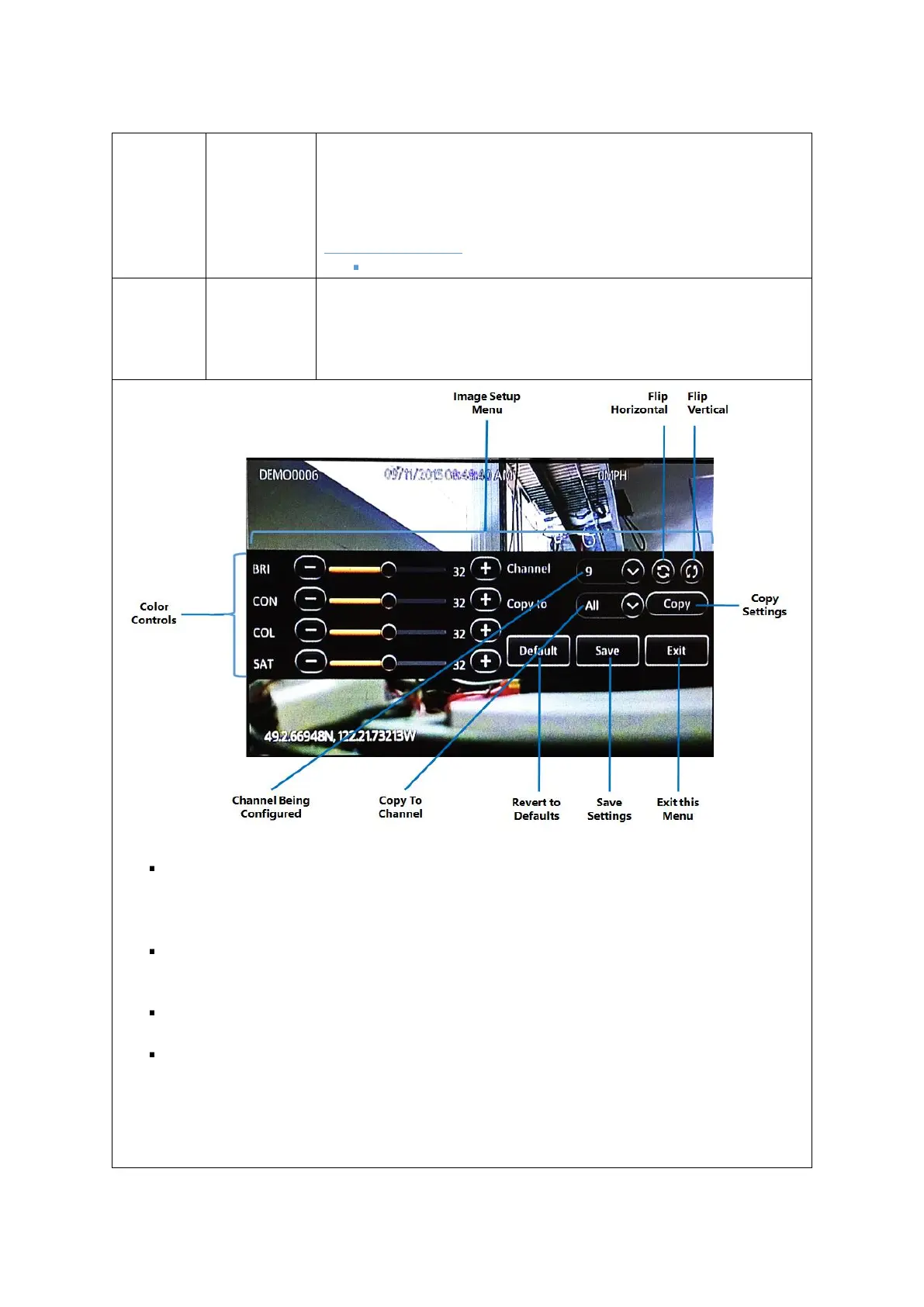
This button displays the image setup screen.
Please adjust the video from the various camera channels using the
settings explained below to meet your preferences
Image Setup Menu: The entire image setup menu is floating over the video from the live
camera. You may click and drag the entire image setup menu up and down to look at
different parts of the image.
Flip Horizontal: This button flips the entire camera video along the horizontal axis. This is
especially useful for cameras installed in an upside-down orientation.
Flip Vertical: This button flips the entire camera video along the vertical axis.
Colour Controls: The (-) and (+) buttons enable you to adjust the color values of the image.
You may also click and drag the respective slider bar knob to adjust the setting quickly. There
are 4 image colour settings that can be adjusted.
BRI : Brightness
CON : Contrast



 To Next Page