9–16 D485 MODBUS TO DEVICENET CONVERTER – USER GUIDE
APPLICATION EXAMPLE
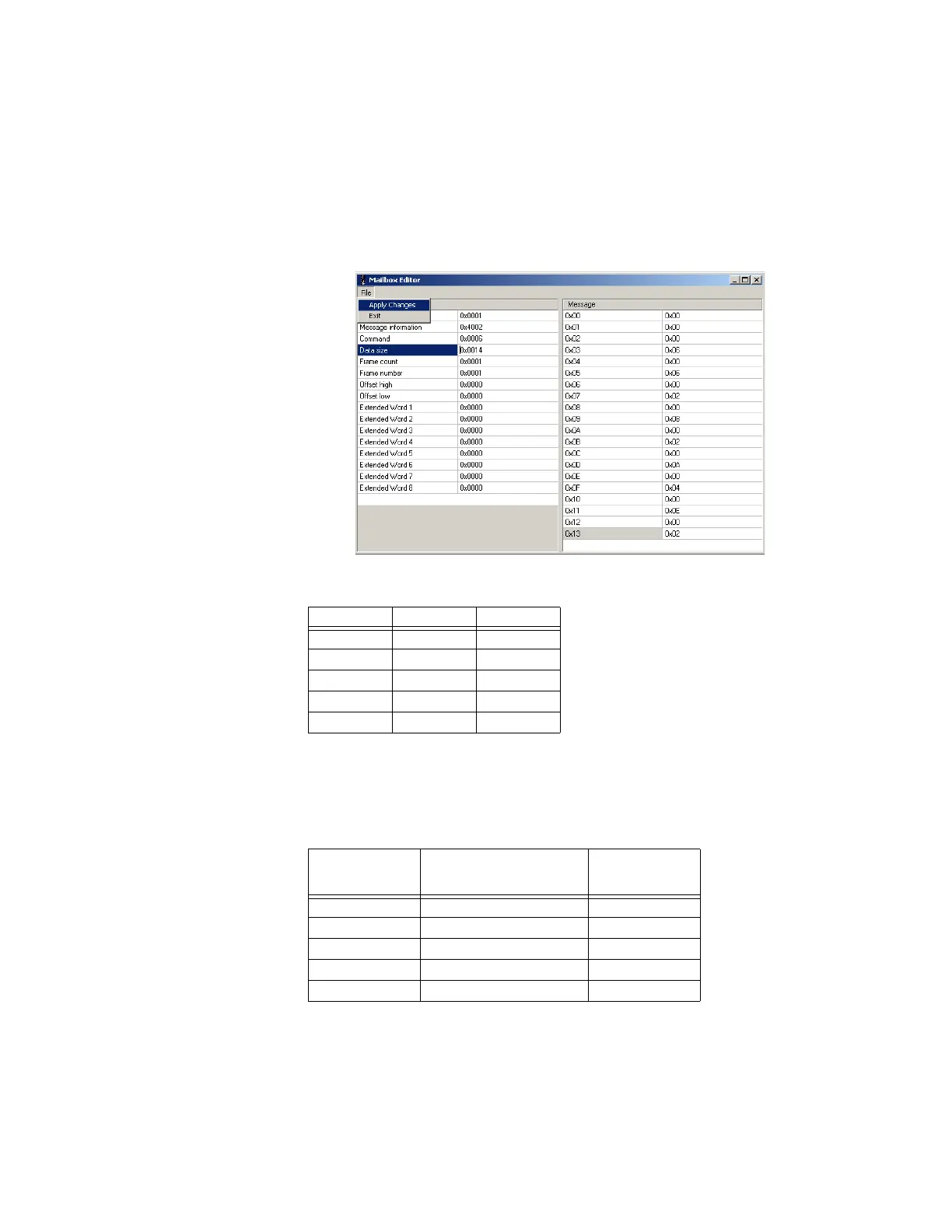
This can be done by using I/O data input area mapping mailbox command (06h)
1. Right click on EndInit item and insert a new mailbox.
2. Set command code to 06 (row 3).
3. The offset and length of attribute for each attribute must be provided. Each attribute
requires two words (four bytes) in message data; therefore, 5 attributes require 20
bytes. Enter 20 in the Data size field - it will automatically convert and display as
0x0014 (hex).
Figure 9-27: Setting offset and data length for IO data input attributes
4. The offset and data length for each attribute in bytes in given below.
5. Enter the offset and data length values from the table above, then select the File >
Apply Changes menu item to save the changes.
6. The above I/O data input mapping object class A0h attributes are mapped to
assembly object class 04h instances with fixed attribute number 03h. The mapping is
given below.
Attribute Offset Data length
1 0x0000 0x0006
2 0x0006 0x0002
3 0x0008 0x0002
4 0x000A 0x0004
5 0x000E 0x0002
Class A1h,
instance 01h,
attribute
Corresponding instance in
assembly object class 04h
(Attribute 03h)
Description
1 96h Input 1
2 97h Input 2
3 98h Input 3
4 99h Input 4
59Ah Input 5



 To Next Page