8 Troubleshooting
86500-IMG rev 3 GE Healthcare 61
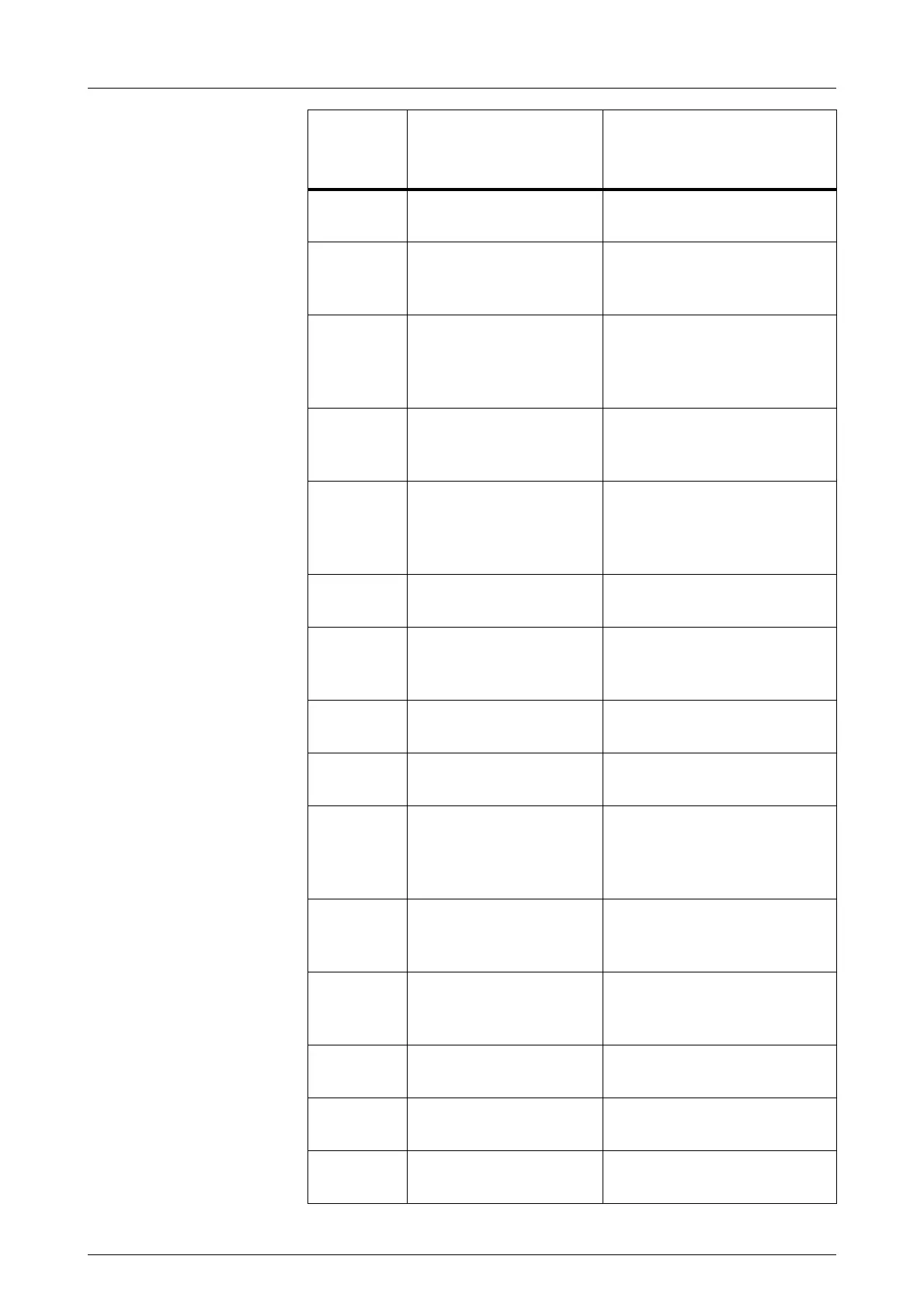
Er0034 Cassette not changed. Change cassette. Try also
with another cassette.
Er0035 Cassette opto sensor
failure.
Check cassette opto sensors.
Reduce lightning in Bucky
area.
Er0037 Grid error during/prior to
exposure. Displayed
after exposure, if
exposure started.
Re-attach Bucky. Try also with
another Bucky.
Er0038 Cassette holder not
attached when trying to
expose. Inhibit exposure.
Attach cassette holder.
Er0041 Stereo not in 0 degrees
when exposing.
With Delta 32, drive the stereo
arm first to left and right, then
back to 0° position. If you
have no Delta 32, call service.
Er0042 Stereo movement error. Check that Delta 32 unit
properly attached.
Er0043 Vertical movement
motor back up time
reached.
Clear and try again. If
problem persists, call service.
Er0045 ECS motor back up time
reached.
Clear and try again. If
problem persists, call service.
Er0048 C-Arm rotation back up
time reached.
Clear and try again. If
problem persists, call service.
Er0051 C-Arm angle
measurement failure.
Drive to predefined
angles not allowed.
Clear and try again. If
problem persists, call service.
Er0053 General communication
error with internal
electronics.
Clear and try again. If
problem persists, call service.
Er0054 External communication
error with serial port.
Buffer overflow.
Clear and try again. If
problem persists, call service.
Er0055 External communication
error with RS232.
Clear and try again. If
problem persists, call service.
Er0057 mA failure. Clear and try again. If
problem persists, call service.
Er0058 Anode start failure Clear and try again. If
problem persists, call service.
Error code
in LCD
display
Reason for error Corrective action
Table 8.1 Diamond error code guide
FOR TRAINING PURPOSES ONLY!
NOTE: Once downloaded, this document is UNCONTROLLED, and therefore may not be the latest revision. Always confirm revision status against a validated source (ie CDL).



 To Next Page