GE
D
IRECTION 5535208-100, REV. 2 LOGIQ E9 SERVICE MANUAL
Chapter 3 LOGIQ E9 Setup 3 - 65
3-9-4-7 How to Setup and Use a DICOM Storage Commitment Service
DICOM Storage Commitment enables the to obtain a commitment from the image storage service that
images have been stored. With this commitment, you may choose to delete the images from the .
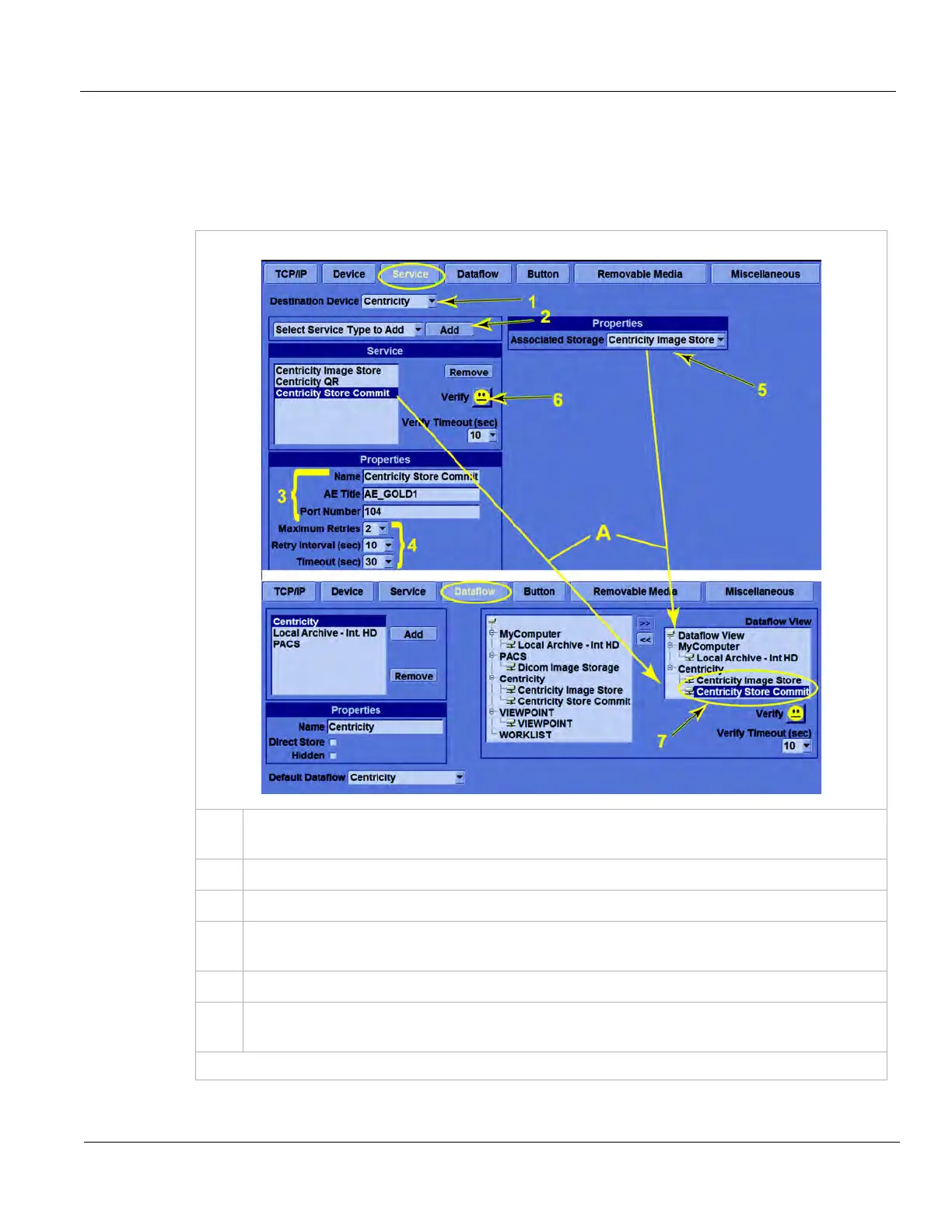
To set up Storage Commitment on the , follow these steps:
Table 3-23 DICOM Storage Commitment Service Setup and Use
1.
In Utility -> Connectivity -> Service, from the Destination Device drop-down menu, select
your Image Storage server.
2.
From the drop-down menu of services, select Dicom Storage Commitment and press Add.
3.
Provide a name, set the AE Title and Port Number for your Image Storage service.
4.
Maximum Retries, Retry Interval and Timeout have the same use as with DICOM Image
Storage Services. See: 3-9-4-2 "Properties" on page 3-45.
5.
For Associated Storage, select the name of your Image Storage service.
6.
Save your changes and press Verify. A Smiley Face indicates successful communication with
the service.
(continued on next page)



 To Next Page