GE
D
IRECTION 5535208-100, REV. 2 LOGIQ E9 SERVICE MANUAL
Chapter 7 Diagnostics/Troubleshooting 7 - 3
7-3-3 Collecting a Screen Capture with Logs
If the system malfunctions, press the Alt+D keys simultaneously. This Alt+D function is available at all
times, and collects a screen capture of the image monitor, user-defined presets, and the following logs:
• Keyboard Shadow Log
• Error Logs
•Crash Log
• Vital Product Data
• DICOM Logs
• Windows Event Logs
• Diagnostic Logs
• Service Logs
For a detailed list of Service Logs captured, see: 7-3-4 "Capturing Service Logs with ALT+D" on page
7-5.
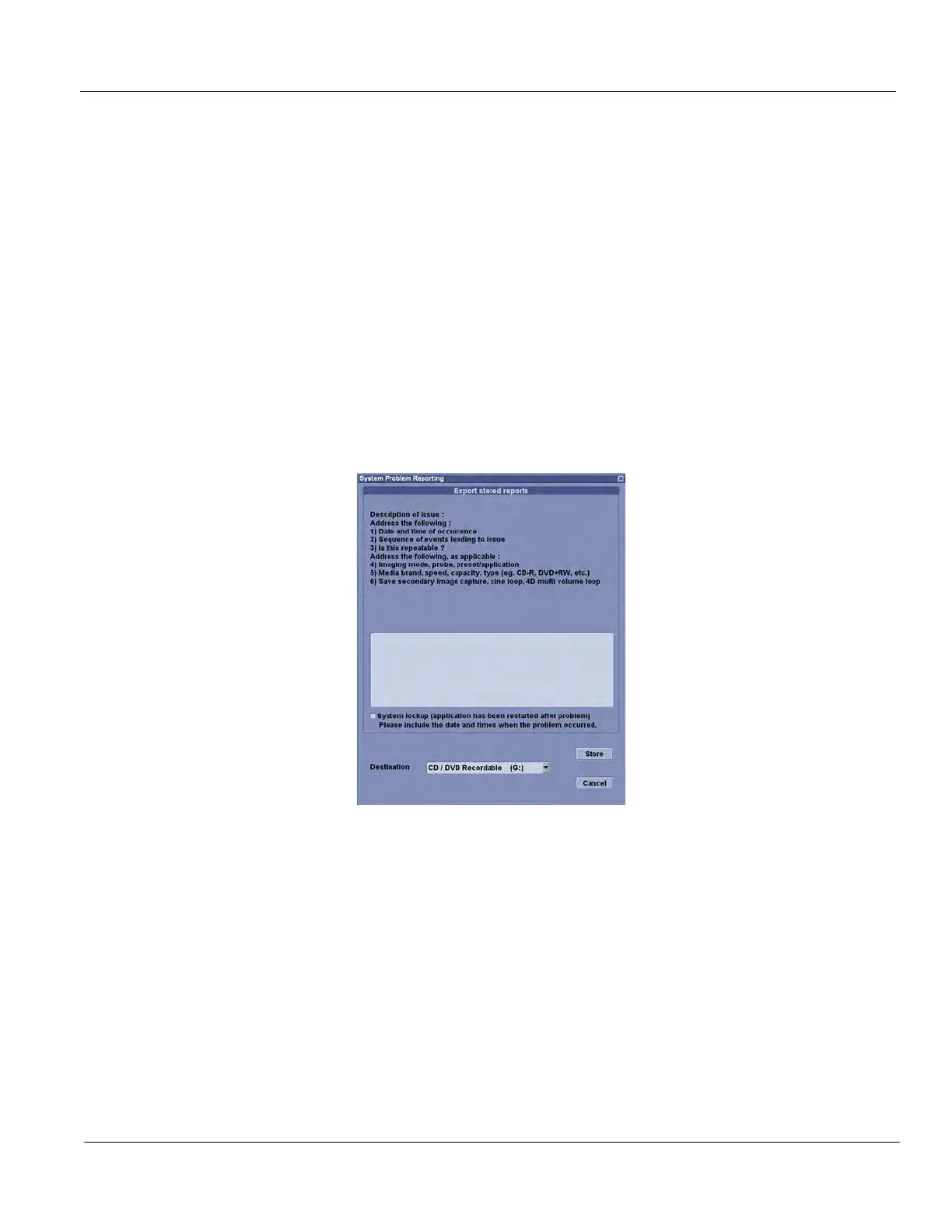
When Alt+D is pressed, a menu box opens. Enter the following information:
• System ID serial number.
• Software version.
• System Date and time of occurrence.
• Sequence of events leading to issue.
• Is the issue repeatable?
• Imaging mode, probe, preset/application.
• Media brand, speed, capacity, type.
• Select the Destination (storage media or Service directory for remote viewing through InSite ExC)
and click the Store button.
Figure 7-1 ALT+D Dialog Box


 To Next Page