TV with Audio/Video Jacks
This connection assumes:
• You are connecting an antenna, cable, or cable box system.
• Your television has audio/video jacks.
This connection provides:
• Stereo sound playback from VCR.
• Record one channel while watching another (except when
using a cable box for all channels).
To use this connection, you must have:
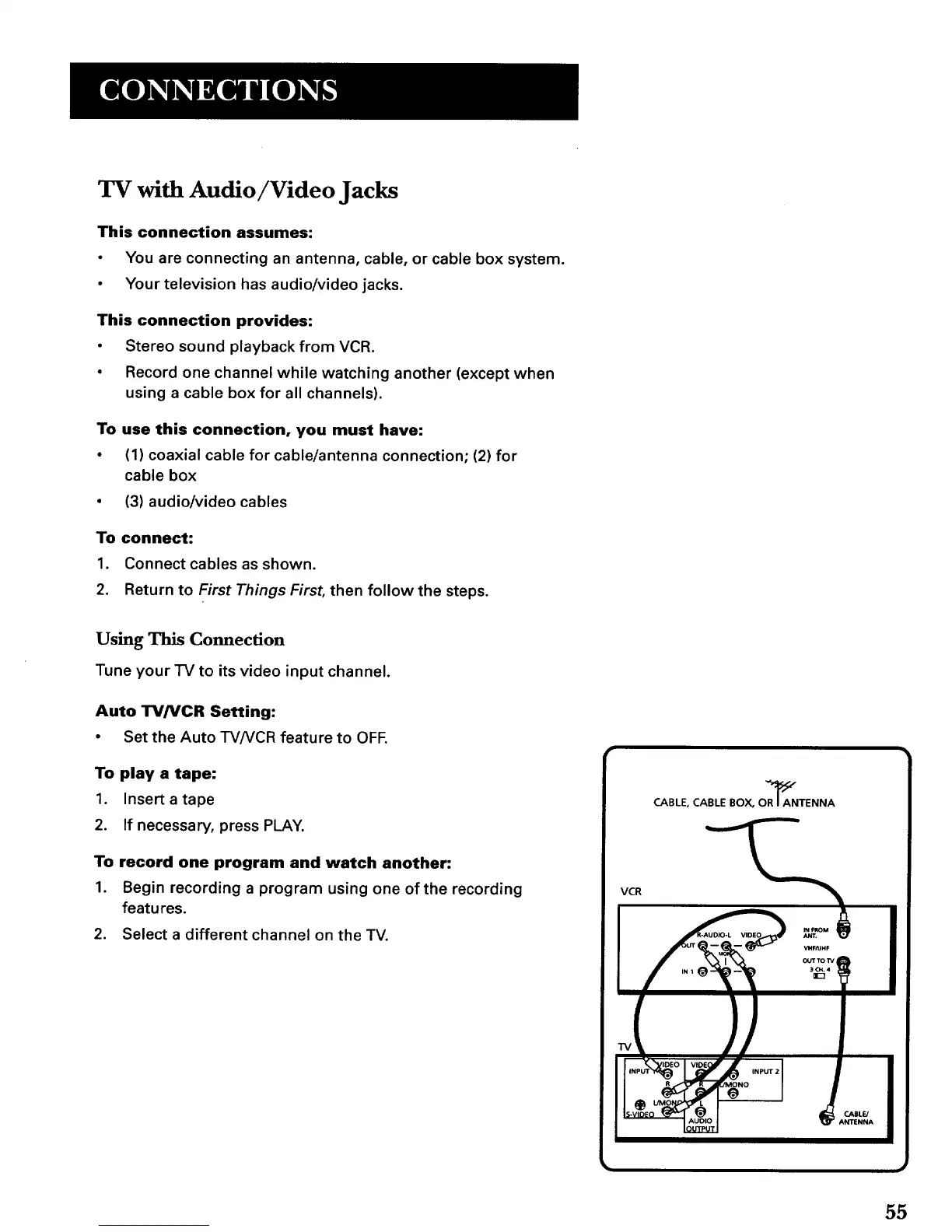
• (1) coaxial cable for cable/antenna connection; (2) for
cable box
• (3) audio/video cables
To connect:
1. Connect cables as shown.
2. Return to First Things First, then follow the steps.
Using This Connection
Tune your TV to its video input channel.
Auto TVNCR Setting:
• Set the Auto TVNCR feature to OFF,
To play a tape:
1. Insert atape
2. If necessary, press PLAY.
To record one program and watch another:
1. Begin recording a program using one ofthe recording
features.
2. Select a different channel on the TV.
CABLE, CABLE BOX, OZNTENNA
VCR
_f-/UMF
!
IV
OUTeUT
55



 To Next Page