TV with RF Jack and Satellite Receiver
This connection assumes:
• You have a basic satellite system.
• Your TV does not have audio/video input jacks.
This connection provides:
• Mono sound playback from VCR.
• Recording from a satellite receiver.
• Recording one off-air or cable channel while watching another
To use this connection, you must have:
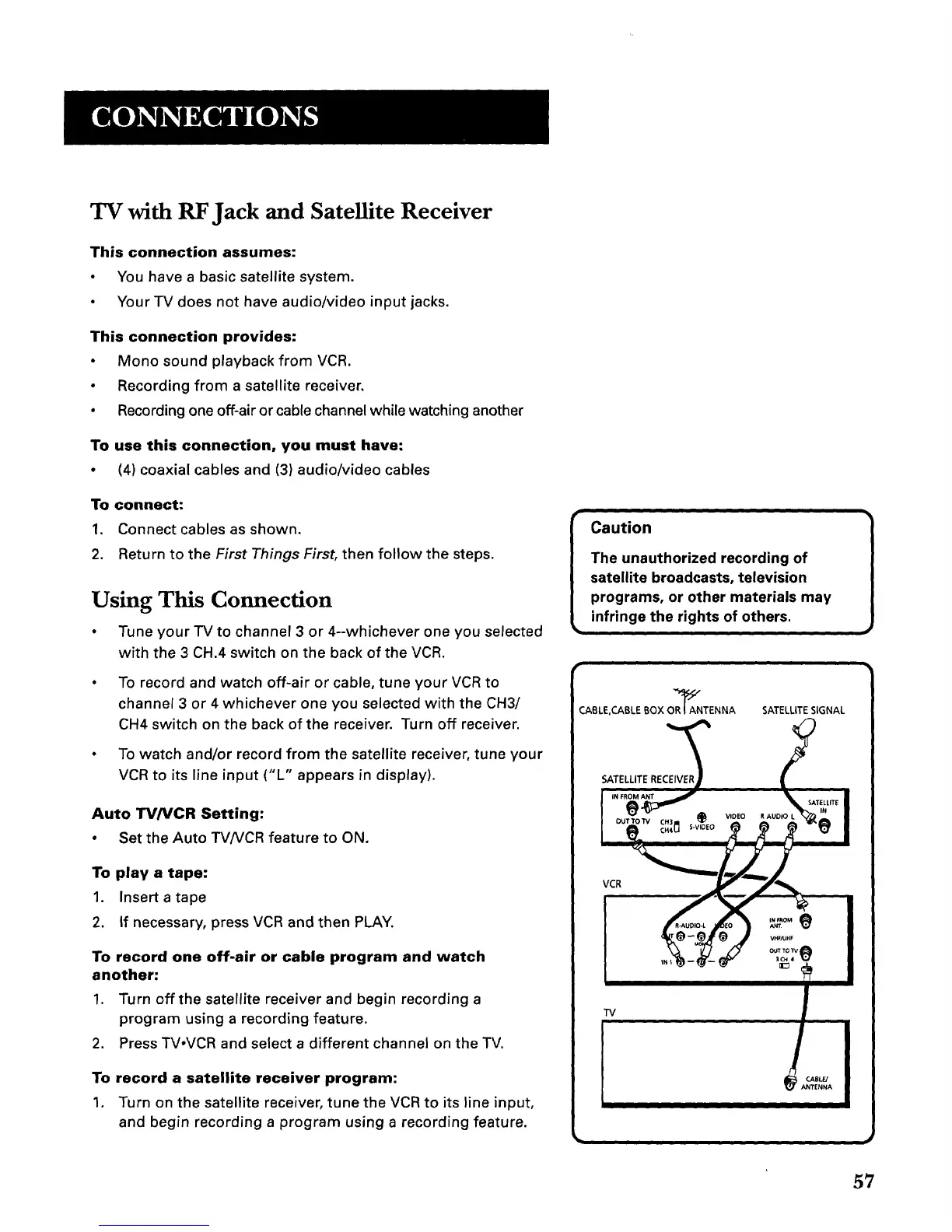
• (4) coaxial cables and (3) audio/video cables
To connect:
1. Connect cables as shown.
2. Return to the First Things First, then follow the steps.
Using This Connection
• Tune your TV to channel 3 or 4--whichever one you selected
with the 3 CH.4 switch on the back of the VCR.
• To record and watch off-air or cable, tune your VCR to
channel 3 or 4 whichever one you selected with the CH3/
CH4 switch on the back of the receiver. Turn off receiver.
• To watch and/or record from the satellite receiver, tune your
VCR to its line input ("L" appears in display).
Auto TV/VCR Setting:
• Set the Auto TV/VCR feature to ON.
To play a tape:
1. Insert a tape
2. If necessary, press VCR and then PLAY.
To record one off-air or cable program and watch
another:
1. Turn off the satellite receiver and begin recording a
program using a recording feature.
2. Press TV,VCR and select a different channel on the TV.
To record a satellite receiver program:
1. Turn on the satellite receiver, tune the VCR to its line input,
and begin recording a program using a recording feature.
Caution
The unauthorized recording of
satellite broadcasts, television
programs, or other materials may
infringe the rights of others.
CABLE,CABLE BOX OR_ANTENNA SATELLITESIGNAL
SATELLITERECEIVE_R /
OUTTO'rVc,3 @ V,OEOR._UCO_ "._
VC , _.
_o-ojo t ...... I
I
!' I
"IV
t ABLFJ n
TENNA
57



 To Next Page