Commissioning
Commissioning the control unit
7160-9001-560
01. December 2020
47 / 74
Installing a connected system
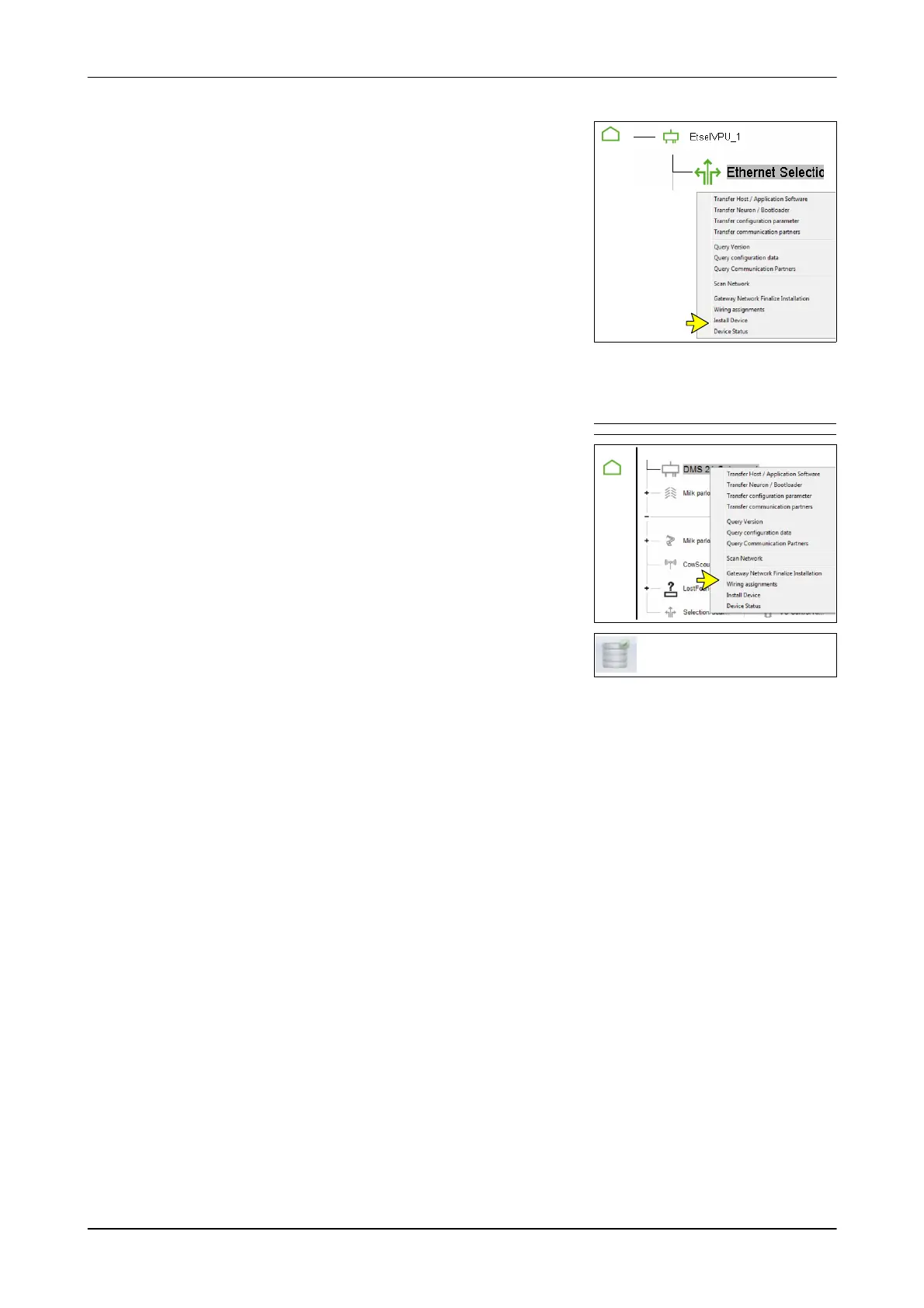
1. Right-click on the system to be installed
Example: AutoSelect (Ethernet Selection)
- Context menu appears
2. Select ”Install devices”
- The behavioural component for the
selected system is created
Example: AutoSelect MI
- The DPService settings are transferred to the control unit
In the event of an error message, set the system to be installed on the
control unit using the user interface.
Complete installation
1. Right-click on the gateway and select
”Gateway Network Finalize Installation”.
Select the Farm in systems without Gateway.
(Farm)
Farm Gateway
2. Save settings
Eliminate the cause of incomplete installation
Eliminate the cause in accordance with the installation status achieved.
Achieved installation status: S1
1. Check cable
2. Check IP addresses
3. Install a control unit with service PIN
Achieved installation status: S2
1. Close DPService
2. Disconnect the ethernet plug
- Wait 5 seconds
3. Reconnect the ethernet plug
4. Start DPService
5. Select installation mode
6. Set ethernet adapter
7. Install a control unit with service PIN
If the status remains S2:
8. Set the installation status manually
(see the appropriate section)
9. Check and set section in the Device menu
(see appropriate section)













 To Next Page