Unpacking inspection After opening the Mizar S package, first check whether the accessories are missing, then check whether the hot end
and the hot bed are loose (the hot end and the hot bed may be loose during transportation), and finally check whether the power supply voltage
is correct. The specific methods are as follows:
3
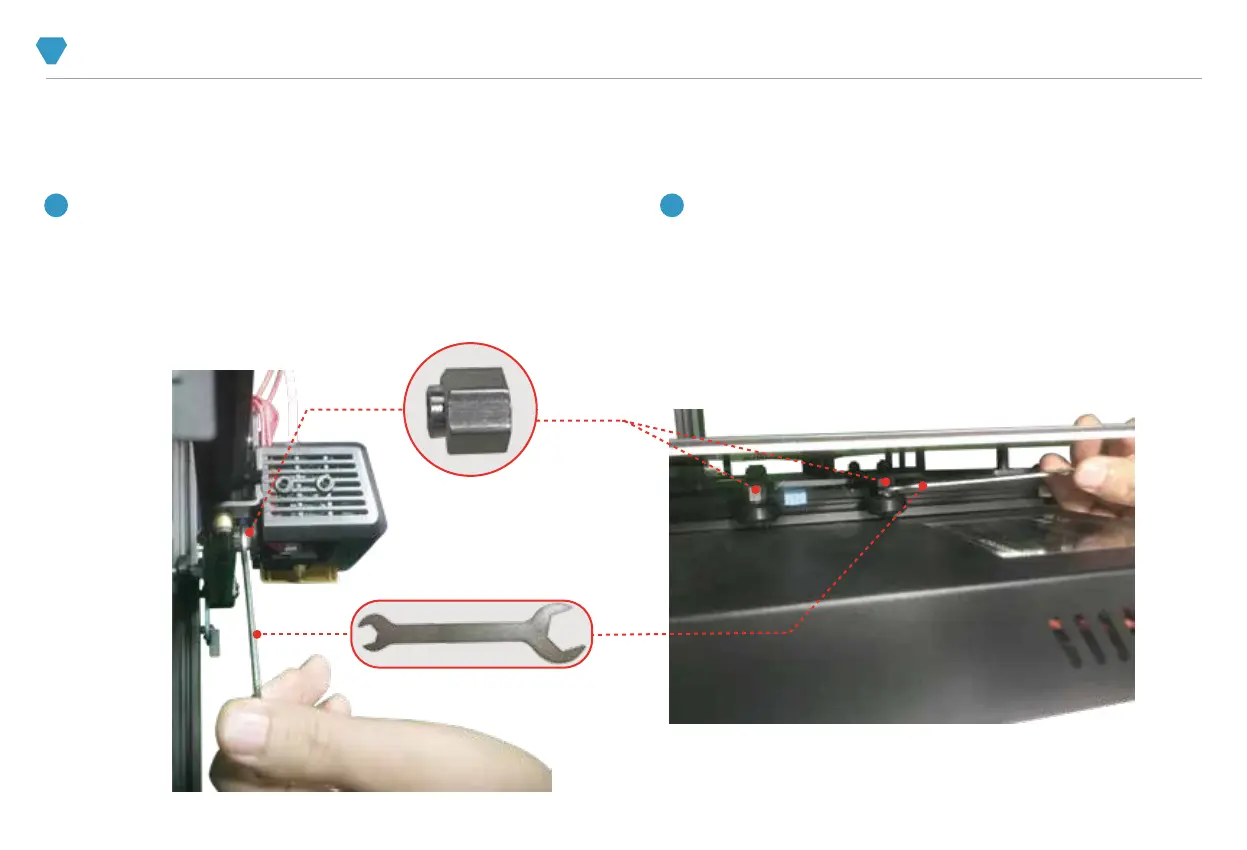
Move the hot bed by hand to check whether it runs smoothly on the Y axis.
If it is found to be loose or stuck, please use the wrench in the tool kit to
adjust the 2 eccentric nuts under the hot bed. It is recommended to move
the hot bed while adjusting to prevent the hot bed from being too loose or
too tight on the Y axis.
2 Check the hot bed.
Move the hot end by hand to check whether it runs smoothly on the X
axis. If it is found to be loose or stuck, use the wrench in the tool kit to
adjust the eccentric nut behind the hot end. It is recommended to
move the hot end while adjusting to prevent the hot end from being too
loose or too tight on the X axis.
1 Check the hot end.
3
THE WHOLE MACHINE STRUCTURE INSPECTION



 To Next Page