10
Connecting to AC Power and Charging the
Battery
NOTE:
Specific models do not have the AC adapter and power cord as standard
items. To purchase the AC adapter kit for your model, contact a Getac
authorized distributor. (Check https://www.getac.com/en/contact/
for
contact information.)
The battery pack is shipped to you in power saving mode that protects it
from charging/discharging. It will get out of the mode to be ready for use
when you install the battery pack and connect AC power to the device for
the very first time.
Charging will not start if the battery’s temperature is outside the allowed
range, which is between 2 °C (35.6 °F) and 50 °C (122 °F). Once the battery’s
temperature meets the requirements, charging automatically resumes.
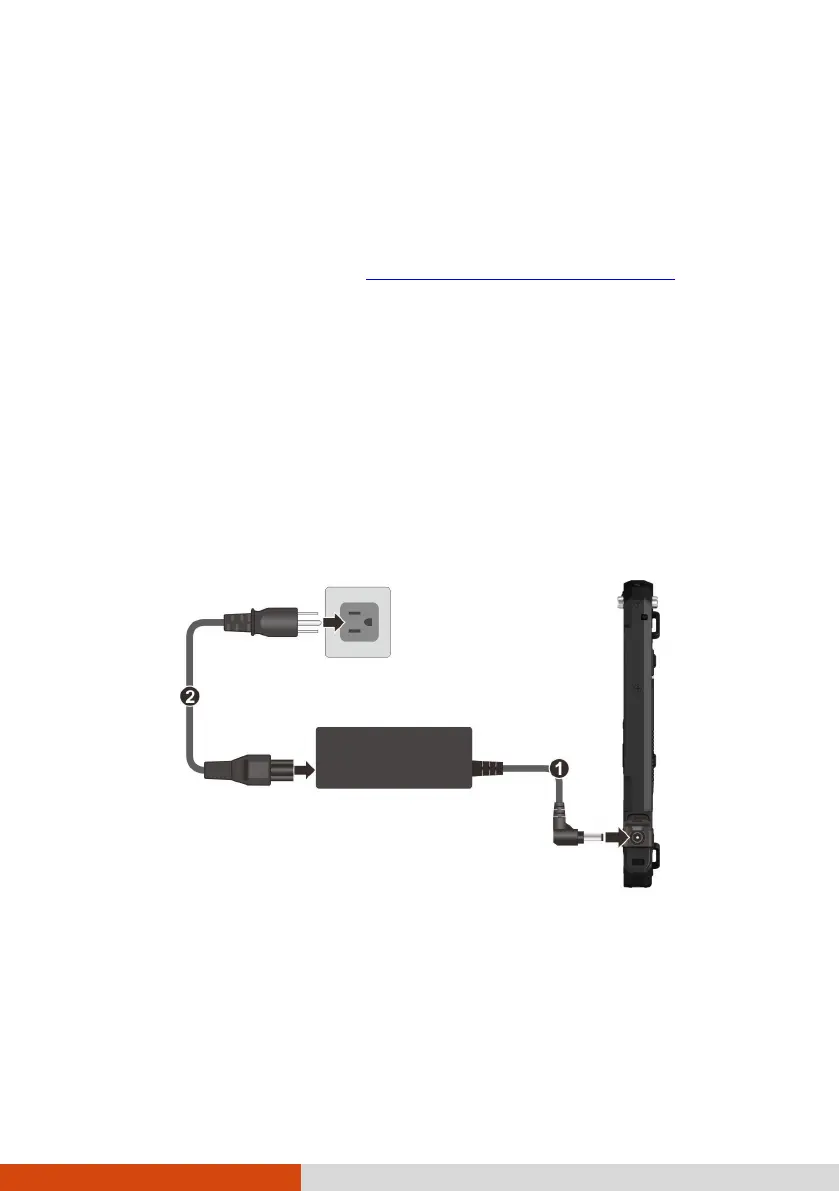
1. Plug the DC cord of the AC adapter to the power connector of the device
(
). Plug the female end of the AC power cord to the AC adapter and the
male end to an electrical outlet (
).
NOTE: The power cord type varies with countries. The look of your power cord
and electrical outlet might not match the one shown in this document.
2. The charge indicator glows in amber when charging is in progress. Do
not disconnect your device from AC power until the battery is fully
charged, as indicated by the amber indicator turning into green. This
will take a couple of hours.



 To Next Page