Home
GL-INET
Network Router
GL-AXT1800
Page 153
GL-INET GL-AXT1800 - Page 153
172 pages
Manual
Save Page as PDF
To Next Page
To Next Page
To Previous Page
To Previous Page
Loading...
Page
148
|
167
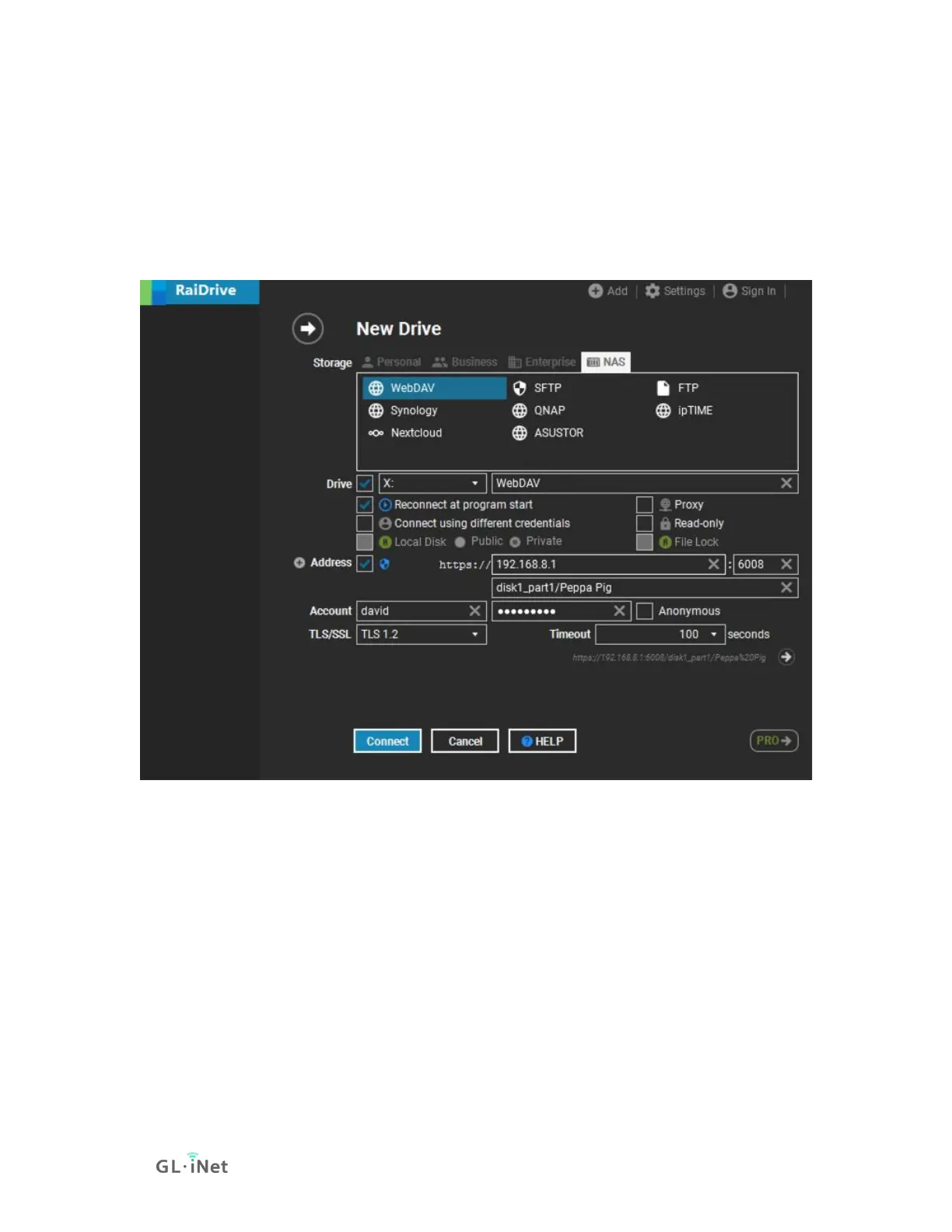
In the
Address
area, check/u
ncheck the checkbox n
ear Address to switch
https/http, enter the
address.
In t
he
Account
area,
enter username and p
assword, or c
heck
the
Anonymous
.
Finally, click
C
onnect
, it will add a X dr
ive in the File Explo
rer.
152
154
Table of Contents
Main Page
Table of Contents
2
Hardware Info
6
Specification
7
PCB Pinout
8
First Time Setup
9
Connect to the Internet Via an Ethernet Cable
13
Protocol
13
Connect to the Internet Via an Existing Wi-Fi by Repeater
16
Basic Steps
16
Join Network Advanced Setting
19
Repeater Options
20
Manage Known Network
21
Join Other Network
23
Reconnection
23
Connect to the Internet Via Usb Tethering
25
Connect to the Internet Via Cellular
28
Wireless
33
Main Wifi
33
Guest Wifi
35
Clients
36
Blocking Client
36
Limiting Speed
36
Remove Offline Clients
37
Firmware Upgrade
38
Online Upgrade
38
Local Upgrade
38
Firewall
41
Port Forwards
41
Open Ports on Router
43
Dmz
44
Vpn
46
VPN Dashboard
46
VPN Client
46
Proxy Mode
47
Global Options
48
VPN Server
49
Openvpn Server Options
49
Openvpn Server Route Rule
50
Wireguard Server Options
50
Wireguard Server Route Rule
51
Openvpn
52
How to Setup Openvpn Client on Gl.inet Router
52
Setup Nordvpn
52
Setup Openvpn Client
56
Setup Openvpn Server on Gl.inet Router
59
Get Configuration Files from Openvpn Service Providers
59
Setup Openvpn Server on Gl.inet Router
60
Make Sure Internet Service Provider Assigns You a Public IP Address
60
Network Topology
60
Setup Openvpn Server
60
To Check if Openvpn Server Is Working Properly
64
Advanced Configuration
66
Openvpn Client App
67
Wireguard
67
How to Setup Wiregaurd Client on Gl.inet Router
67
Setup Azirevpn
67
Setup Mullvad
70
Setup Wireguard Client
73
Setup Wireguard Server on Gl.inet Router
80
Get Configuration Files from Wireguard Service Providers
80
Setup Wireguard Server on Gl.inet Router
81
Make Sure Internet Service Provider Assigns You a Public IP Address
81
Network Topology
81
Setup Wireguard Server
81
Wireguard Client App
87
Applications
88
Plug-Ins
88
Dynamic DNS
89
Enable DDNS
89
Check if DDNS Is in Effect
90
HTTP Remote Access
91
HTTPS Remote Access
92
SSH Remote Access
97
Gl.inet Goodcloud
98
Contents
98
Introduction
99
Setup
100
Manage Your Devices
107
Site to Site
115
Batch Setting
124
Template Management
127
Task List
131
Goodcloud and VPN
132
Turn off Cloud
133
Adguard Home
135
Network Storage
137
Contents
137
Introduction
137
Insert Storage Device
137
Set up Samba
138
Set up Webdav
142
Set up DLNA
146
Samba Client
147
Webdav Client
152
Log
154
More Settings
155
Admin Password
155
Lan
156
Private Network
156
Reserve an IP for a Client
158
Guest Network
158
Time Zone
161
Dns
162
DNS Server Settings
162
Edit Hosts
165
Network Mode
166
Ipv6
168
Toggle Button Settings
170
Reset Firmware
171
Advanced Settings
172
Related product manuals
GL-INET GL-AX1800
2 pages
GL-INET GL-AR300M16
81 pages
GL-INET GL-AR300M-Ext
81 pages
GL-INET GL-AR300M-Lite
81 pages
GL-INET GL-AR300M16-Ext
81 pages
GL-INET GL-B1300
13 pages
GL-INET GL-SFT1200
158 pages
GL-INET Collie GL-X300B
42 pages
GL-INET GL-MT300N-V2 Series
81 pages
GL-INET Convexa-B
156 pages
GL-INET Opal
158 pages


 To Next Page
 Loading...