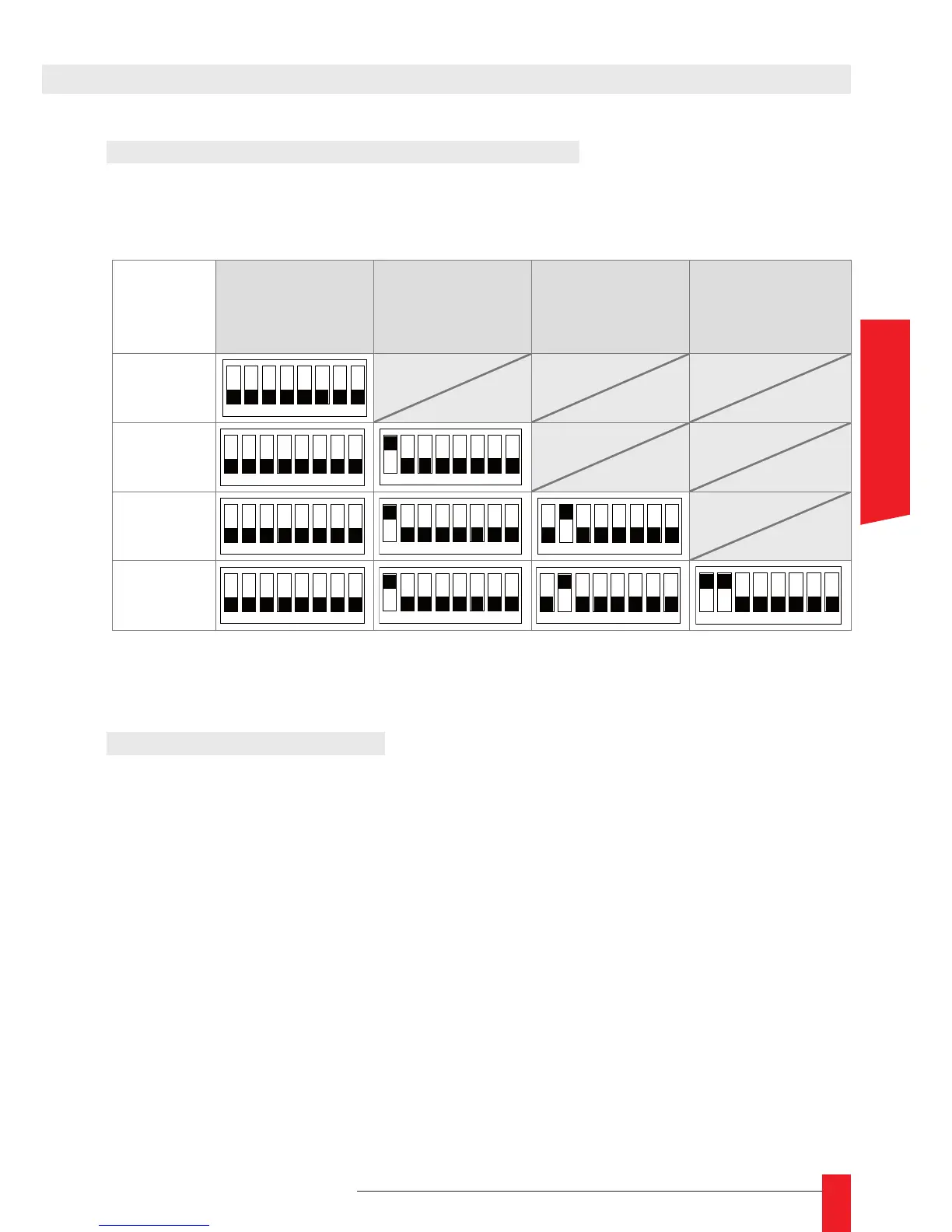
2. OUTPUT CARD SWITCHS VERIFICATION
If you need to add an output card or if an output seems to be in failure (do not appear in the
WEB page), open the device and verify the switch conguration on the output cards:
Output 1
(the nearest of
the supply card
103064)
Output 2 Output 3
Output 4
(the furthest of
the supply card
103064)
1 output
The 8th switch of each card allows you to test the card by forcing the signal on output.
Don’t forget to put it OFF again after testing!
3. UPDATING FIRMWARE
3.1. Obtaining Firmware
Firmware updates and releases notes for GORGY TIMING NTP devices can be down-
loaded directly from GORGY TIMING WEB site (www.ntp-secured-solutions.com).
This tool only runs on a PC running Windows 98, NT, 2000 or XP.
The upgrade is an auto-extractable executable. The name of this tool has the following
layout:
product_upgrade_prevers_new_vers_.exe
The different elds of this name are :
product_ : name of the product concerned by the update. ►
prevers_ : version of the product concerned by the update. ►
new_vers_ : new version of the product after applying the update. ►
For example, for an update of the LEDI Network from any version 2 to the version 2.11,
the update le shall have the name ledinetwork_upgrade_2xx_211.exe.



 To Next Page