23
5.3.8 How to Create a Register Mark
The PT 331SCC is designed to center register, however the registration mark reader is located on the non-operator
side of the PT 331SCC. When creating a print layout with a registration mark, ensure the mark is placed within the
following parameters.
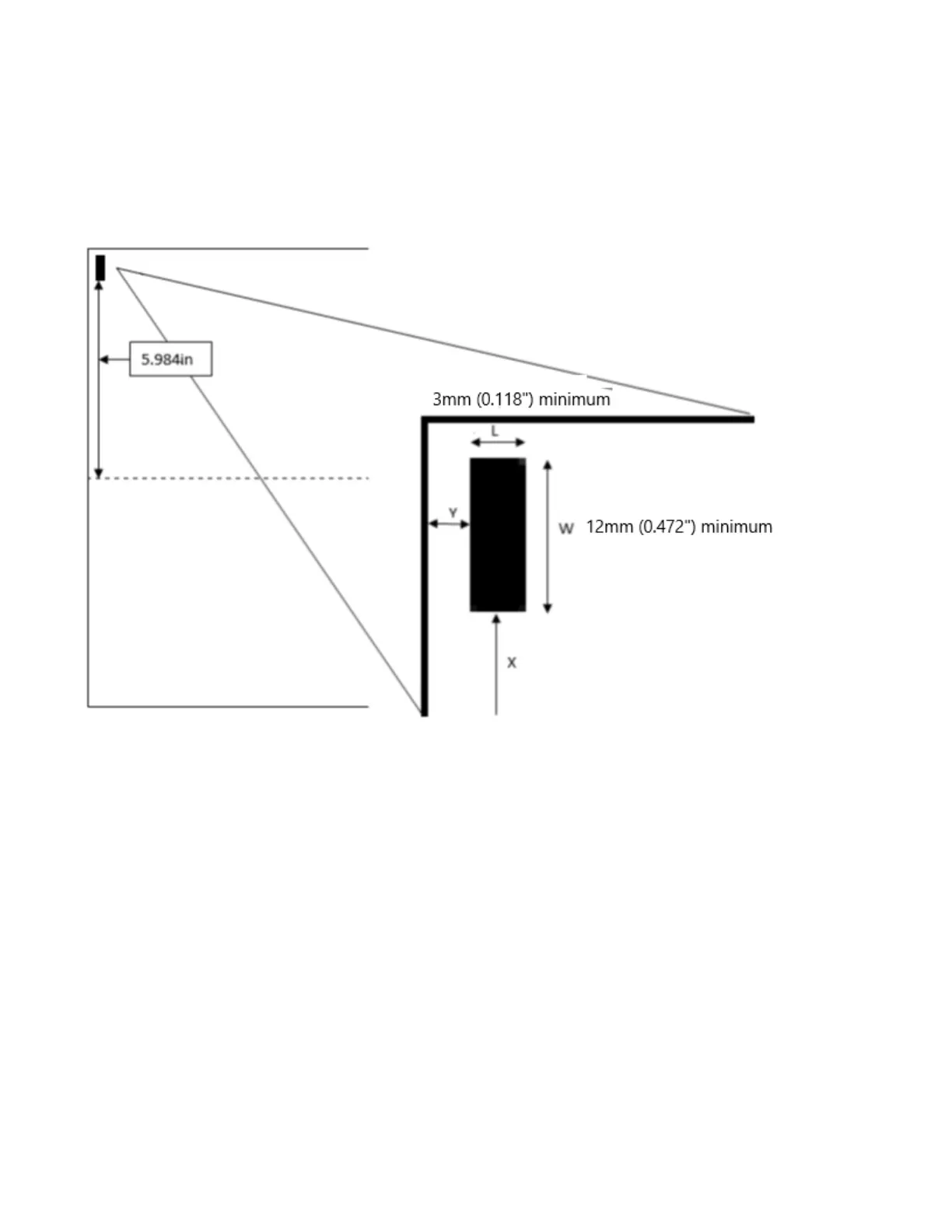
The following diagram is for a 13” sheet:
• For a 12” wide sheet, the mark should be 5.484” from center.
• For a 13” wide sheet, the mark should be 5.984” from center. The sensor must be moved manually for
this setup.
• Register cut mark distance should be between 0.118” - 0.591” (3-15mm) from leading edge.
• The black mark should be more than 3x12mm (W>=0.472”, L>=0.118”) (W>=12mm, L>=3mm)
• The area above the mark should be blank. Any color could potentially interfere with the registration
mark reader.
• The register mark reference point is the top edge of the mark.


 To Next Page