40
C – 2 Paper Jam at Infeed Roller
The infeed sensor is located inside the top cover, just after the infeed roller
belt assembly.
The infeed sensor is looking for the paper sheet to pass through and clear the sensor in a certain length of time. If
the sensor is not cleared within the allocated time, the paper jam at infeed error will display and the paper jam
indicator will come on. The SCC will stop. Check for paper jammed in the slitters. Clear any jammed paper from the
slitters by carefully pulling out the paper. Use the forward and reverse buttons to move the paper through the SCC.
The cover should be closed when using the paper advance buttons.
• Check for scrap paper under the sensor. Clear out any loose paper. Empty the waste bin.
• If the paper is stopping at the slitters, make sure slitter motor is turned on. See page 14 section “Crease &
Slit Screen”
• Clean out the sensor with compressed air or with a soft, dry, lint-free cloth.
• Check the quality of the paper before running the job again.
C – 3 Paper Jam at Outfeed Roller
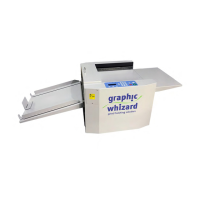
The outfeed sensors are located at the exit of the PT 331SCC.
Ensure the finished paper is clearing the exit sensors. If running a business
card job, watch the cards as they exit the machine. If they are getting stuck
on the deflectors, reform the deflectors by pressing down with your thumbs to create a sharper angle. Empty the
card catchers if full.
For non-business card jobs, ensure the cards have
enough room to clear the exit and drop cleanly to
the exit tray. The sensors are located at the very
edge of the exit. It does not take much for the
sensors to be tripped by finished stock.
• Clean the sensors with compressed air.
• Remove any paper jams using the same procedure as defined under the infeed jam error.
• Ensure the actual paper length matches the length of the sheet as defined in the job parameters.


 To Next Page