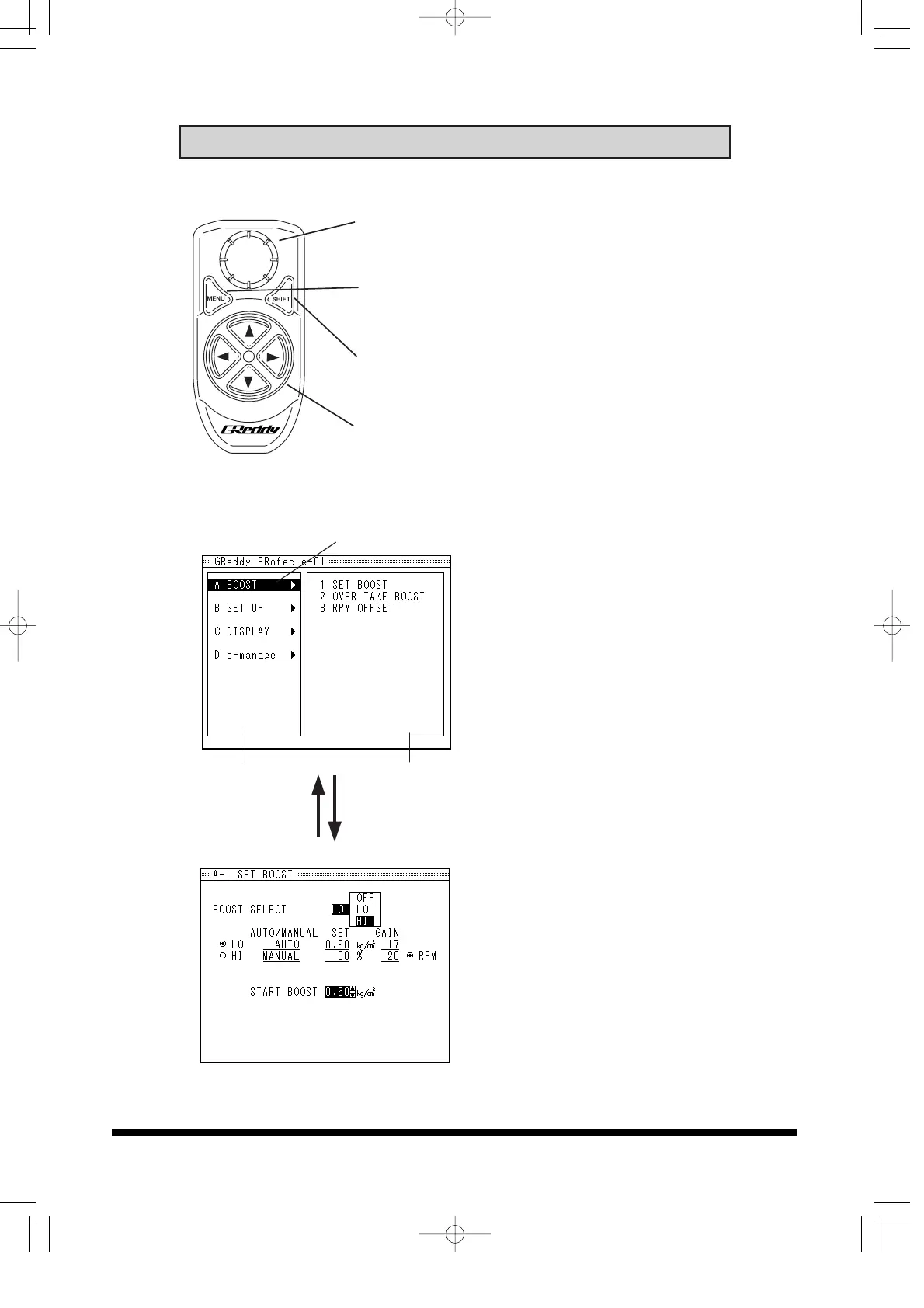
5. Display unit and Controller Functions
14
SET knob
• Used to change, select and confirm settings
• Used to change display mode
MENU button
• Used to go to Menu mode from display mode
• Used to cancel out during setup
SHIFT button
• Used to turn on the Over Take Boost mode.
• Used for e-manage setup
4-Way navigation button
• Scroll through menus and lists, also set
feature values
Controller features
Menu screen
Cursor
Main Menu Sub Menu
MENU button SET Knob
Setup Screen
(1) Basic Boost setup
To set each feature, scroll
down and select the desired
Main menu and Sub-menu
and make the changes in
the Setup screen.
(2) Menu screen
In the Menu screen move
the cursor using the 4-way
Navigation button and push
the Set knob to select each
feature.
(3) Setup Screen
In the Setup screen, use
the 4-way Navigation button
to move the cursor. To
change the value or setting,
turn the SET knob to
change and press the SET
knob to confirm the
changes.
(4) Press the MENU button to
return to the Menu screen
from setup screen.


 To Next Page