GSK980MDc Milling CNC System User Manual
242
Ⅱ Operation
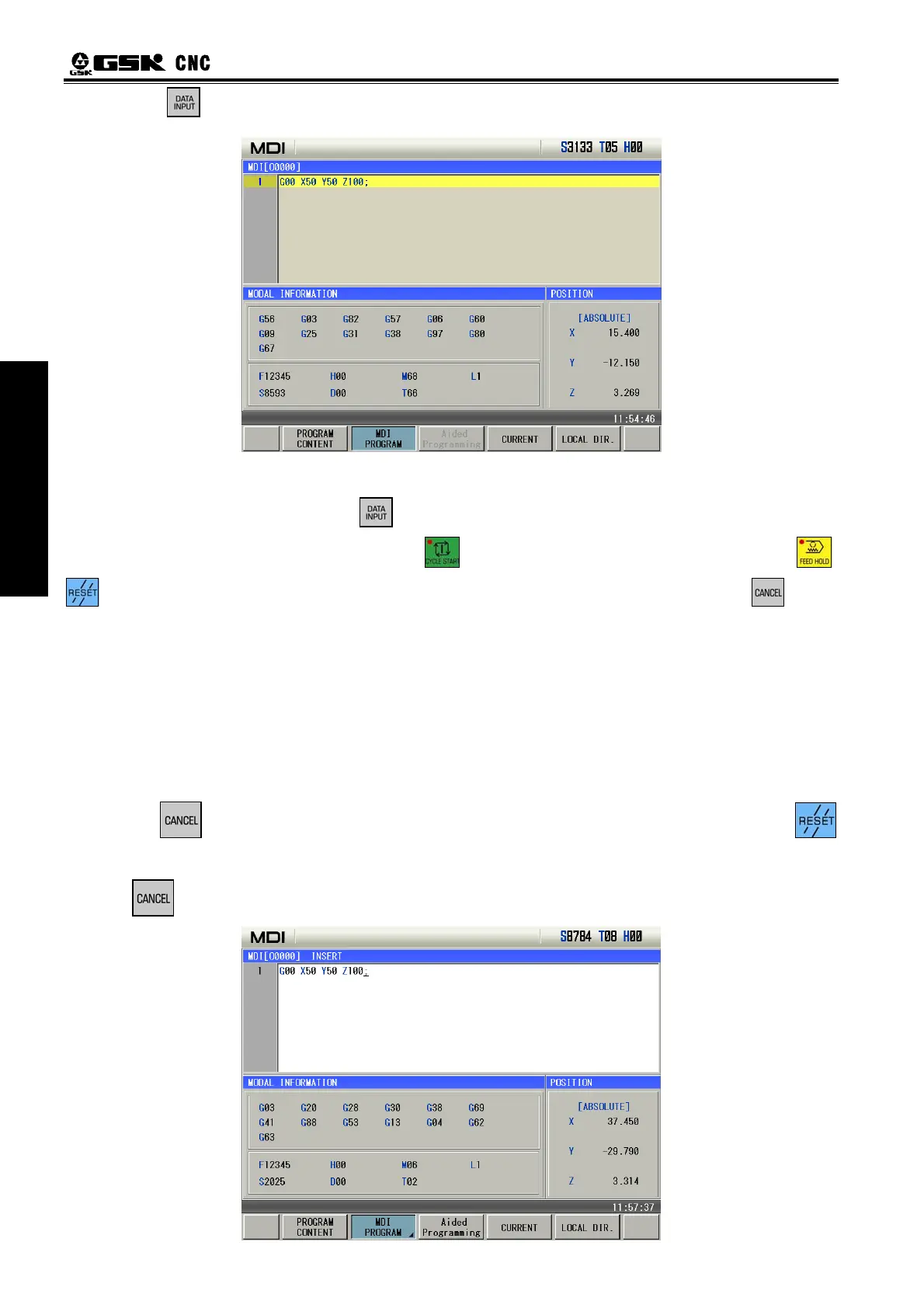
4. Press ,the page is as follows:
5.2 Blocks Execution
After the words are input, and press , the background color of program segment becomes
white, these MDI words are executed after the key is pressed. During the execution, press ,
and Emergency Stop button may be pressed to terminate the MDI words execution. If key is
pressed, the background color of program segment will becomes black, then words can be input again.
Note: The subprogram call command (M98 P, etc.) is invalid in MDI mode.
5.3 Parameter Setting
In MDI mode, the parameter value can be modified after entering the parameter interface. See details
in II Operation, Chapter 9.
5.4 Data Modification
In the PRG STATE page, before the inputted words will be executed, if there is an error in inputted
words, press
to cancel highlight state, then program segment can be modified. It may press
key to clear all the words, then input the correct words; for example ,”Z1000” will be inputted to replace
Z100 in Section 5.1 of this chapter, the steps are as follow.
1. press
key,the page is as follows:


 To Next Page