Chapter 3 G Command
57
I Programming
3.17 Scaling G50, G51
Scaling means programmed figure can be magnified or reduced. The dimension specified by X, Y, Z
can be scaled up or down with the same or different rates of magnification. The magnification rate can be
specified by the program or parameter.
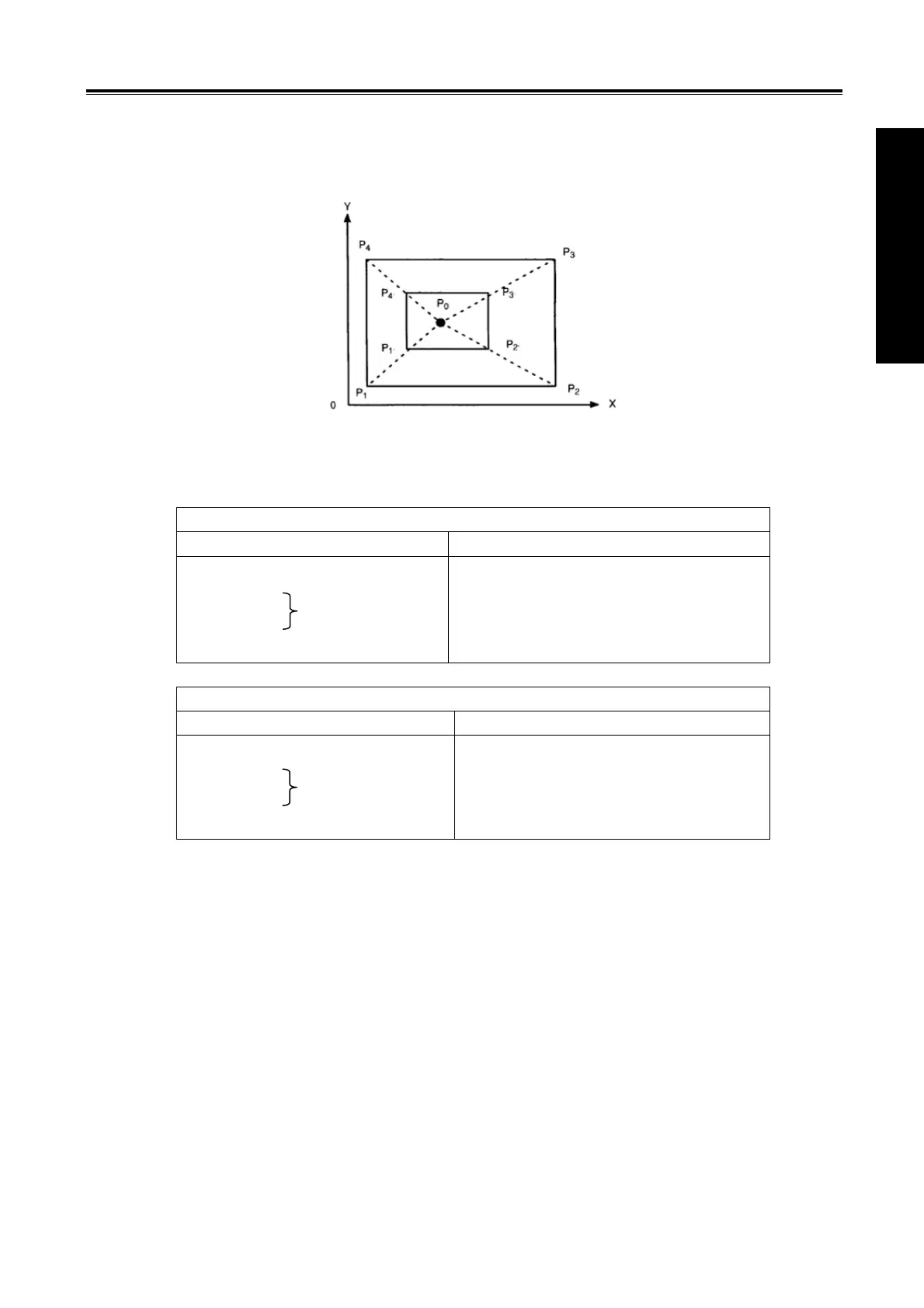
As the above figure, P0 is the scaling center. P1P2P3P4 scales to P1
’
P2’P3’P4’.
Format:
Scale up or down along all axes at the same magnification rate
Format Significance of command
G51 X_Y_Z_P_;Scaling start
: Scaling is valid
: (Scaling mode)
G50; Scaling cancel
X_Y_Z_: Absolute command for cente
coordinate value of scaling
P_ :Scaling rate
Scale up or down along all axes at a different magnification rate
Format Significance of command
G51 X_Y_Z_I_J_K_;Scaling start
: Scaling is valid
: (Scaling mode)
G50; Scaling cancel
X_Y_Z_:Absolute command for cente
coordinate value of scaling
I_J_K_ :Scaling rate for X axis, Y axis, Z
axis respectively
G50,G51 are G code of No.11, it is a modal G code.
The unit of scaling is 0.001.
State parameter SCLX, SXLY, SCLZ(No.562) are used to set whether the scaling function of each axis
is valid.
Explanations:
z Scale up or down along all axes at the same magnification rate
When state parameter XSC (No.562) is set to 0, if P is specified on the block G51, the scaling is
specified by P, otherwise, the value set by data parameter will be taken as the magnification rate.
z Scale up or down along all axes at a separate scaling.
When state parameter XSC (No.562) is set to 1, and each axis is scaled up or down at a different scale,
the rate is specified by I, J, K on the block G51. If I, J, K are not specified on the block, the rate is
determined by data parameter SCLVX, SCLVY and SCLVZ(No.5421).
When a negative scale is specified, mirror image is applied.


 To Next Page