GPT-9000/9000A Series User Manual
24
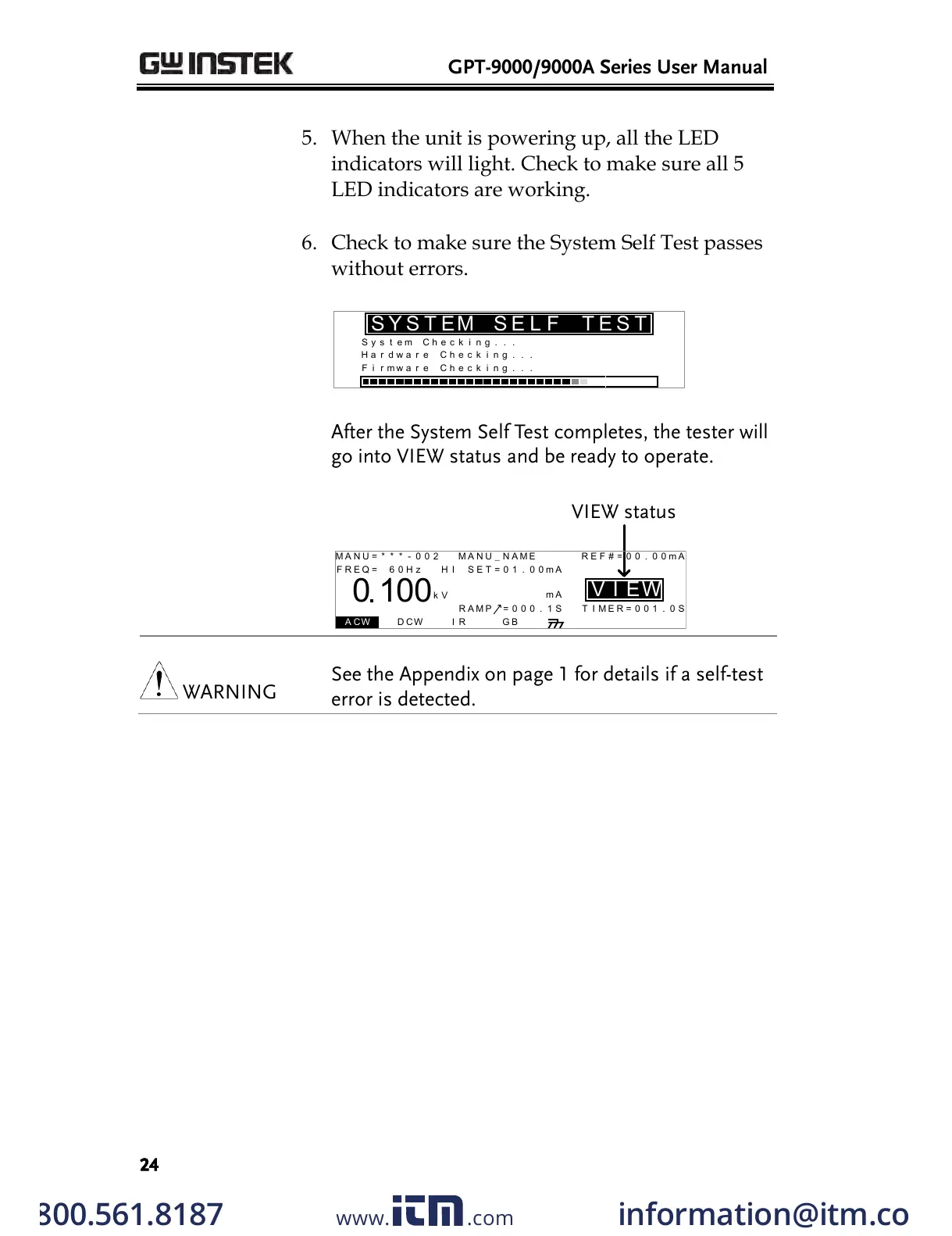
5. When the unit is powering up, all the LED
indicators will light. Check to make sure all 5
LED indicators are working.
6. Check to make sure the System Self Test passes
without errors.
S y s e m t
H a r w a rd
e C
h
C h e c i g . .n .
F i r w a rm
e C h
SYS T E
S M E L F T E
S T
k
e c i g . .n .k
e c i g . .n .k
After the System Self Test completes, the tester will
go into VIEW status and be ready to operate.
I R G B A CW D CW
E
F R E Q = 0 H z 6
0
100
k V
EIV
MT I E = 0 0 1 . 0 SR
0 0 m AER F =# 0 .0
1 . 0 0 m AIH ES = 0T
0 0 . 1 S0A M P =R
W
VIEW status
MM A UN N A_2M A N U = * * * - 0 0
m A
See the Appendix on page 1 for details if a self-test
error is detected.
w ww . . co m
information@itm.com1.800.561.8187
All manuals and user guides at all-guides.com


 To Next Page
 Loading...