P/N 53063-30, Manual revision: B
A-12
Providing Reference Information
" Push the Feed button to continue printing.
" Close the lid, ensuring the paper pass through the guideline lid.
Ribbon installation
If the printout is no longer readable, the operator should verify the ribbon
state.
If the ribbon is not finished, the operator shoud proceed as follows:
" Open the printer lid.
" Turn the wheel marked with an arrow until only the unused section of
the ribbon is exposed.
To install a new ribbon:
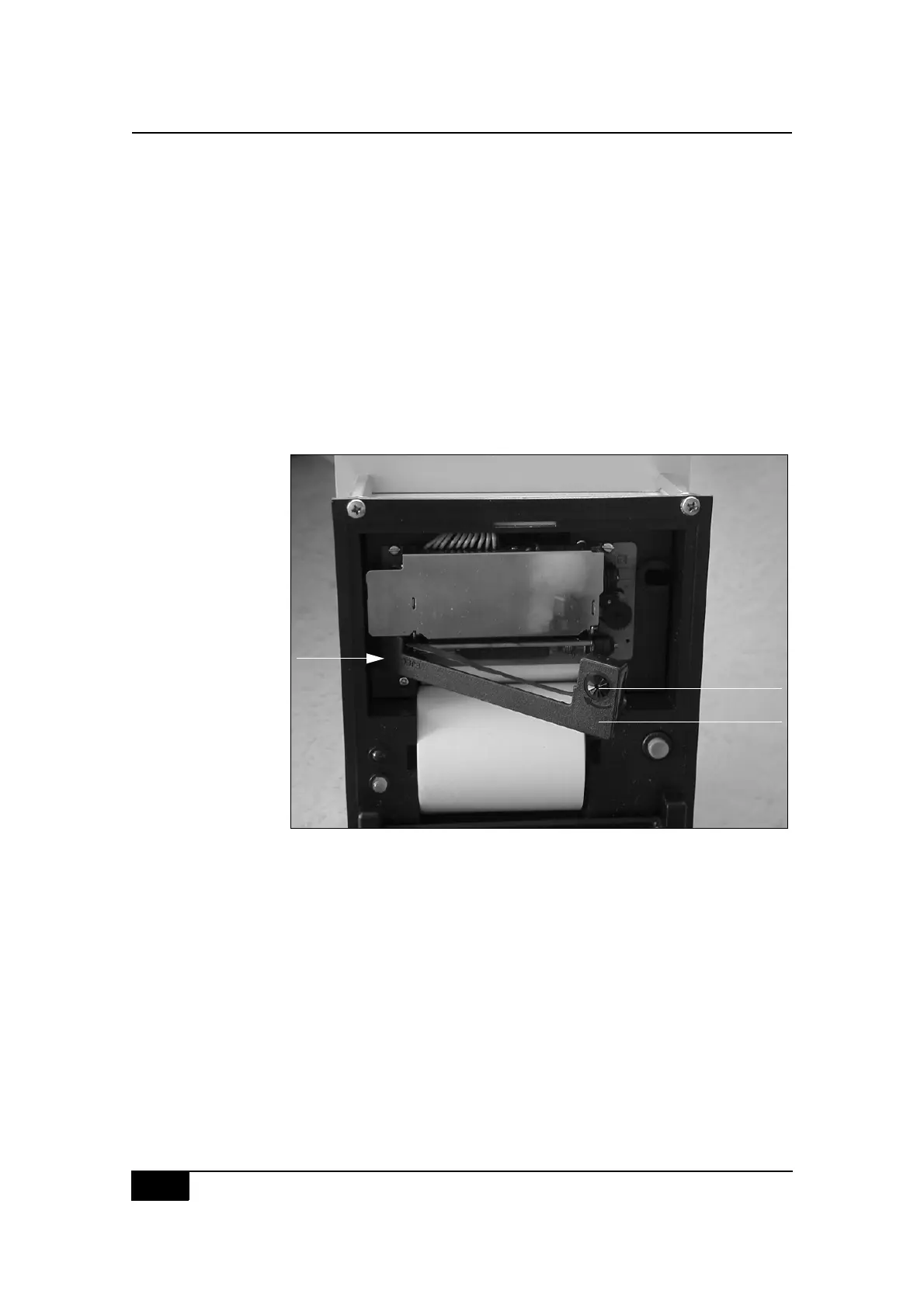
Figure A-2, Removal of the ribbon by pressing on the PUSH / EJECT text
" Open the printer lid.
" Press on the ribbon as indicated by the PUSH / EJECT text.
" Place the new ribbon.
" Close the printer lid.
Ordering references
! P/N 52276-00 Non-thermal printer kit.
! P/N 52273-00 Non-thermal printer.
! P/N 52274-00 Non-thermal paper.
! P/N 52308-00 Typewriter ribbon.
2.
3.
1.
1. Ribbon
2. Wheel and arrow
to move the ribbon
3. PUSH / EJECT text



 To Next Page