396LE008146B
Navigation and menus
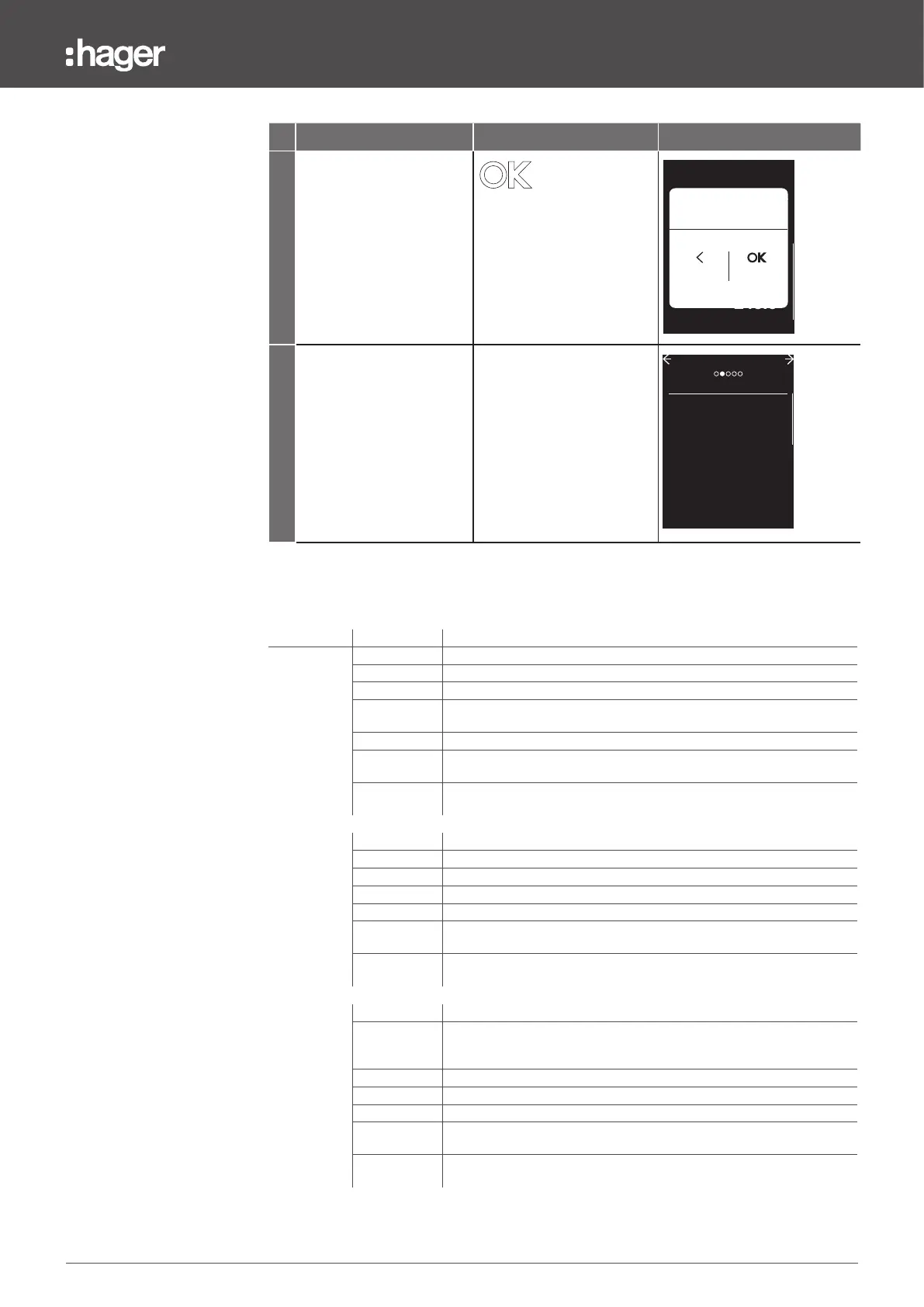
3.9 Alarms menu
Type Text Description
Current
STATUS O, On
OPTION 1 I1, I2, I3, IN, IMax, I1Unb, I2 Unb, I3 Unb, I Max Unb, I Avg
OPTION 2 Under or over (alarm activation condition on Option 1)
THRESHOLD
in A for I1, I2, I3, IN, IMax,I Avg
in% for I1Unb, I2 Unb, I3 Unb, I Max Unb
TIME 1 to 3000 s in increments of 1 s
DROPOUT
VAL
in A for I1, I2, I3, IN, IMax,I Avg
in% for I1Unb, I2 Unb, I3 Unb, I Max Unb
DROPOUT
DEL
1 to 3000 s in increments of 1 s
Earth
STATUS O, On
OPTION 1 % IG
OPTION 2 Over
THRESHOLD 30 to 100% in increments of 1%
TIME 1 to 3000 s in increments of 1 s
DROPOUT
VAL
10 to 30% in increments of 1%
DROPOUT
DEL
1 to 3000 s in increments of 1 s
Voltage
STATUS O, On
OPTION 1
V1N, V2N, V3N, VMax, VMin, V1N Unb, V2N Unb, V3N Unb, MaxUnbV,
VAvg, U12, U23, U31, UMax, UMin, U12 Unb, U23, Unb, U31 Unb,
MaxUnbU
OPTION 2 Under or over
THRESHOLD 80 to 850 V in increments of 0.5 V
TIME 1 to 3000 s in increments of 1 s
DROPOUT
VAL
80 to 850 V in increments of 0.5 V
DROPOUT
DEL
1 to 3000 s in increments of 1 s
Content of the CUSTOM ALARMS submenu
Step/Action Button Display
9 Confirm the new
parameterisation.
ALARM 1
<
Over
10S
OPTION 2
DROPOUT DEL
TIME
DROPOUT VAL
260.0V
30S
245.0V
THRESHOLD
Apply changes
Confirm
Cancel
10 Alarm 1 is configured to
monitor a voltage.
CUSTOM ALARMS
On
O
O
O
O
1. Voltage
5. Current
3. Current
2. Current
4. Current


 To Next Page