Trophy68 | Service instructions 68 | Service instructions
5.4.7 Upgrade instructions controllers
Mount the foot throttle for advanced electronics (ID-no > QT02400)
Preparation
• Switch off the scooter with the ignition key.
• Disconnect the batteries.
Instructions
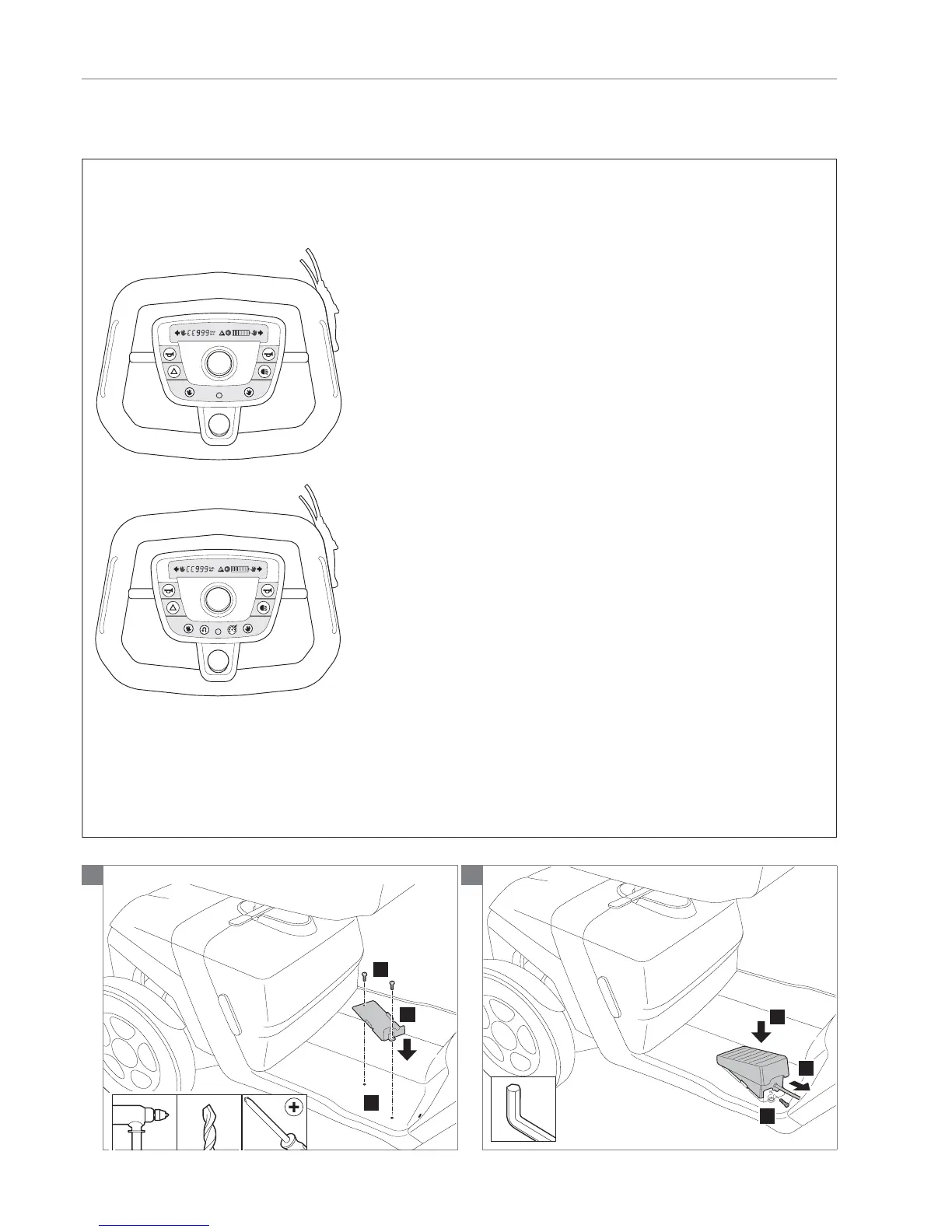
Basic display
Advanced display
Note! This procedure is intended for the Throphy with the
latest electronics. In case your Trophy has the dashboard
as one above, you have the latest version electronics.
Contact Handicare in case you have another dashboard
(original electronics ID-no < QT02400).
The following operations are required to mount the foot
throttle:
Note! Suitable work area required!
Note! Remove always one fi nger-control! Replace it with
cover steering wheel 9007423.
Note! In case you have a basic display, a advanced display
will be delivered with the foot throttle. Dismount the basic
display and mount the advanced display.
• Loosen the fl oor mat from the frame.
Note! For mounting the foot throttle on the fl oor mat you
have to drill two holes in the fl oor mat and frame. Be
sure you will not damage any cables mounted under the
frame!
• Determine the exact laying of the cables under the
frame.
• Reposition the cables in case they will be damaged
while drilling the two holes.
• Replace the fl oor mat and position the foot throttle
mounting plate on the fl oor mat.
• Drill the holes and mount the foot throttle mounting plate.
• Mount the foot throttle on the mounting plate.
• Guide the cable trough and under the frame, to the
electronics compartment on the backside of the scooter.
• Remove the rear cover.
• Connect the plug to the socket in the electronics
compartment and replace the rear cover.
Relevant article numbers
• 9007083 Foot throttle Advanced electronics
• 1008730 4,8x19 self tapping screw
Tools used
• Allen key, 3 mm
• Metal drill, 6 mm
• Drill
• Screwdriver, crosshead
1


 To Next Page