Page 42 Entering Data in Your Handheld
Writing accented characters
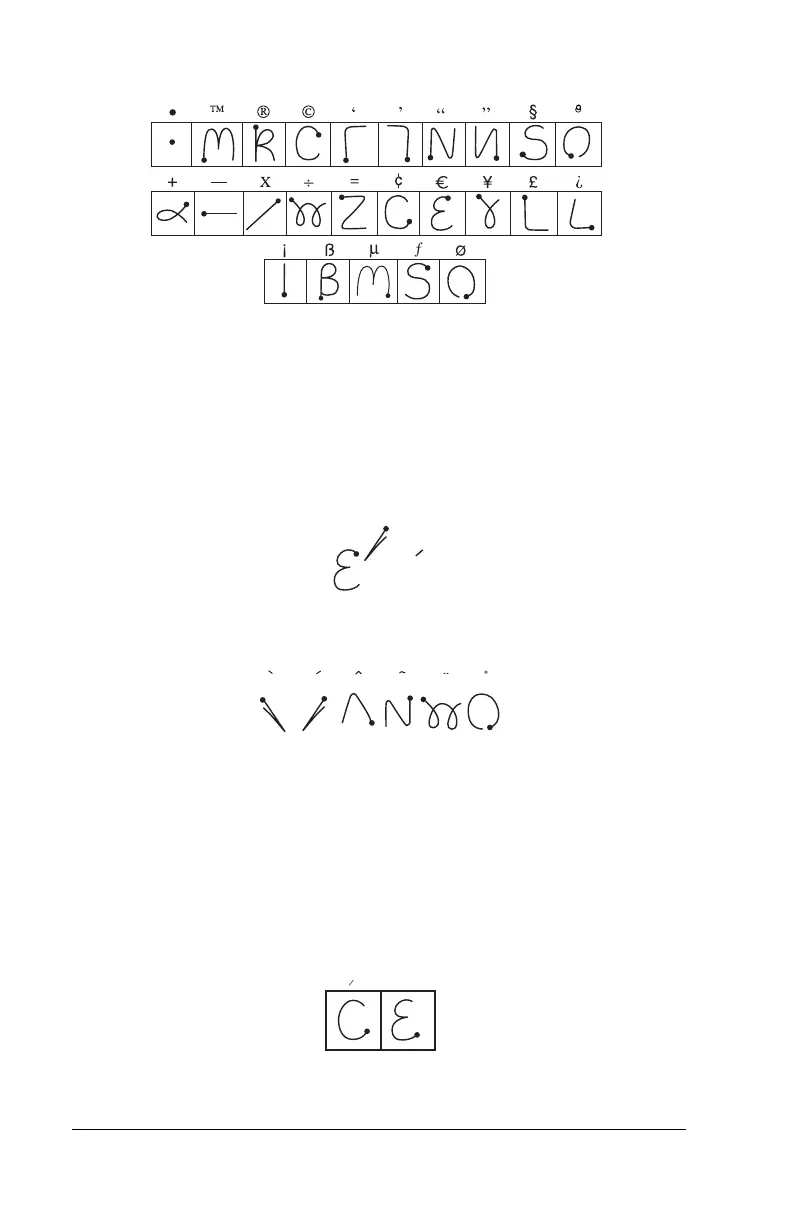
To create accented characters, draw the stroke normally used to create
the letter, followed by an accent stroke. Graffiti writing then adds the
accent to the letter.
For example, the following diagram shows the strokes required to
draw an accented “e.”
Accent strokes
Using these accent strokes, you can write the following accented
letters:
à á â ã ä å è é ê ì í î ï ò ó ô õ ö ù ú û ü ÿ ý ñ
Additional non-English characters
You can write the following characters in the lowercase alphabet
mode without any special punctuation or shifting:
Note:
You must write these non-English characters in the left side of
the Graffiti writing area.
= e
a a a a a a
c
a
e



 To Next Page