HI 6600 Series Modular Sensor System User Guide
Page | 34
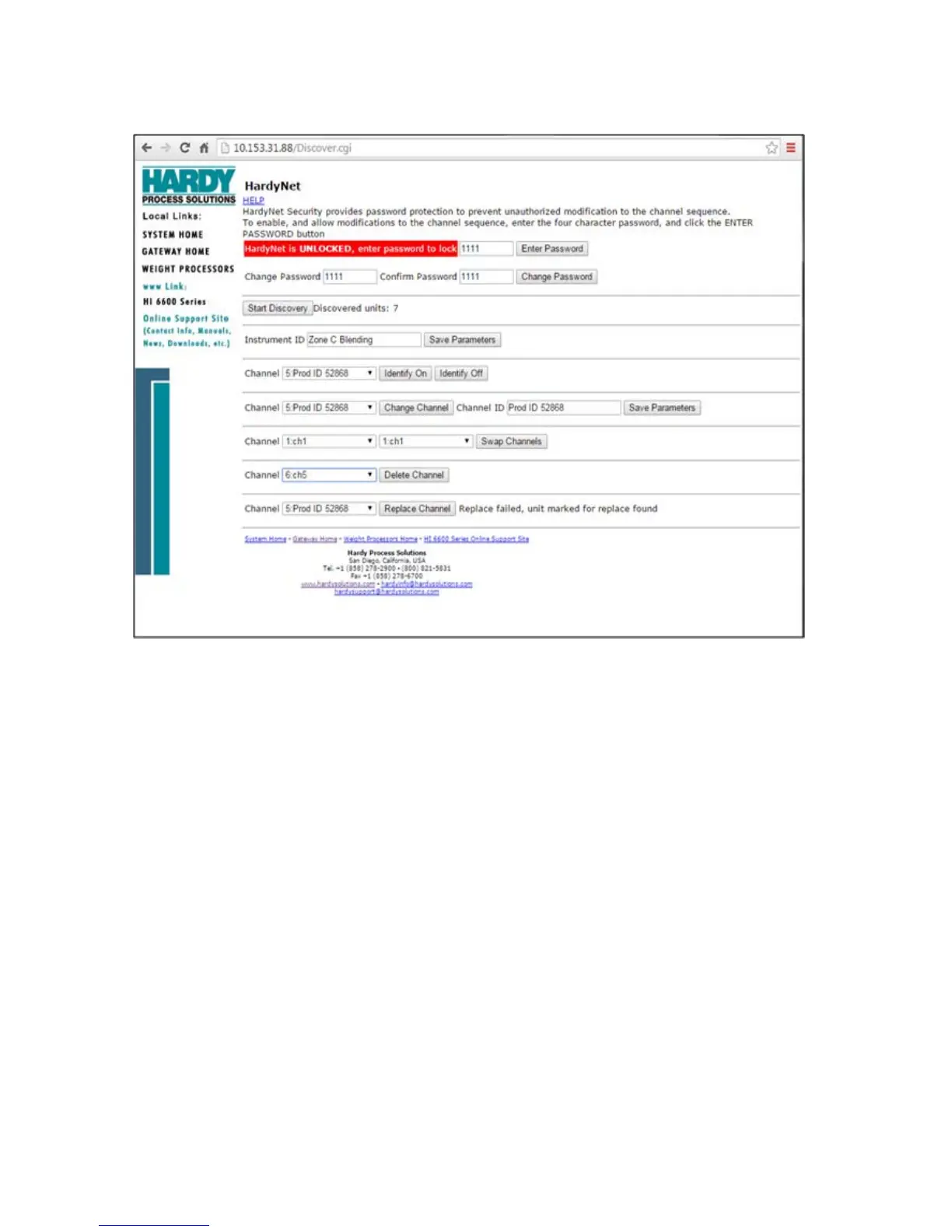
Instrument ID
Use the Instrument ID to assign the Gateway Module with a meaningful name (such as Batching System A). Use of
Instrument ID is especially useful if more than one HI 6600 system is present on a network. Select SAVE
PARAMETERS write the Instrument ID into non-volatile memory.
Channel Identification
During the discovery process, new channels on the system are identified and sequenced in order of discovery, not by
physical location or distance from the Gateway module; use the Channel Identify function to easily locate a module,
assign an identification name or number, change its sequence order or delete it from the system. The module’s indicator
light will blink green once per second when IDENTIFY ON is pressed (Webserver) or highlighted (Front Panel Display).
Naming the Weight Processing Modules
To ease identification of specific Weight Processor Modules on the system, a meaningful name (ie: Ingredient
A, BIN 5 or Vessel #28) may be assigned to the module by using CHANNEL ID. Select the channel to assign
a new Channel ID and click CHANGE CHANNEL, input up to a 15 character alpha-numeric identifier than
click SAVE PARAMETERS to write the new channel name to non-volatile memory.


 To Next Page