9
87
A B C D
Bracketing setting
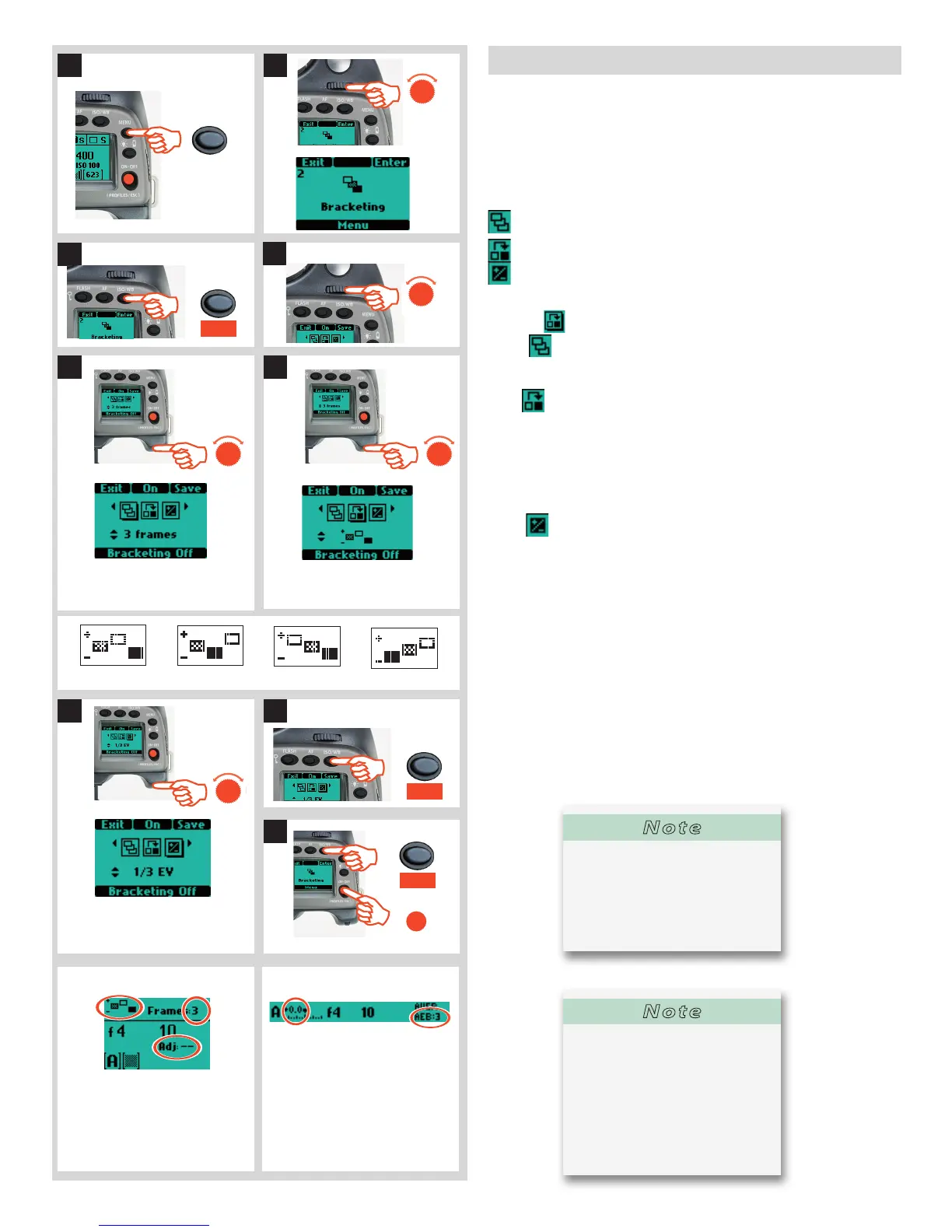
The Bracketing function is set in the following manner:
1) Press the MENU button.
2) Turn the front control wheel until Bracketing appears
3) Press Enter (ISO/WB) button on the grip
4) Turn the front control wheel to access the options, that are:
Number of Captures (the number of captures required in the sequence)
Sequence (the sequential order of the over- or underexposures)
Step (the amount of EV variation from the standard exposure setting)
(A drop shadow will be displayed beneath the selected symbol, for
example
)
5) In
turn the rear wheel to choose the number of frames
required: 2, 3, 5, 7 or 9.
6) In turn the rear wheel to choose one of four sequences:
A: Standard, Over, Under
B: Standard, Under, Over
C: Over, Standard, Under
D: Under, Standard, Over
7) In turn the rear wheel to choose the amount of EV variation
required: 3, 2, 1, 1/2, 1/3 EV.
8) Press SAVE (ISO/WB button) to save the setting.
9) Press ENTER (ISO/WB button) again from the Bracketing screen
to activate the function. Press On (AF button). Note that this now
reads O ff and the line of text at the bottom of the screen reads
‘Bracketing on’.
Half-press the shutter release button to standby mode for this
function (press the shutter release button again (full press) for
activation) or full-press the shutter release for immediate activa-
tion.
To escape from this mode press MENU, then Enter (ISO/WB but-
ton on the Bracketing screen, then O ff (AF button).
Number of captures highlighted.
3 captures chosen as option.
Sequence highlighted. ‘Standard,
over, under’ chosen as option.
Step highlighted.
1/3 EV variation chosen as option.
Screen after Bracketing setting acti-
vated indicating 3 frames remaining
in a Standard, Over, Under, sequence
with no adjustment to the next frame.
View nder display indicating no
adjustment to next frame and three
frames left in the sequence.
EXAMPLE EXAMPLE
MENU
Save
ISO/WB
ISO/WB
Enter
ON•OFF
PROFILES/ESC
Note
The default setting is a shutter
speed change in a bracketing se-
quence. However, if the camera
is set in Manual mode, you can
choose an aperture change in-
stead (Custom Options - Bracket
param. in Manual #25)
Note
As an example, a 5 frame se-
quence with an EV 1 variation
setting at ‘Standard, Over, Under’
would produce: Standard (O EV
variation), +1EV, -1EV, +2EV, -2EV.






 To Next Page