39
H4D
3
1
Manual Exposure — M
Manual mode will provide total user control of the shutter and
aperture settings.
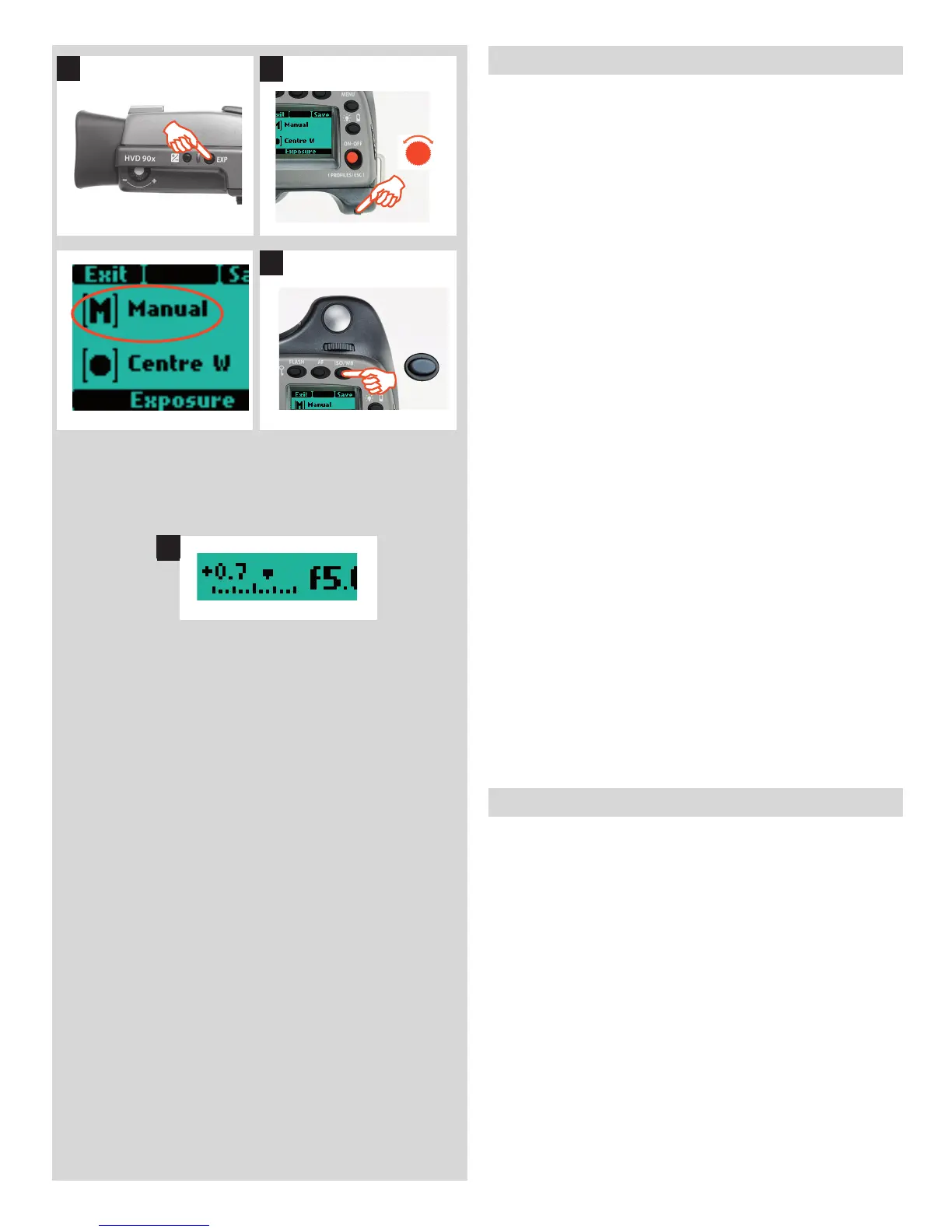
To set the Manual mode, proceed as follows with the camera in
active mode:
1) Press the EXP button on the view nder.
2) Turn the front control wheel (either direction 2a) until you
reach M (Manual) 2b.
3) Press Save (ISO / WB button) to retain the setting.
In this mode the shutter speed and aperture settings are manu-
ally chosen by turning the front and rear control wheels.
The standard exposure setting is obtained when the pointer over
the exposure scale is positioned above the central index (in the
view nder display).
Any deviation from this standard setting is displayed by:
• the pointer appearing elsewhere than above the central index
and
• by fi gures above the scale representing the amount of
adjustment in EVs.
A ‘+ 0.7’ above the scale in the display, as in illustration 4 for ex-
ample, would indicate a ‘0.7 EV overexposure’ setting. Conversely,
a ‘-2’ , for example, would indicate a ‘2EV underexposure’ setting.
Note that the appearance of a +/- symbol on the grip and view-
nder displays in manual mode means that a change has been
made to the exposure compensation setting. See later section on
‘Exposure compensation’.
The actual aperture settings and shutter speeds are indicated to
the right of the exposure scale in the conventional manner. (Note:
‘full-stops’, ‘half-stops’ and ‘third-stops’ are also displayed, ac-
cording to setting (see ‘increment setting). For example, a setting
between f/8 and f/11 will appear as f/9,5 if ‘half-stop’ is chosen).
Automatic Exposure — A, S, P, Pv
Automatic exposure provides a choice of two ways of controlling
shutter speed and aperture settings semi-automatically and two
ways fully automatically:
Aperture priority: A - The aperture is manually chosen by you
by turning the front control wheel, and the shutter speed is auto-
matically chosen by the camera.
Shutter priority: S - The shutter speed is manually chosen by
you by turning the front control wheel, and the aperture is auto-
matically chosen by the camera.
Programmed: P - In this mode, an aperture / shutter combi-
nation is chosen by the camera according to the EV measured
(metering method remains as your choice), though only within
pre-set appropriate limitations to suit various requirements and
applications.
Programmed variable: Pv - This mode is very similar to Pro-
grammed, except with the additional parameters of lens focal
length being automatically taken into account. For example, long
EXP
ISO / WB
Save
2
4












 To Next Page