52
H4D
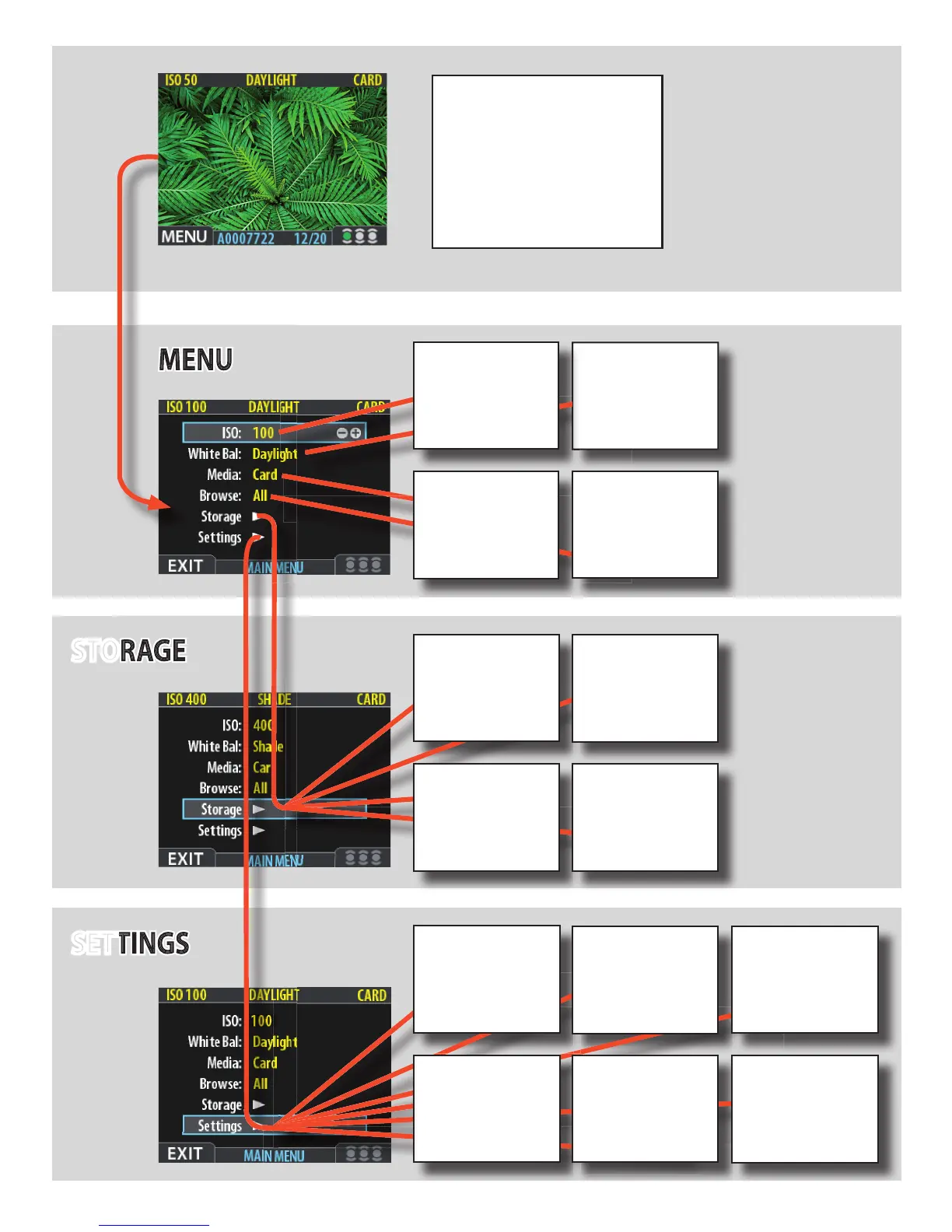
MENU
DELETE
Forsingleormultipledele-
tionofimages.
BATCH
Usedtocreatenewstorage
folders(batches)andname
them.
STORAGE
SETTINGS
Byusingthebuttonsonthecontrol
panelandthecontrolwheelsonthegrip
youcannavigatedownthroughthevari-
ouslevelsinthemenu.
Belowisanoverviewofthesetting
optionsavailable.
Simple
description
of menu
items
ABOUT
Displaysserialnumberand
rmwareversion.
MEDIA
Determineswhereleswill
bestored.
WHITE
BALANCE
Setsthecolortemperature
oflightused.
ISO
Setsthelightsensitivityof
thesensor.
BROWSE
SetstheIAAapprovalstatus
(rating)lterforeasierand
quickerimagebrowsing..
Forsingleormultipledele-
Forsingleormultipledele-
Forsingleormultipledele-
Forsingleormultipledele-
Forsingleormultipledele-
DELETE
Forsingleormultipledele-
tionofimages.
FORMAT
UsedtoformatCFcardsfor
optimumuse.
Usedtocreatenewstorage
Usedtocreatenewstorage
Usedtocreatenewstorage
Usedtocreatenewstorage
folders(batches)andname
Usedtocreatenewstorage
folders(batches)andname
Usedtocreatenewstorage
folders(batches)andname
folders(batches)andname
folders(batches)andname
folders(batches)andname
folders(batches)andname
BATCH
Usedtocreatenewstorage
folders(batches)andname
them.
DEFAULT APP
LEVEL
AssignsadefaultIAA
approvalstatus(rating)to
allnewimages.
USER INTERFACE
Setsmenulanguage,power
down,sound,date&time
andseveralothercustom
settings.
CAMERA
Setsoptionswhendigital
captureunitisattachedtoa
viewcamera.
Displaysserialnumberand
Displaysserialnumberand
Displaysserialnumberand
Displaysserialnumberand
Displaysserialnumberand
Displaysserialnumberand
Displaysserialnumberand
Displaysserialnumberand
ABOUT
Displaysserialnumberand
rmwareversion.
DEFAULT
Resetsallcustomsettings
backtotheoriginalfactory
settings.
GPS
SetsoptionsfortheGIL
(GlobalImageLocator)GPS
accessorywhenattached.
CUSTOM
OPTIONS
Setsoptionsregardingtilit
sensor,menucontroland
display.












 To Next Page