116
H4D
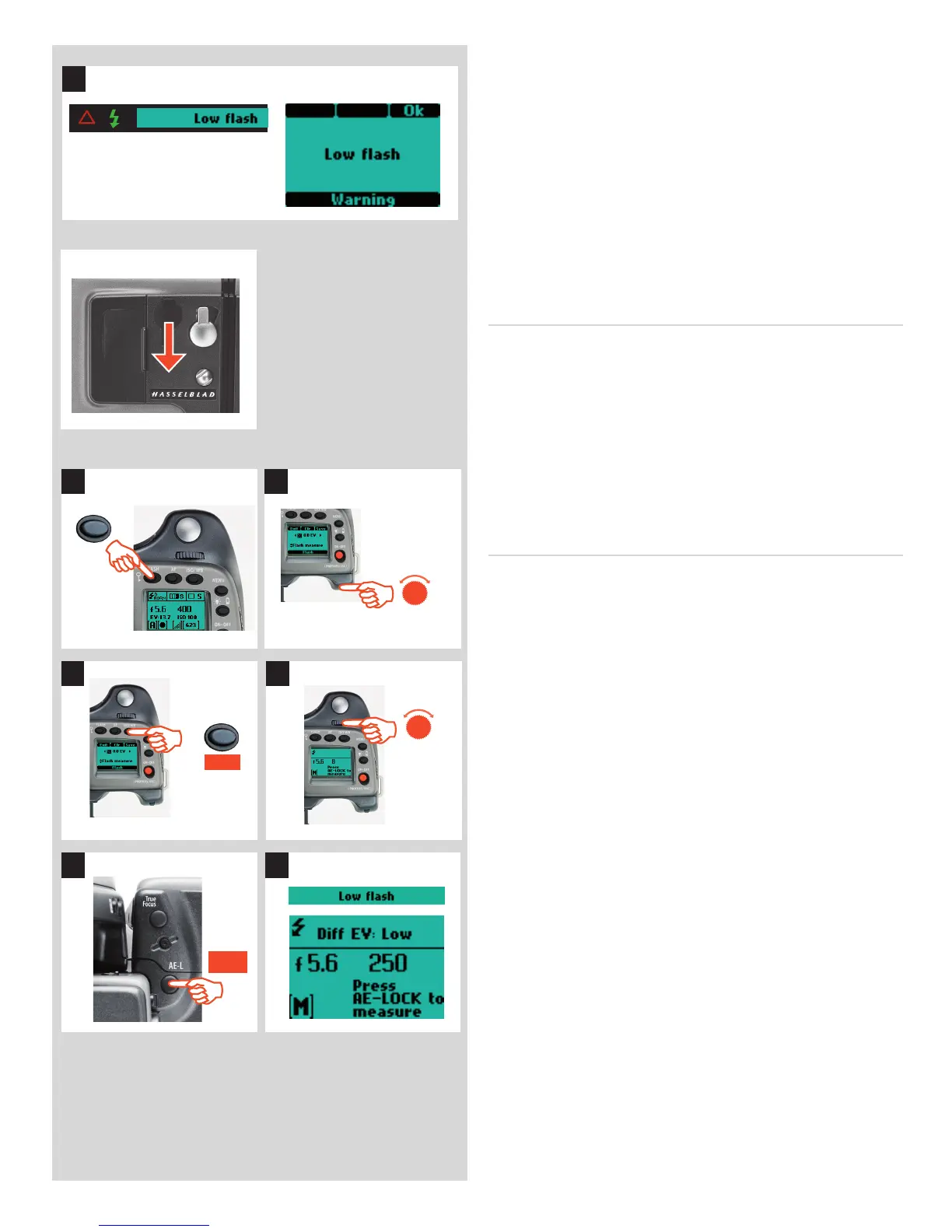
5) If the settings were incorrect to match the output of the ash
unit, the view nder display shows a red triangle alongside a
ashing green ‘ ash’ symbol plus a warning message - ‘Low
fl a s h ’. The grip display will also show a warning message -
‘Low fl ash’.
Conventional measures should then be taken to correct the
situation. (That is: move closer to the main subject, use a
larger aperture setting or use a higher ISO setting).
The ‘Low Flash’ warning can be turned o in Custom Option #26
if preferred.
Separate ash unit connection and use
Separate ash units can be electrically connected either by way
of the hot shoe accessory holder (see previous warnings) on the
top of the view nder or via a cord to the PC connection port on
the left hand side of the camera body. Slave unit switches/ trans-
mitters can also be connected similarly dependant on unit (see
speci c user manuals for details).
Keep the plastic safety cover in place in the hot shoe when not
in use.
Flash measure of separate ash unit
You can measure the e ect of an attached ash unit (with PC con-
nected ash units and SCA3902 compatible ash units set to M
mode), where the camera acts much as a ash meter would. The
aperture setting can be adjusted and more trial exposures made
until the information on the grip display is satisfactory.
To use fl ash measure:
1) Press the
FLASH button on the grip to access the ash option
screen.
2) Turn the rear control wheel until Flash measure appears.
3) Press Save (ISO/WB
button) to access the ash exposure
screen.
4) Make preliminary required aperture setting by turning the
front control wheel.
5) Press the AE-L button. The camera will close the aperture,
raise the mirror and re the ash. Light re ected from the
ash lit subject will be re ected o a white spot on the auxil-
iary shutter to the meter sensor.
6) Deviations from a normal exposure are displayed as di er-
ences in EV on the grip display and the view nder display. If
‘high’ or ‘low’ appears, change the aperture accordingly and
make a new test reading.
Change the aperture until Diff EV: 0 appears, or the desired
amount of deviation from the normal exposure.
D i ff E V
:
Low signi es more than 2 EV under
D i ff E V
:
High signi es more than 2 EV over
5 6
1 2
FLASH





 To Next Page