17
H4D
PQR
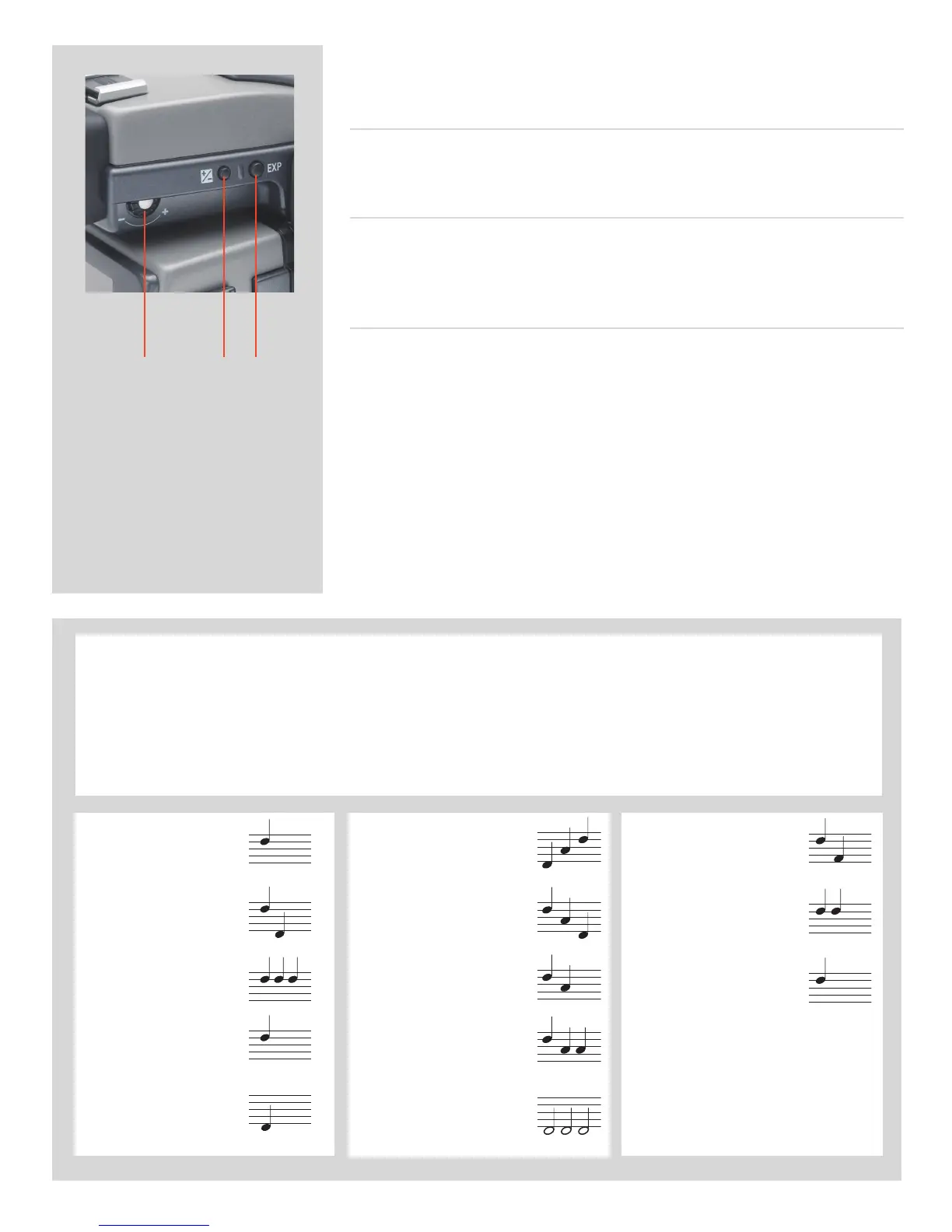
There are also two control buttons on the viewfinder, as well as the eyesight
correction adjustment wheel:
Eyesight correction adjustment wheel P
The personal eyesight adjustment facility has a diopter range of -5 to +3.5, to suit most
users.
EV correction adjustment button Q
Press this button to access the EV compensation screen. Settings are made with either
the front or rear control wheels. An EV correction symbol appears on the grip and view-
nder display as conrmation.
EXPbutton R
The
EXP
(Exposure) button accesses the exposure mode and metering method options
screen. Settings are made with the front and rear control wheels and the appropriate
symbols appear on the grip and viewnder displays accordingly.
IAA yellow:
Overwrite red:
Transfer complete:
Overexposure:
Underexposure:
5 images left:
1 image left:
Media full:
Audio feedback
There are 14 dierent sounds to help provide immediate information. A button press has a normal mechanical ‘click’ sound
while the remaining actions listed here are more musical. For example, a capture rated as overexposed is signied by three
rapid notes going up the musical scale, whereas an underexposed capture has three rapid notes going down the musical
scale, as illustrated here.
See later section about available options on the digital capture unit for activation and volume control.





 To Next Page