57
H4D
Formatting
The camera is only able to read and write to storage media that
have been formatted. New cards or disks sometimes have no for-
matting, or you might want to convert media that are currently
using a format that the camera cannot read.
The digital capture unit is capable of formatting any type of
storage medium. When you do this, all data contained on the
target medium will be erased.
You can also use the format command to delete all images on a
disk. This is sometimes faster than using the delete function, but
it is not as exible because all data from all batches will always
be erased.
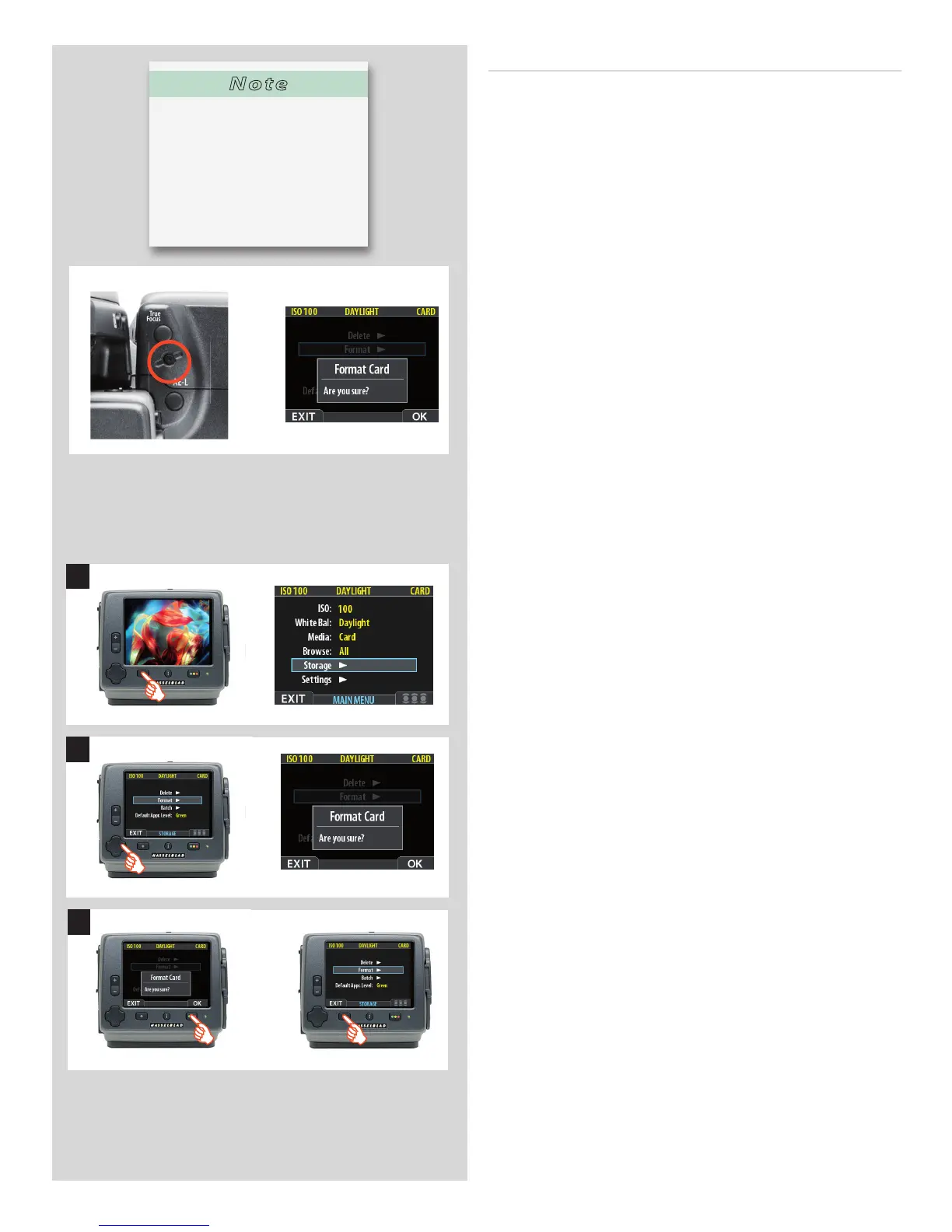
There are two ways to format cards. The quickest way is to use the
Format card button on the grip. If you prefer, you can also use the
menu on the digital capture unit.
Format button :
Press the
Format
button on the camera grip. It is purposely re-
cessed to avoid unintentional use, so use a ball-point pen or simi-
lar. A warning is displayed as con rmation.
Format on digital capture unit menu:
1. Select
MAIN MENU > STORAGE > Format
.
2. Press the to open the
Format Card
dialog.
3. You are now asked to con rm the operation.
• To con rm, press the
OK
button. This will carry out the format
and delete all data on the current medium.
• To cancel, press the
EXIT
.
1
2
3
Note
It is good practice to format new
cards and regularly reformat old-
er cards (particularly if they have
been formatted or used with
other devices) to exploit the opti-
mum for speed, storage capacity
and secure storage





 To Next Page