40
H4D
shutter speeds will automatically be avoided with a long focal
length lens.
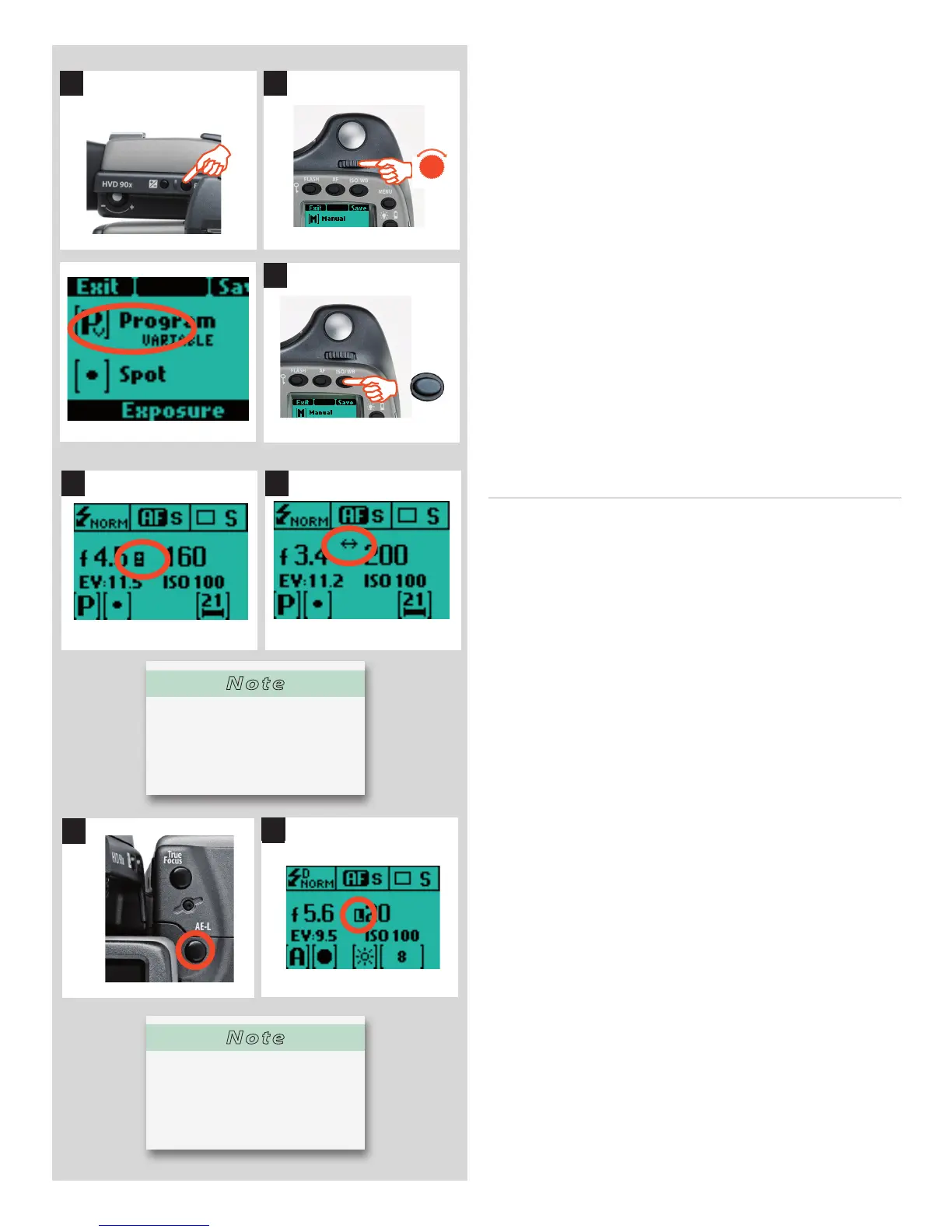
To set one of the modes, proceed as follows with the camera in
active mode:
1) Press the EXP button on the view nder.
2) Turn the front control wheel (either direction) until you reach
the required setting.
3) Press Save (ISO / WB button) to retain the setting.
In Automatic mode the front control wheel selects alternative
aperture /shutter combinations while maintaining the same EV
and the rear control wheel alters the amount of exposure com-
pensation. The compensation appears as a +/- symbol on the grip
display and view nder display (illus. 4).
Variations (chosen by using the front control wheel) from the
speci c combination selected by the P or Pv mode are signi ed
by a double arrow symbol appearing between the aperture and
speed settings (illus. 5) on the grip display. These new variations
provide the correct exposure but in di erent combinations.
AE- L button 1, 2, 3, 4, 5, 6
This button has two main functions that can be incorporated in
various working methods involving exposure locking. It also has
an extra function for the ash meter capability (see AE-L section
under Flash). The AE-L button can:
a) lock an EV setting in manual and automatic modes.
b) be used as a Zone System placement button.
a) When the button is pressed ( g 1), the light metering facility is
locked to the EV setting at that moment. An L (= locked) symbol
appears between the shutter speed and the aperture indication
( g 2) on the grip display and view nder display to con rm the
status. Press the AE-L button again to unlock (toggle function).
In the locked setting, the aperture and shutter speed become in-
terlocked. In this way, a new aperture/shutter combination that
still represents the same EV, can be rapidly chosen. For example,
if you set the shutter at 1/125s and the aperture at f/8 and lock
them together, you can access new EV-equivalent combinations
of, for example, 1/30s a f/16 or 1/500s at f/4 just by moving the
front control wheel.
In practice this means you could, for example, in auto mode, posi-
tion the metering area (spot setting) over an area in the subject
that you determine to be equivalent to a mid-grey and lock it with
the AE-L button. You can then recompose the picture with the
metering zone positioned over an area much brighter or darker
while still retaining the original exposure setting and choose a
new combination of aperture and shutter speed settings.
b) The AE-L button also allows the spot metering function to
make zone placements. When the AE-L button is pressed, the
metered area is saved as a mid-grey (Zone 5). When the spot area
is then placed over another part of the scene, the new area is then
compared to the saved area and the di erence can be read o
the scale seen in the view nder. For example, in a landscape situ-
ation you could meter the foreground, lock the reading with the
AE-L button (thereby locking that area to be reproduced as the
equivalent to a mid-grey 18%), point the camera at some rocks to
1
3
2
ISO / WB
Save
EXP
4 5
1
2
Note
Aperture and shutter speed set-
tings can both be changed even
while the busy light on digital
capture unit is ashing.
Note
Access to the B and T shutter
speed settings can be temporar-
ily hidden. See Custom Options
#34.












 To Next Page