56
H4D
A
B
1
2
3 4
1
3
4
1
2
2
Using compact fl ash memory cards
When using a compact- ash card, the H4D is completely self-
contained. No additional wires or connectors need to be
attached.
The H4D is shipped with a 4GB (or larger) compact- ash card,
which is able to hold over 40 shots. Lossless compression is ap-
plied to the images, so the actual size of each capture can vary,
thereby a ecting the total number of shots you can t on the
card.
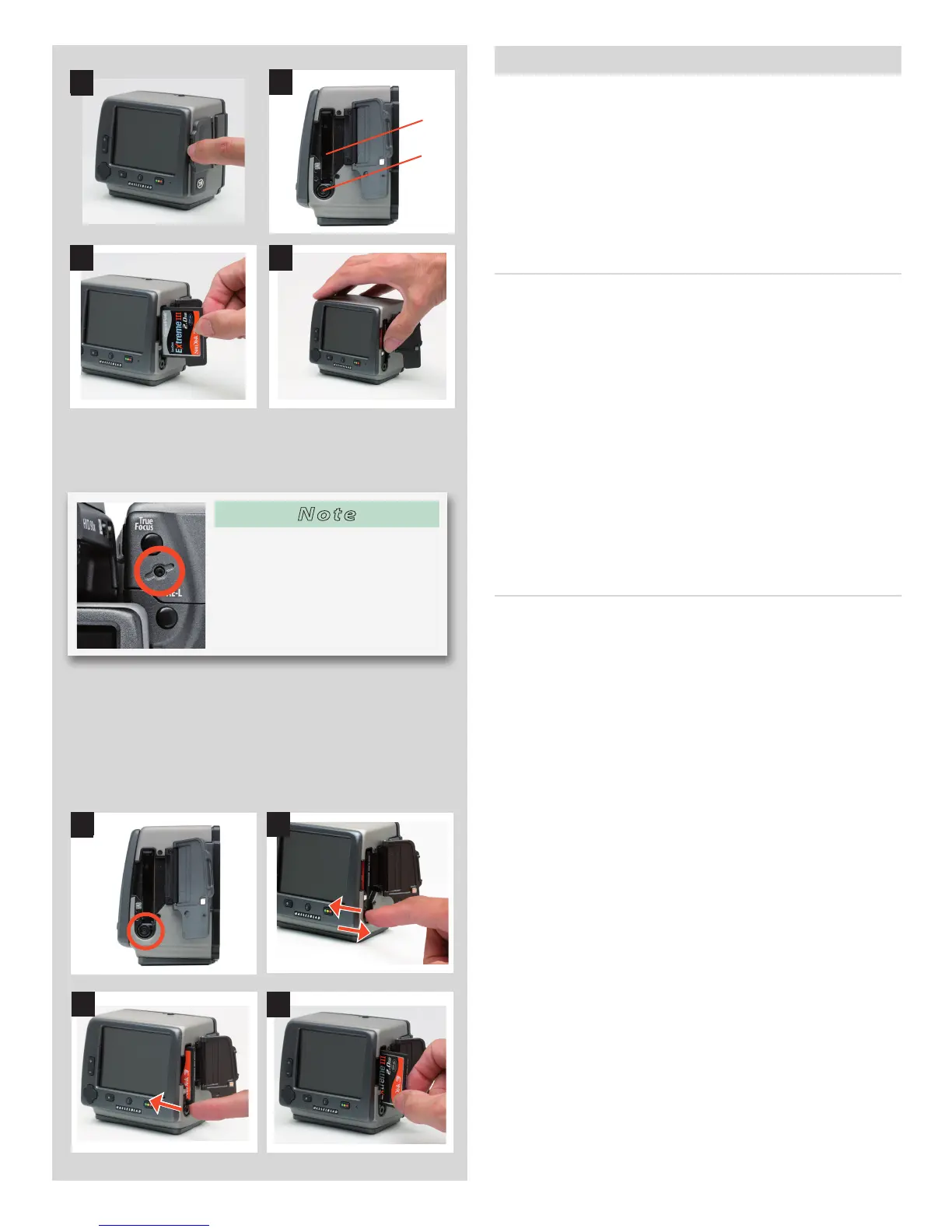
Inserting a card
1. Open the CF card slot cover on the digital capture unit.
2. Behind the cover, you will see a slot for the card (A) and a
release button (B) below the slot.
3. Hold the compact- ash card so that the connector holes
face into the slot in the digital capture unit, with the brand
label facing in the same direction as the digital capture unit
preview screen, as in the illustration. Gently press the card
into the slot. If you encounter resistance, it might be because
you are holding the card backwards or upside down.
4. If the card can be easily inserted nearly all the way into the
unit, then you are inserting it correctly. Press the card anoth-
er couple of millimeters rmly into place.
5. Close the slot cover shut again.
Removingacard
1. Open the CF card slot cover on the digital capture unit.
2. Press the release button a little way in to release it into the
active position.
3. Press the now extended release button all the way back into
the digital capture unit again. Some force is required. As you
do this, the card will be pushed out a few millimeters.
4. Grasp the card and pull it away from the digital capture unit.
5. Close the slot cover shut again.
Note
You can reformat a card by press-
ing the Card format button on
the camera grip or via the menu
on the digital capture unit:
Menu>Storage>Format. See "For-
matting" for details.












 To Next Page