92
H4D
21
3 4
5
9
6
7 8
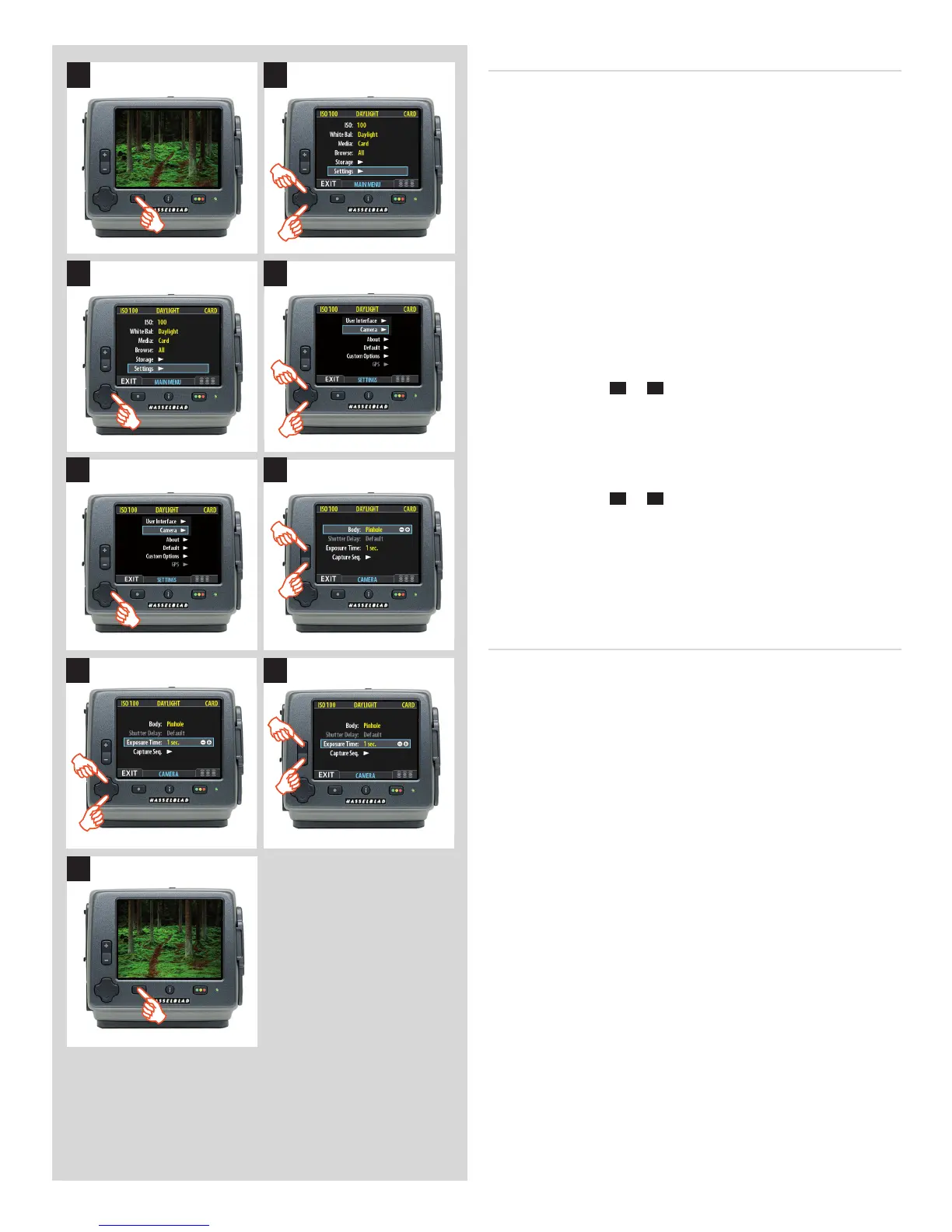
SettingCAMERAmodelandoptions
These settings are only available when the digital capture unit is
not attached to an H4D body.
Proceed as follows:
1. Press the menu (
MENU
) button to open the menu.
2. Use and to select the
SETTINGS
sub-menu.
3. Press to open the
SETTINGS
menu.
4. Use and to select
CAMERA
.
5. Press to open the
CAMERA
menu.
6. Press either the
+
or
–
button to select camera model.
7. Use and to select
EXPOSURE TIME
or
CAPTURE SEQ.
if
required
.
8. Press either the
+
or
–
button to make new settings if
required.
9. Press the menu (
EXIT
) button to exit the menu system and
keep your settings.
OptionsavailableforPINHOLEandFLASHSYNC
Shutter Delay
The normal setting is Default and cannot be changed.
Exposure Time
This setting should be changed for cable-free exposure times lon-
ger than 1/8 second, ensuring that it matches the shutter speed/
exposure time on the camera/lens. The settings range from 1/8
second to 32 seconds (1/8 second is the default setting).
Capture Sequence
This feature functions in the same manner as an interval timer.
Initial delay: Controls the amount of time required to elapse be-
fore the rst capture.
Delay: Controls the amount of time required between each
capture.
Count: Controls the total number of captures required.












 To Next Page