5
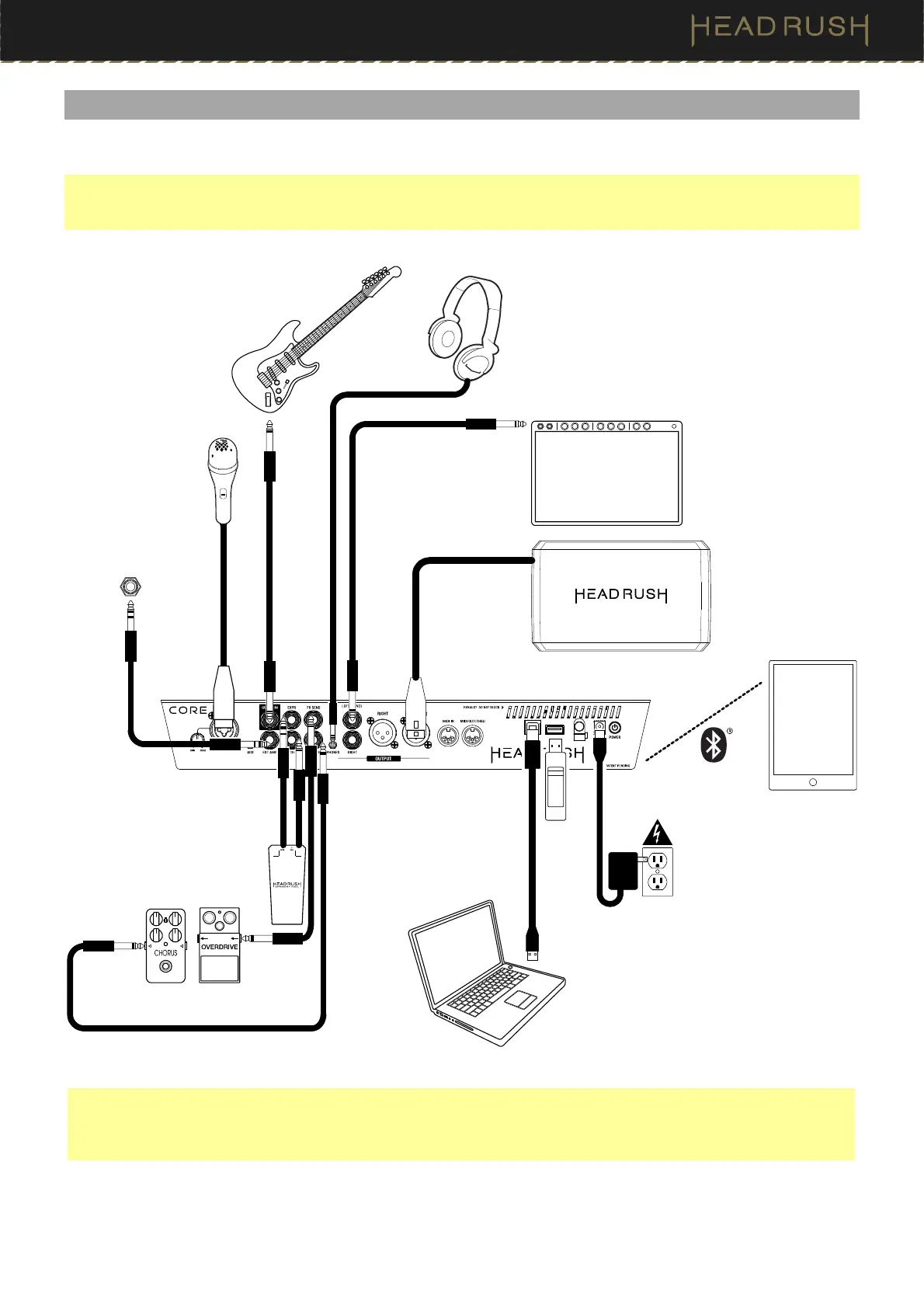
(2.0) Setup
Items not listed under (1.1) Introduction > Box Contents are sold separately.
IMPORTANT! In the (4.20.2) Global Settings > Audio menu, make sure you set the Outputs to send signal at amp
level if you are using a traditional guitar amplifier, or line level (default) if you are using a full-range flat-response
amplifier, mixer, PA speaker or audio interface.
Guitar
Full-range, flat-
response amplifier or
traditional guitar
amplifier
External effect stompboxes,
modules, etc.
Computer
(optional)
Power
outlet
Expression
pedal
Amp
Footswitch
Input*
* IMPORTANT! Only connect this output to amplifiers that have a "short-to-sleeve" footswitch input. If you connect
this output to any other type of footswitch input, you may cause permanent damage to your equipment. If you are
unsure if your amplifier has a "short-to-sleeve" footswitch input, please consult the amplifier's manual or
manufacturer to confirm before attempting.
Tablet
USB
Drive
Microphone
Headphones



 To Next Page